<?xml version="1.0" encoding="utf-8"?>
<feed xmlns="http://www.w3.org/2005/Atom">
    <id>https://about.gitlab.com/blog</id>
    <title>GitLab</title>
    <updated>2025-07-02T19:29:42.146Z</updated>
    <generator>https://github.com/jpmonette/feed</generator>
    <author>
        <name>The GitLab Team</name>
    </author>
    <link rel="alternate" href="https://about.gitlab.com/blog"/>
    <link rel="self" href="https://about.gitlab.com/atom.xml"/>
    <subtitle>Gitlab Blog RSS feed</subtitle>
    <icon>https://about.gitlab.com/favicon.ico</icon>
    <rights>All rights reserved 2025,</rights>
    <entry>
        <title type="html"><![CDATA[Reduce the load on GitLab Gitaly with bundle URI]]></title>
        <id>https://about.gitlab.com/blog/reduce-the-load-on-gitlab-gitaly-with-bundle-uri/</id>
        <link href="https://about.gitlab.com/blog/reduce-the-load-on-gitlab-gitaly-with-bundle-uri/"/>
        <updated>2025-06-24T00:00:00.000Z</updated>
        <content type="html"><![CDATA[<p>Gitaly plays a vital role in the GitLab ecosystem — it is the server
component that handles all Git operations. Every push and pull made to/from
a repository is handled by Gitaly, which has direct access to the disk where
the actual repositories are stored. As a result, when Gitaly is under heavy
load, some operations like CI/CD pipelines and browsing a repository in the
GitLab UI can become quite slow. This is particularly true when serving
clones and fetches for large and busy monorepos, which can consume large
amounts of CPU and memory.</p>
<p><a href="https://docs.gitlab.com/administration/gitaly/bundle_uris/">Bundle URI</a> takes significant load off of Gitaly servers during clones by allowing Git to pre-download a bundled repository from object storage before calling the Gitaly servers to fetch the remaining objects.</p>
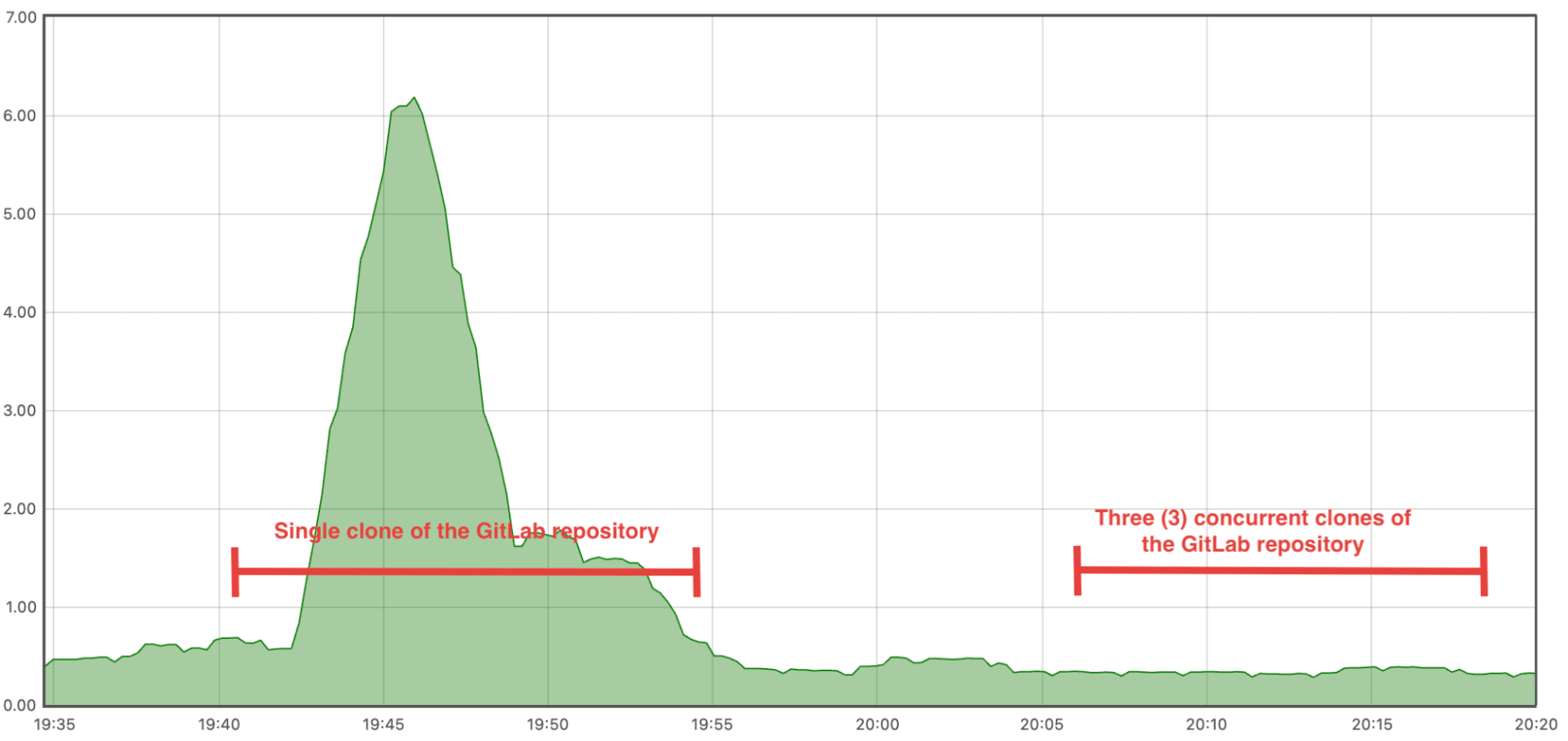
<p>Here is a graph that shows the difference between clones without and with bundle URI.</p>
<p><img src="https://res.cloudinary.com/about-gitlab-com/image/upload/v1750705069/rvbm4ru1w58msd6zv4x7.png" alt="Graph that shows the difference between clones without and with bundle URI"></p>
<p>This graph shows the results of a small test we ran on an isolated GitLab installation, with Gitaly running on a machine with 2 CPUs. We wanted to test bundle URI with a large repository, so we pushed the <a href="https://gitlab.com/gitlab-org/gitlab">GitLab repository</a> to the instance. We also generated a bundle beforehand.</p>
<p>The big CPU spike is from when we performed a single clone of the GitLab repository with bundle URI disabled. It's quite noticeable. A little later, we turned on bundle URI and launched three concurrent clones of the GitLab repository. Sure enough, turning on bundle URI provides massive performance gain. We can't even distinguish the CPU usage of the three clones from normal usage.</p>
<h2>Configure Gitaly to use bundle URI</h2>
<p>To enable bundle URI on your GitLab installation, there are a couple of things you need to configure.</p>
<h3>Create a cloud bucket</h3>
<p>Bundles need to be stored somewhere. The ideal place is in a cloud storage bucket. Gitaly uses the <a href="https://pkg.go.dev/gocloud.dev">gocloud.dev</a> library to read and write from cloud storage. Any cloud storage solution supported by this library can be used. Once you have a cloud bucket URL, you can add it in the Gitaly configuration here:</p>
<pre><code class="language-toml">[bundle_uri]
go_cloud_url = &quot;&lt;bucket-uri&gt;&quot;
</code></pre>
<p>It must be noted that Gitaly does not manage the lifecycle of the bundles stored in the bucket. To avoid cost issues, object lifecycle policies must be enabled on the bucket in order to delete unused or old objects.</p>
<h3>Enable the feature flags</h3>
<p>There are two feature flags to enable:</p>
<ul>
<li>
<p><code>gitaly_bundle_generation</code> enables <a href="#auto-generated">auto-generation</a> of bundles.</p>
</li>
<li>
<p><code>gitaly_bundle_uri</code> makes Gitaly advertise bundle URIs when they are available (either manually created or auto-generated) and allows the user to <a href="#manual">manually</a> generate bundles.</p>
</li>
</ul>
<p>These feature flags can be enabled at-large on a GitLab installation, or per repository. See the <a href="https://docs.gitlab.com/administration/feature_flags/#how-to-enable-and-disable-features-behind-flags">documentation on how to enable a GitLab feature behind a feature flag</a>.</p>
<h3>How to generate bundles</h3>
<p>Gitaly offers two ways for users to use bundle URI: a <a href="#manual">manual</a> way and an <a href="#auto-generated">auto-generated</a> way.</p>
<h4>Manual</h4>
<p>It is possible to create a bundle manually by connecting over SSH with the Gitaly node that stores the repository you want to create a bundle for, and run the following command:</p>
<pre><code class="language-shell">sudo -u git -- /opt/gitlab/embedded/bin/gitaly bundle-uri 
--config=&lt;config-file&gt;
--storage=&lt;storage-name&gt;
--repository=&lt;relative-path&gt;
</code></pre>
<p>This command will create a bundle for the given repository and store it into the bucket configured above. When a subsequent <code>git clone</code> request will reach Gitaly for the same repository, the bundle URI mechanism described above will come into play.</p>
<h4>Auto-generated</h4>
<p>Gitaly can also generate bundles automatically, using a heuristic to determine if it is currently handling frequent clones for the same repository.</p>
<p>The current heuristic keeps track of the number of times a <code>git fetch</code> request is issued for each repository. If the number of requests reaches a certain <code>threshold</code> in a given time <code>interval</code>, a bundle is automatically generated. Gitaly also keeps track of the last time it generated a bundle for a repository. When a new bundle should be regenerated, based on the <code>threshold</code> and <code>interval</code>, Gitaly looks at the last time a bundle was generated for the given repository. It will only generate a new bundle if the existing bundle is older than some <code>maxBundleAge</code> configuration. The old bundle is overwritten. There can only be one bundle per repository in cloud storage.</p>
<h2>Using bundle URI</h2>
<p>When a bundle exists for a repository, it can be used by the <code>git clone</code> command.</p>
<h3>Cloning from your terminal</h3>
<p>To clone a repository from your terminal, make sure your Git configuration enables bundle URI. The configuration can be set like so:</p>
<pre><code class="language-shell">git config --global transfer.bundleuri true
</code></pre>
<p>To verify that bundle URI is used during a clone, you can run the <code>git clone</code> command with <code>GIT_TRACE=1</code> and see if your bundle is being downloaded:</p>
<pre><code class="language-shell">➜  GIT_TRACE=1 git clone https://gitlab.com/gitlab-org/gitaly
...
14:31:42.374912 run-command.c:667       trace: run_command: git-remote-https '&lt;bundle-uri&gt;'
...
</code></pre>
<h3>Cloning during CI/CD pipelines</h3>
<p>One scenario where using bundle URI would be beneficial is during a CI/CD pipeline, where each job needs a copy of the repository in order to run. Cloning a repository during a CI/CD pipeline is the same as cloning a repository from your terminal, except that the Git client in this case is the GitLab Runner. Thus, we need to configure the GitLab Runner in such a way that it can use bundle URI.</p>
<p><strong>1. Update the helper-image</strong></p>
<p>The first thing to do to configure the GitLab Runner is to <a href="https://docs.gitlab.com/runner/configuration/advanced-configuration/#override-the-helper-image">overwrite the helper-image</a> that your GitLab Runner instances use. The <code>helper-image</code> is the image that is used to run the process of cloning a repository before the job starts. To use bundle URI, the image needs the following:</p>
<ul>
<li>
<p>Git Version 2.49.0 or later</p>
</li>
<li>
<p><a href="https://gitlab.com/gitlab-org/gitlab-runner/-/tree/main/apps/gitlab-runner-helper?ref_type=heads"><code>GitLab Runner helper</code></a> Version 18.1.0 or later</p>
</li>
</ul>
<p>The helper-images can be found <a href="https://gitlab.com/gitlab-org/gitlab-runner/container_registry/1472754?orderBy=PUBLISHED_AT&amp;sort=desc&amp;search%5B%5D=v18.1.0">here</a>. Select an image that corresponds to the OS distribution and the architecture you use for your GitLab Runner instances, and verify that the image satisfies the requirements.</p>
<p>At the time of writing, the <code>alpine-edge-&lt;arch&gt;-v18.1.0*</code> tag meets all requirements.</p>
<p>You can validate the image meets all requirements with:</p>
<pre><code class="language-shell">docker run -it &lt;image:tag&gt;
$ git version ## must be 2.49.0 or newer
$ gitlab-runner-helper -v ## must be 18.0 or newer
</code></pre>
<p>If you do not find an image that meets the requirements, you can also use the helper-image as a base image and install the requirements yourself in a custom-built image that you can host on <a href="https://docs.gitlab.com/user/packages/container_registry/">GitLab Container Registry</a>.</p>
<p>Once you have found the image you need, you must configure your GitLab Runner instances to use it by updating your <code>config.toml</code> file:</p>
<pre><code class="language-toml">[[runners]]
 (...)
 executor = &quot;docker&quot;
 [runners.docker]
    (...)
    helper_image = &quot;image:tag&quot; ## &lt;-- put the image name and tag here
</code></pre>
<p>Once the configuration is changed, you must restart the runners for the new configuration to take effect.</p>
<p><strong>2. Turn on the feature flag</strong></p>
<p>Next, you must enable the <code>FF_USE_GIT_NATIVE_CLONE</code> <a href="https://docs.gitlab.com/runner/configuration/feature-flags/">GitLab Runner feature flags</a> in your <code>.gitlab-ci.yml</code> file. To do that, simply add it as a variable and set to <code>true</code> :</p>
<pre><code class="language-yaml">variables:
  FF_USE_GIT_NATIVE_CLONE: &quot;true&quot;
</code></pre>
<p>The <code>GIT_STRATEGY</code> must also be <a href="https://docs.gitlab.com/ci/runners/configure_runners/#git-strategy">set to <code>clone</code></a>, as Git bundle URI only works with <code>clone</code> commands.</p>
<h2>How bundle URI works</h2>
<p>When a user clones a repository with the <code>git clone</code> command, a process called <a href="https://git-scm.com/docs/git-receive-pack"><code>git-receive-pack</code></a> is launched on the client's machine. This process communicates with the remote repository's server (it can be over HTTP/S, SSH, etc.) and asks to start a <a href="https://git-scm.com/docs/git-receive-pack"><code>git-upload-pack</code></a> process. Those two processes then exchange information using the Git protocol (it must be noted that bundle URI is only supported with <a href="https://git-scm.com/docs/protocol-v2">Git protocol v2</a>). The capabilities both processes support and the references and objects the client needs are among the information exchanged. Once the Git server has determined which objects to send to the client, it must package them into a packfile, which, depending on the size of the data it must process, can consume a good amount of resources.</p>
<p>Where does bundle URI fit into this interaction? If bundle URI is advertised as a capability from the <code>upload-pack</code> process and the client supports bundle URI, the Git client will ask the server if it knows about any bundle URIs. The server sends those URIs back and the client downloads those bundles.</p>
<p>Here is a diagram that shows those interactions:</p>
<pre><code class="language-mermaid">
sequenceDiagram


    participant receive as Client


    participant upload as Server


    participant cloud as File server


    receive -&gt;&gt; upload: issue git-upload-pack


    upload --&gt;&gt; receive: list of server capabilities


    opt if bundle URI is advertised as a capability


    receive -&gt;&gt; upload: request bundle URI


    upload --&gt;&gt; receive: bundle URI


    receive -&gt;&gt; cloud: download bundle at URI


    cloud --&gt;&gt; receive: bundle file


    receive -&gt;&gt; receive: clone from bundle


    end


    receive -&gt;&gt; upload: requests missing references and objects


    upload --&gt;&gt; receive: packfile data

</code></pre>
<p>As such, Git <a href="https://git-scm.com/docs/bundle-uri">bundle URI</a> is a mechanism by which, during a <code>git clone</code>, a Git server can advertise the URI of a bundle for the repository being cloned by the Git client. When that is the case, the Git client can clone the repository from the bundle and request from the Git server only the missing references or objects that were not part of the bundle. This mechanism really helps to alleviate pressure from the Git server.</p>
<h2>Alternatives</h2>
<p>GitLab also has a feature <a href="https://docs.gitlab.com/administration/gitaly/configure_gitaly/#pack-objects-cache">Pack-objects cache</a>. This feature works slightly differently than bundle URI. When the server packs objects together into a so-called packfile, this feature will keep that file in the cache. When another client needs the same set of objects, it doesn't need to repack them, but it can just send the same packfile again.</p>
<p>The feature is only beneficial when many clients request the exact same set of objects. In a repository that is quick-changing, this feature might not give any improvements. With bundle URI, it doesn't matter if the bundle is slightly out-of-date because the client can request missing objects after downloading the bundle and apply those changes on top. Also bundle URI in Gitaly stores the bundles on external storage, which the Pack-objects Cache stores them on the Gitaly node, so using the latter doesn't reduce network and I/O load on the Gitaly server.</p>
<h2>Try bundle URI today</h2>
<p>You can try the bundle URI feature in one of the following ways:</p>
<ul>
<li>
<p>Download a <a href="https://about.gitlab.com/free-trial/">free, 60-day trial version of GitLab Ultimate</a>.</p>
</li>
<li>
<p>If you already run a self-hosted GitLab installation, upgrade to 18.1.</p>
</li>
<li>
<p>If you can't upgrade to 18.1 at this time, <a href="https://about.gitlab.com/install/">download GitLab</a> to a local machine.</p>
</li>
</ul>
]]></content>
        <author>
            <name>Olivier Campeau</name>
            <uri>https://about.gitlab.com/blog/authors/olivier-campeau</uri>
        </author>
        <published>2025-06-24T00:00:00.000Z</published>
    </entry>
    <entry>
        <title type="html"><![CDATA[GitLab Ultimate for IBM Z: Modern DevSecOps for mainframes]]></title>
        <id>https://about.gitlab.com/blog/gitlab-ultimate-for-ibm-z-modern-devsecops-for-mainframes/</id>
        <link href="https://about.gitlab.com/blog/gitlab-ultimate-for-ibm-z-modern-devsecops-for-mainframes/"/>
        <updated>2025-06-23T00:00:00.000Z</updated>
        <content type="html"><![CDATA[<p>GitLab and IBM have partnered to solve a fundamental disconnect in enterprise development: enabling mainframe developers to work with the same modern tools, workflows, and collaboration features as their distributed counterparts. GitLab Ultimate for IBM Z, a GitLab-certified, integrated DevSecOps solution tailored for the mainframe environment, does just that — allowing organizations to modernize their mainframe development workflows by facilitating a seamless migration from outdated legacy library managers. With CI/CD pipelines running natively on IBM z/OS, customers experience accelerated innovation and reduced operational costs.</p>
<h2>Challenges of today's mainframe development</h2>
<p>Enterprise organizations that use IBM Z systems for mission-critical workloads face challenges that conventional DevSecOps tools aren’t equipped to address. Cloud-native teams benefit from modern <a href="https://about.gitlab.com/topics/ci-cd/">CI/CD</a> pipelines, collaborative development, and automated testing. In contrast, mainframe teams are often left behind — stuck with outdated tools that lead to costly inefficiencies and operational silos.</p>
<p>Teams often resort to workarounds, such as SSH connections and manual file transfers, which create security vulnerabilities and audit difficulties. When compliance requirements are stringent, these improvised solutions become unacceptable risks. Meanwhile, organizations maintain expensive parallel toolchains, with legacy mainframe development tools carrying premium licensing costs while delivering limited functionality compared to modern alternatives.</p>
<p>This fragmentation creates two problems: slower delivery cycles and difficulty attracting developers who expect modern development experiences.</p>
<blockquote>
<p><strong>&quot;GitLab Ultimate for IBM Z represents an important step in addressing a long-standing industry challenge. IDC research shows that mainframe developers often work with legacy tooling that contributes to delivery inefficiencies and makes it harder to attract new talent. With this offering, modern DevSecOps capabilities and unified workflows are brought directly to the mainframe. This empowers developers to work more collaboratively and efficiently, while helping organizations accelerate innovation and integrate mainframe development into broader digital transformation strategies.&quot;</strong> - Katie Norton, Research Manager, DevSecOps and Software Supply Chain Security at IDC</p>
</blockquote>
<h2>Unified development environments</h2>
<p>True modernization means more than just updating mainframe development. It means creating a unified platform where mainframe, cloud-native, web, and mobile development teams collaborate seamlessly.</p>
<p>GitLab Ultimate for IBM Z enables developers to use consistent workflows whether they're deploying to z/OS, cloud, or on-premises infrastructure — knowledge transfers between teams instead of staying siloed. Organizations can modernize incrementally without business disruption, as legacy systems continue operating while teams adopt modern practices at their own pace.</p>
<p>As organizations pursue hybrid cloud strategies, GitLab provides the foundation for applications that span mainframe and cloud-native environments.</p>
<h2>What is GitLab Ultimate for IBM Z?</h2>
<p>GitLab Ultimate for IBM Z delivers native z/OS Runner support, enabling seamless CI/CD pipeline execution directly on your mainframe infrastructure. This GitLab-certified solution helps eliminate the need for complex workarounds while maintaining the security and reliability your enterprise applications demand.</p>
<p>The combination of GitLab's comprehensive DevSecOps platform with IBM's deep mainframe expertise creates something unique in the market: a certified solution that provides a true bridge between enterprise legacy systems and cloud-native innovation.</p>
<h2>GitLab Ultimate for IBM Z capabilities</h2>
<p>GitLab Ultimate for IBM Z provides enterprise teams with the tools they need to modernize mainframe development while preserving critical business systems.</p>
<p><strong>Native z/OS Runner support</strong> helps eliminate security risks and scalability bottlenecks associated with remote connections, while accelerating delivery through CI/CD pipelines that execute directly where your mainframe code resides.</p>
<p><strong>Unified Source Code Management</strong> modernizes your toolchain by replacing expensive legacy library managers with GitLab's searchable, version-controlled repository system, helping reduce licensing costs and maintenance overhead.</p>
<p><strong>Seamless integration</strong> with IBM Developer for z/OS Enterprise Edition (IDzEE) delivers faster software releases through dependency-based builds, automated code scanning, and comprehensive debugging tools within familiar developer environments, enhancing both quality and security.</p>
<p><strong>End-to-end visibility</strong> across mainframe and distributed environments provides comprehensive project management from planning to production, enabling automated DevOps workflows that help retain talent through modern, next-generation development tools.</p>
<h2>Modernize your mainframe development environment today</h2>
<p>GitLab Ultimate for IBM Z is available now for organizations ready to transform their mainframe development experience. To learn more, visit the <a href="https://about.gitlab.com/partners/technology-partners/ibm/">GitLab and IBM partnership page</a>.</p>
]]></content>
        <author>
            <name>Mike Flouton</name>
            <uri>https://about.gitlab.com/blog/authors/mike-flouton</uri>
        </author>
        <author>
            <name>Andy Bradfield</name>
            <uri>https://about.gitlab.com/blog/authors/andy-bradfield</uri>
        </author>
        <published>2025-06-23T00:00:00.000Z</published>
    </entry>
    <entry>
        <title type="html"><![CDATA[Automating role-based access control (RBAC) at scale]]></title>
        <id>https://about.gitlab.com/blog/automating-role-based-access-control-rbac-at-scale/</id>
        <link href="https://about.gitlab.com/blog/automating-role-based-access-control-rbac-at-scale/"/>
        <updated>2025-06-20T00:00:00.000Z</updated>
        <content type="html"><![CDATA[<p>Security starts with structure. Building a scalable and secure development platform begins with getting the fundamentals right — especially role-based access control (RBAC).</p>
<p>To help our customers scale effectively, we developed the RBAC Accelerator — a modular, outcome-driven enablement program that supports large organizations in defining, enforcing, and scaling access policies across GitLab.</p>
<p>This foundation enables broader transformation. For example, the Secure SDLC Accelerator, built on top of the RBAC Accelerator, empowers customers to integrate compliance, security, and DevSecOps best practices into their workflows.</p>
<p>GitLab customer <a href="https://www.lelyna.com/us/">Lely</a>, a major Dutch manufacturer of agricultural machines and robots, used this approach to migrate to GitLab Dedicated. Lely automated user provisioning via Azure AD using OpenID Connect (OIDC), enforced <a href="https://about.gitlab.com/blog/the-ultimate-guide-to-least-privilege-access-with-gitlab/">least-privilege policies</a>, and created a scalable, reusable access model to support their future development initiatives.</p>
<p>In this guide, we’ll take you through a hands-on implementation example of GitLab + <a href="https://www.keycloak.org/">Keycloak</a> + OIDC, covering everything from running the setup in a Docker environment to automating role mapping, designing a scalable group hierarchy, and aligning GitLab access controls with organizational structure and compliance goals.</p>
<p>This is a local demo setup intended for proof-of-concept purposes only.</p>
<p>Whether you’re just starting out or optimizing at scale, this modular foundation ensures you’re not just securing access — you’re enabling everything that comes next.</p>
<h2>Getting started with access control planning</h2>
<p>Before implementing any tooling, it’s essential to understand your access landscape.</p>
<p>Consider:</p>
<ul>
<li>What GitLab resources need protection (projects, groups, environments)?</li>
<li>Who are your personas (Developers, Maintainers, Guests, etc.)?</li>
<li>What organizational units (departments, cost centers) should govern access?</li>
<li>How does your IdP structure (Keycloak) define users and roles?</li>
</ul>
<p>Use this stage to draft your:</p>
<ul>
<li>Access control matrix</li>
<li>GitLab group hierarchy (team- or product-based)</li>
<li>Least privilege policy assumptions</li>
</ul>
<p>Sample group hierarchy</p>
<pre><code class="language-mermaid">graph TD
    Root[&quot;Root (Root Group)&quot;]
    FirmwareTeam[&quot;Firmware-Team&quot;]
    FirmwareDevelopers[&quot;Developers (GitLab Developer Role)&quot;]
    FirmwareMaintainers[&quot;Maintainers (GitLab Maintainer Role)&quot;]
    FirmwareReporters[&quot;Reporters (GitLab Reporter Role)&quot;]
    HardwareTeam[&quot;Hardware-Team&quot;]
    HardwareDevelopers[&quot;Developers&quot;]
    SoftwareTeam[&quot;Software-Team&quot;]
    SoftwareDevelopers[&quot;Developers&quot;]
    SoftwareMaintainers[&quot;Maintainers&quot;]
    SoftwareReporters[&quot;Reporters&quot;]
    
    Enterprise --&gt; FirmwareTeam
    Enterprise --&gt; HardwareTeam
    Enterprise --&gt; SoftwareTeam
    
    FirmwareTeam --&gt; FirmwareDevelopers
    FirmwareTeam --&gt; FirmwareMaintainers
    FirmwareTeam --&gt; FirmwareReporters
    
    HardwareTeam --&gt; HardwareDevelopers
    
    SoftwareTeam --&gt; SoftwareDevelopers
    SoftwareTeam --&gt; SoftwareMaintainers
    SoftwareTeam --&gt; SoftwareReporters
</code></pre>
<h2>Demo system setup: GitLab + Keycloak in a local Docker environment</h2>
<h3>Prerequisites</h3>
<ul>
<li>Docker, Docker Compose, OpenSSL</li>
<li>GitLab Version 17.7.3 and Keycloak Version 23.0.7 container images</li>
<li>Self-signed certificates</li>
</ul>
<h3>.env configuration</h3>
<p>The demo setup is using the following GitLab and Keycloak versions, ports and secrets.</p>
<h4>GitLab configuration</h4>
<pre><code class="language-bash">GITLAB_VERSION=17.7.3-ee.0
GITLAB_EXTERNAL_URL=http://localhost:8081
GITLAB_SSH_PORT=8222
</code></pre>
<h4>Keycloak configuration</h4>
<pre><code class="language-bash">KEYCLOAK_VERSION=latest
KEYCLOAK_ADMIN=&lt;your-admin-username&gt;
KEYCLOAK_ADMIN_PASSWORD=&lt;your-admin-password&gt;
KEYCLOAK_HTTPS_PORT=8443
KEYCLOAK_CLIENT_SECRET=&lt;your-client-secret&gt;  # Get this from Keycloak after setup
</code></pre>
<h2>Generate SSL certificates</h2>
<p>To establish trust between GitLab and Keycloak, especially in a self-hosted Docker environment, we’ll need to generate self-signed SSL certificates. These certificates will enable encrypted HTTPS communication and ensure GitLab can securely talk to Keycloak during the OIDC authentication process.</p>
<p>For production environments, we recommend using certificates from a trusted Certificate Authority (CA), but for local testing and development, self-signed certificates are sufficient.</p>
<p>Follow these step-by-step instructions:</p>
<ol>
<li>Create a folder for the certificates.</li>
</ol>
<p><code> mkdir -p certs</code></p>
<ol start="2">
<li>Generate a self-signed certificate with OpenSSL.</li>
</ol>
<pre><code class="language-bash">openssl req -x509 -nodes -days 365 -newkey rsa:2048 \
  -keyout certs/tls.key \
  -out certs/tls.crt \
  -subj &quot;/CN=keycloak&quot; \
  -addext &quot;subjectAltName=DNS:keycloak,DNS:localhost&quot;
</code></pre>
<ol start="3">
<li>Create a PKCS12 keystore for Keycloak.</li>
</ol>
<pre><code class="language-bash">openssl pkcs12 -export \
  -in certs/tls.crt \
  -inkey certs/tls.key \
  -out certs/keystore.p12 \
  -name keycloak \
  -password pass:password
</code></pre>
<h2>Start the service using Docker compose</h2>
<p>Now that we have our certificates, we can stand up our local GitLab + Keycloak environment using Docker Compose:</p>
<pre><code class="language-yaml">version: '3.8'
services:
  gitlab:
    image: gitlab/gitlab-ee:${GITLAB_VERSION}
    container_name: gitlab
    restart: unless-stopped
    environment:
      GITLAB_OMNIBUS_CONFIG: |
        external_url '${GITLAB_EXTERNAL_URL:-http://localhost:8081}'
        gitlab_rails['gitlab_shell_ssh_port'] = ${GITLAB_SSH_PORT:-8222}
        gitlab_rails['display_initial_root_password'] = true

        # OAuth Configuration
        gitlab_rails['omniauth_enabled'] = true
        gitlab_rails['omniauth_allow_single_sign_on'] = ['openid_connect']
        gitlab_rails['omniauth_block_auto_created_users'] = false
        gitlab_rails['omniauth_providers'] = [
            {
                'name' =&gt; 'openid_connect',
                'label' =&gt; 'Keycloak',
                'args' =&gt; {
                    'name' =&gt; 'openid_connect',
                    'scope' =&gt; ['openid', 'profile', 'email'],
                    'response_type' =&gt; 'code',
                    'issuer' =&gt; 'https://localhost:8443/realms/GitLab',
                    'client_auth_method' =&gt; 'query',
                    'discovery' =&gt; false,
                    'uid_field' =&gt; 'preferred_username',
                    'pkce' =&gt; true,
                    'client_options' =&gt; {
                        'identifier' =&gt; 'gitlab',
                        'secret' =&gt; '${KEYCLOAK_CLIENT_SECRET}',
                        'redirect_uri' =&gt; '${GITLAB_EXTERNAL_URL:-http://localhost:8081}/users/auth/openid_connect/callback',
                        'authorization_endpoint' =&gt; 'https://localhost:8443/realms/GitLab/protocol/openid-connect/auth',
                        'token_endpoint' =&gt; 'https://keycloak:8443/realms/GitLab/protocol/openid-connect/token',
                        'userinfo_endpoint' =&gt; 'https://keycloak:8443/realms/GitLab/protocol/openid-connect/userinfo',
                        'jwks_uri' =&gt; 'https://keycloak:8443/realms/GitLab/protocol/openid-connect/certs'
                    }
                }
            }
        ]
    volumes:
      - gl-config:/etc/gitlab
      - gl-data:/var/opt/gitlab
      - ./certs/tls.crt:/etc/gitlab/trusted-certs/keycloak.crt
    ports:
      - '${GITLAB_EXTERNAL_PORT:-8081}:8081'
      - '${GITLAB_SSH_PORT:-8222}:22'
    shm_size: '256m'

  keycloak:
    image: quay.io/keycloak/keycloak:${KEYCLOAK_VERSION}
    container_name: keycloak-server
    restart: unless-stopped
    command: [
      &quot;start-dev&quot;,
      &quot;--import-realm&quot;,
      &quot;--https-port=${KEYCLOAK_HTTPS_PORT}&quot;,
      &quot;--https-key-store-file=/etc/x509/https/keystore.p12&quot;,
      &quot;--https-key-store-password=password&quot;
    ]
    volumes:
      - ./data:/opt/keycloak/data/import
      - ./certs:/etc/x509/https
    environment:
      KEYCLOAK_ADMIN: ${KEYCLOAK_ADMIN}
      KEYCLOAK_ADMIN_PASSWORD: ${KEYCLOAK_ADMIN_PASSWORD}
    ports:
      - &quot;${KEYCLOAK_HTTPS_PORT}:8443&quot;

volumes:
  gl-config:
  gl-data:
</code></pre>
<p>Run the <code>docker-compose up -d</code> command and your GitLab + Keycloak environment will be up in minutes.</p>
<pre><code>docker-compose up -d
</code></pre>
<h2>Keycloak realm configuration</h2>
<p>Your Keycloak realm is automatically configured on startup as it's defined in the <code>docker-compose</code> file.</p>
<p>The realm configuration will include:</p>
<ul>
<li>Pre-configured GitLab client</li>
<li>Default client secret</li>
</ul>
<p>You can access Keycloak admin console at <code>https://localhost:8443</code> with:</p>
<ul>
<li>Username: admin</li>
<li>Password: from your <code>.env</code> file</li>
<li>To verify the setup:
<ul>
<li>Log into Keycloak admin console</li>
<li>Select the <strong>GitLab</strong> realm</li>
<li>Check <strong>Clients &gt; gitlab</strong></li>
</ul>
</li>
</ul>
<p>Verify the client configuration matches your environment.</p>
<p>To showcase the automated RBAC mechanism, you will need to follow these steps:</p>
<ul>
<li>Map realm roles to GitLab roles</li>
<li>Create group structure with mapping roles, matching the Group, Sub-group, Project pattern in GitLab.</li>
</ul>
<p>Before provisioning your first users to the user groups, it’s recommended to log into your GitLab instance to retrieve your instance root password:</p>
<ol>
<li>
<p>Access GitLab at <code>http://localhost:8081</code>.</p>
</li>
<li>
<p>Get the root password:</p>
</li>
</ol>
<pre><code>docker exec gitlab grep 'Password:' `/etc/gitlab/initial_root_password`

</code></pre>
<ol start="3">
<li>Log in as root with the retrieved password.</li>
</ol>
<h2>Putting it all together</h2>
<p>To demonstrate the power of this integrated RBAC model, start by walking through a real-world user journey — from identity to access.</p>
<p>Begin in Keycloak by showcasing a user assigned to specific realm roles (e.g., developer, maintainer) and groups (e.g., /engineering/platform). These roles have been mapped to GitLab access levels via OIDC claims, while group affiliations align with GitLab’s structured hierarchy of root groups, sub-groups, and projects.</p>
<p>Upon login through GitLab’s SSO Keycloak endpoint, the user is automatically provisioned into the correct group and assigned the appropriate role — with no manual intervention.</p>
<p>Within GitLab, you can see that the  user can interact with the assigned project: For example, a developer might push code and open a merge request, but not merge to protected branches — validating the least-privilege model.</p>
<p>Finally, you can showcase access across multiple teams or products that are managed centrally in Keycloak, yet enforced precisely in GitLab through group sync and permissions inheritance. This demo illustrates not just role assignment, but how GitLab and Keycloak together deliver real-time, automated access governance at scale — ready for secure, compliant, enterprise-grade software development.</p>
<h2>Why GitLab?</h2>
<p>GitLab’s comprehensive, intelligent DevSecOps platform is the ideal foundation for secure, scalable access management. With native OIDC support, granular role enforcement, SCIM-based user provisioning, and built-in audit logging, GitLab allows organizations to centralize control without compromising agility. Its flexible group hierarchy mirrors enterprise structure, making it easy to manage access across teams.</p>
<p>Integrating with identity providers like Keycloak automates onboarding, ensures least-privilege access, and creates a seamless identity-to-permission pipeline that supports regulatory and security goals. As a core component of GitLab’s security capabilities, RBAC ties directly into CI/CD, policy enforcement, and vulnerability management workflows.</p>
<h2>Summary</h2>
<p>RBAC is just the beginning. With GitLab and Keycloak, you’re not just securing access — you’re enabling structured, automated governance that scales. As you expand into policy enforcement, Secure SDLC, and DevSecOps automation, this foundation becomes a launchpad for sustainable, enterprise-grade software delivery.</p>
<blockquote>
<p>Get started with RBAC in GitLab today with a free, 60-day trial of GitLab Ultimate. <a href="https://about.gitlab.com/free-trial/">Sign up today</a>!</p>
</blockquote>
]]></content>
        <author>
            <name>James Wormwell</name>
            <uri>https://about.gitlab.com/blog/authors/james-wormwell</uri>
        </author>
        <author>
            <name>Paul Meresanu</name>
            <uri>https://about.gitlab.com/blog/authors/paul-meresanu</uri>
        </author>
        <author>
            <name>Kees Valkhof</name>
            <uri>https://about.gitlab.com/blog/authors/kees-valkhof</uri>
        </author>
        <published>2025-06-20T00:00:00.000Z</published>
    </entry>
    <entry>
        <title type="html"><![CDATA[What’s new in Git 2.50.0?]]></title>
        <id>https://about.gitlab.com/blog/what-s-new-in-git-2-50-0/</id>
        <link href="https://about.gitlab.com/blog/what-s-new-in-git-2-50-0/"/>
        <updated>2025-06-16T00:00:00.000Z</updated>
        <content type="html"><![CDATA[<p>The Git project recently released <a href="https://lore.kernel.org/git/xmqq1prj1umb.fsf@gitster.g/T/#u">Git Version 2.50.0</a>. Let's look at a few notable highlights from this release, which includes contributions from the Git team at GitLab and also the wider Git community.</p>
<h2>New git-diff-pairs(1) command</h2>
<p>Diffs are at the heart of every code review and show all the changes made
between two revisions. GitLab shows diffs in various places, but the most
common place is a merge request's <a href="https://docs.gitlab.com/user/project/merge_requests/changes/">&quot;Changes&quot; tab</a>.
Behind the scenes, diff generation is powered by
<a href="https://git-scm.com/docs/git-diff"><code>git-diff(1)</code></a>. For example:</p>
<pre><code class="language-shell">$ git diff HEAD~1 HEAD
</code></pre>
<p>This command returns the full diff for all changed files. This might pose a scalability challenge because the number of files changed between a set of revisions could be very large and cause the command to reach self-imposed timeouts for the GitLab backend. For large change sets, it would be better if
there were a way to break diff computation into smaller, more digestible chunks.</p>
<p>One way this can be achieved is by using
<a href="https://git-scm.com/docs/git-diff-tree"><code>git-diff-tree(1)</code></a> to retrieve info
about all the changed files:</p>
<pre><code class="language-shell">$ git diff-tree -r -M --abbrev HEAD~ HEAD
:100644 100644 c9adfed339 99acf81487 M      Documentation/RelNotes/2.50.0.adoc
:100755 100755 1047b8d11d 208e91a17f M      GIT-VERSION-GEN
</code></pre>
<p>Git refers to this output as the <a href="https://git-scm.com/docs/git-diff-tree#_raw_output_format">&quot;raw&quot; format</a>.
In short, each line of output lists filepairs and the accompanying metadata
about what has changed between the start and end revisions. Compared to
generating the &quot;patch&quot; output for large changes, this process is relatively
quick and provides a summary of everything that changed. This command can optionally perform rename detection by  appending the <code>-M</code> flag to check if identified changes were due to a file rename.</p>
<p>With this information, we could use <code>git-diff(1)</code> to compute each of the
filepair diffs individually. For example, we can provide the blob IDs
directly:</p>
<pre><code class="language-shell">$ git diff 1047b8d11de767d290170979a9a20de1f5692e26 208e91a17f04558ca66bc19d73457ca64d5385f
</code></pre>
<p>We can repeat this process for each of the filepairs, but spinning up a
separate Git process for each individual file diff is not very efficient.
Furthermore, when using blob IDs, the diff loses some contextual information
such as the change status, and file modes which are stored in with the parent
tree object. What we really want is a mechanism to feed &quot;raw&quot; filepair info and
generate the corresponding patch output.</p>
<p>With the 2.50 release, Git has a new built-in command named
<a href="https://git-scm.com/docs/git-diff-pairs"><code>git-diff-pairs(1)</code></a>. This command
accepts &quot;raw&quot; formatted filepair info as input on stdin to determine exactly which patches to output. The following example showcases how this command could be
used:</p>
<pre><code class="language-shell">$ git diff-tree -r -z -M HEAD~ HEAD | git diff-pairs -z
</code></pre>
<p>When used in this manner, the resulting output is identical to using <code>git-diff(1)</code>.
By having a separate command to generate patch output, the &quot;raw&quot; output from
<code>git-diff-tree(1)</code> can be broken up into smaller batches of filepairs and fed to separate
<code>git-diff-pairs(1)</code> processes. This solves the previously mentioned scalability
concern because diffs no longer have to be computed all at once. Future GitLab
releases could build upon this mechanism to improve diff
generation performance, especially in cases where large change sets are
concerned. For more information on this change, check out the corresponding
<a href="https://lore.kernel.org/git/20250228213346.1335224-1-jltobler@gmail.com/">mailing-list thread</a>.</p>
<p><em>This project was led by <a href="https://gitlab.com/justintobler">Justin Tobler</a>.</em></p>
<h2>Batched reference updates</h2>
<p>Git provides the <a href="https://git-scm.com/docs/git-update-ref"><code>git-update-ref(1)</code></a>
command to perform reference updates. When used with the <code>--stdin</code> flag,
multiple reference updates can be batched together in a single transaction by
specifying instructions for each reference update to be performed on stdin.
Bulk updating references in this manner also provides atomic behavior whereby a
single reference update failure results in an aborted transaction and no
references being updated. Here is an example showcasing this behavior:</p>
<pre><code class="language-shell"># Create repository with three empty commits and branch named &quot;foo&quot;
$ git init
$ git commit --allow-empty -m 1
$ git commit --allow-empty -m 2
$ git commit --allow-empty -m 3
$ git branch foo

# Print out the commit IDs
$ git rev-list HEAD
cf469bdf5436ea1ded57670b5f5a0797f72f1afc
5a74cd330f04b96ce0666af89682d4d7580c354c
5a6b339a8ebffde8c0590553045403dbda831518

# Attempt to create a new reference and update existing reference in transaction.
# Update is expected to fail because the specified old object ID doesn’t match.
$ git update-ref --stdin &lt;&lt;EOF
&gt; create refs/heads/bar cf469bdf5436ea1ded57670b5f5a0797f72f1afc
&gt; update refs/heads/foo 5a6b339a8ebffde8c0590553045403dbda831518 5a74cd330f04b96ce0666af89682d4d7580c354c
&gt; EOF
fatal: cannot lock ref 'refs/heads/foo': is at cf469bdf5436ea1ded57670b5f5a0797f72f1afc but expected 5a74cd330f04b96ce0666af89682d4d7580c354c

# The &quot;bar&quot; reference was not created.
$ git switch bar
fatal: invalid reference: bar
</code></pre>
<p>Compared to updating many references individually, updating in bulk is also
much more efficient. While this works well, there might be certain
circumstances where it is okay for a subset of the requested reference updates
to fail, but we still want to take advantage of the efficiency gains of bulk
updates.</p>
<p>With this release, <code>git-update-ref(1)</code> has the new <code>--batch-updates</code> option,
which allows the updates to proceed even when one or more reference updates
fails. In this mode, individual failures are reported in the following format:</p>
<pre><code class="language-text">rejected SP (&lt;old-oid&gt; | &lt;old-target&gt;) SP (&lt;new-oid&gt; | &lt;new-target&gt;) SP &lt;rejection-reason&gt; LF
</code></pre>
<p>This allows successful reference updates to proceed while providing context to
which updates were rejected and for what reason. Using the same example
repository from the previous example:</p>
<pre><code class="language-shell"># Attempt to create a new reference and update existing reference in transaction.
$ git update-ref --stdin --batch-updates &lt;&lt;EOF
&gt; create refs/heads/bar cf469bdf5436ea1ded57670b5f5a0797f72f1afc
&gt; update refs/heads/foo 5a6b339a8ebffde8c0590553045403dbda831518 5a74cd330f04b96ce0666af89682d4d7580c354c
&gt; EOF
rejected refs/heads/foo 5a6b339a8ebffde8c0590553045403dbda831518 5a74cd330f04b96ce0666af89682d4d7580c354c incorrect old value provided

# The &quot;bar&quot; reference was created even though the update to &quot;foo&quot; was rejected.
$ git switch bar
Switched to branch 'bar'
</code></pre>
<p>This time, with the <code>--batch-updates</code> option, the reference creation succeeded
even though the update didn't work. This patch series lays the groundwork for
future performance improvements in <code>git-fetch(1)</code> and <code>git-receive-pack(1)</code>
when references are updated in bulk. For more information, check the
<a href="https://lore.kernel.org/git/20250408085120.614893-1-karthik.188@gmail.com/">mailing-list thread</a></p>
<p><em>This project was led by <a href="https://gitlab.com/knayakgl">Karthik Nayak</a>.</em></p>
<h2>New filter option for git-cat-file(1)</h2>
<p>With <a href="https://git-scm.com/docs/git-cat-file"><code>git-cat-file(1)</code></a>, it is possible
to print info for all objects contained in the repository via the
<code>--batch–all-objects</code> option. For example:</p>
<pre><code class="language-shell"># Setup simple repository.
$ git init
$ echo foo &gt;foo
$ git add foo
$ git commit -m init

# Create an unreachable object.
$ git commit --amend --no-edit

# Use git-cat-file(1) to print info about all objects including unreachable objects.
$ git cat-file --batch-all-objects --batch-check='%(objecttype) %(objectname)'
commit 0b07e71d14897f218f23d9a6e39605b466454ece
tree 205f6b799e7d5c2524468ca006a0131aa57ecce7
blob 257cc5642cb1a054f08cc83f2d943e56fd3ebe99
commit c999f781fd7214b3caab82f560ffd079ddad0115
</code></pre>
<p>In some situations, a user might want to search through all objects in the
repository, but only output a subset based on some specified attribute. For
example, if we wanted to see only the objects that are commits, we could use
<code>grep(1)</code>:</p>
<pre><code class="language-shell">$ git cat-file --batch-all-objects --batch-check='%(objecttype) %(objectname)' | grep ^commit
commit 0b07e71d14897f218f23d9a6e39605b466454ece
commit c999f781fd7214b3caab82f560ffd079ddad0115
</code></pre>
<p>While this works, one downside with filtering the output is that
<code>git-cat-file(1)</code> still has to traverse all the objects in the repository, even
the ones that the user is not interested in. This can be rather inefficient.</p>
<p>With this release, <code>git-cat-file(1)</code> now has the <code>--filter</code> option, which only
shows objects matching the specified criteria. This is similar to the option of
the same name for <code>git-rev-list(1)</code>, but with only a subset of the filters
supported. The supported filters are <code>blob:none</code>, <code>blob:limit=</code>, as well as
<code>object:type=</code>. Similar to the previous example, objects can be filtered by
type with Git directly:</p>
<pre><code class="language-shell">$ git cat-file --batch-all-objects --batch-check='%(objecttype) %(objectname)' --filter='object:type=commit'
commit 0b07e71d14897f218f23d9a6e39605b466454ece
commit c999f781fd7214b3caab82f560ffd079ddad0115
</code></pre>
<p>Not only is it convenient for Git to handle the processing, for large
repositories with many objects, it is also potentially more efficient. If a
repository has bitmap indices, it becomes possible for Git to efficiently
lookup objects of a specific type, and thus avoid scanning through the
packfile, which leads to a significant speedup. Benchmarks conducted on the
<a href="https://github.com/chromium/chromium.git">Chromium repository</a> show
significant improvements:</p>
<pre><code class="language-text">Benchmark 1: git cat-file --batch-check --batch-all-objects --unordered --buffer --no-filter
   Time (mean ± σ):     82.806 s ±  6.363 s    [User: 30.956 s, System: 8.264 s]
   Range (min … max):   73.936 s … 89.690 s    10 runs

Benchmark 2: git cat-file --batch-check --batch-all-objects --unordered --buffer --filter=object:type=tag
   Time (mean ± σ):      20.8 ms ±   1.3 ms    [User: 6.1 ms, System: 14.5 ms]
   Range (min … max):    18.2 ms …  23.6 ms    127 runs

Benchmark 3: git cat-file --batch-check --batch-all-objects --unordered --buffer --filter=object:type=commit
   Time (mean ± σ):      1.551 s ±  0.008 s    [User: 1.401 s, System: 0.147 s]
   Range (min … max):    1.541 s …  1.566 s    10 runs

Benchmark 4: git cat-file --batch-check --batch-all-objects --unordered --buffer --filter=object:type=tree
   Time (mean ± σ):     11.169 s ±  0.046 s    [User: 10.076 s, System: 1.063 s]
   Range (min … max):   11.114 s … 11.245 s    10 runs

Benchmark 5: git cat-file --batch-check --batch-all-objects --unordered --buffer --filter=object:type=blob
   Time (mean ± σ):     67.342 s ±  3.368 s    [User: 20.318 s, System: 7.787 s]
   Range (min … max):   62.836 s … 73.618 s    10 runs

Benchmark 6: git cat-file --batch-check --batch-all-objects --unordered --buffer --filter=blob:none
   Time (mean ± σ):     13.032 s ±  0.072 s    [User: 11.638 s, System: 1.368 s]
   Range (min … max):   12.960 s … 13.199 s    10 runs

Summary
   git cat-file --batch-check --batch-all-objects --unordered --buffer --filter=object:type=tag
    74.75 ± 4.61 times faster than git cat-file --batch-check --batch-all-objects --unordered --buffer --filter=object:type=commit
   538.17 ± 33.17 times faster than git cat-file --batch-check --batch-all-objects --unordered --buffer --filter=object:type=tree
   627.98 ± 38.77 times faster than git cat-file --batch-check --batch-all-objects --unordered --buffer --filter=blob:none
  3244.93 ± 257.23 times faster than git cat-file --batch-check --batch-all-objects --unordered --buffer --filter=object:type=blob
  3990.07 ± 392.72 times faster than git cat-file --batch-check --batch-all-objects --unordered --buffer --no-filter
</code></pre>
<p>Interestingly, these results indicate that the computation time now scales with
the number of objects for a given type instead of the number of total objects
in the packfile. The original mailing-list thread can be found
<a href="https://lore.kernel.org/git/20250221-pks-cat-file-object-type-filter-v1-0-0852530888e2@pks.im/">here</a>.</p>
<p><em>This project was led by <a href="https://gitlab.com/pks-gitlab">Patrick Steinhardt</a>.</em></p>
<h2>Improved performance when generating bundles</h2>
<p>Git provides a means to generate an archive of a repository which contains a
specified set of references and accompanying reachable objects via the
<a href="https://git-scm.com/docs/git-bundle"><code>git-bundle(1)</code></a> command. This operation
is used by GitLab to generate repository backups and also as part of the
<a href="https://git-scm.com/docs/bundle-uri">bundle-URI</a> mechanism.</p>
<p>For large repositories containing millions of references, this operation can
take hours or even days. For example, with the main GitLab repository
(<a href="https://gitlab.com/gitlab-org/gitlab">gitlab-org/gitlab</a>), backup times were
around 48 hours. Investigation revealed there was a performance bottleneck due
to how Git was performing a check to avoid duplicated references being included
in the bundle. The implementation used a nested <code>for</code> loop to iterate and
compare all listed references, leading to O(N^2) time complexity. This scales
very poorly as the number of references in a repository increases.</p>
<p>In this release, this issue was addressed by replacing the nested loops with a
map data structure leading to a significant speedup. The following benchmark
the performance improvement for creating a bundle with a repository containing
100,000 references:</p>
<pre><code class="language-text">Benchmark 1: bundle (refcount = 100000, revision = master)
  Time (mean ± σ):     14.653 s ±  0.203 s    [User: 13.940 s, System: 0.762 s]
  Range (min … max):   14.237 s … 14.920 s    10 runs

Benchmark 2: bundle (refcount = 100000, revision = HEAD)
  Time (mean ± σ):      2.394 s ±  0.023 s    [User: 1.684 s, System: 0.798 s]
  Range (min … max):    2.364 s …  2.425 s    10 runs

Summary
  bundle (refcount = 100000, revision = HEAD) ran
    6.12 ± 0.10 times faster than bundle (refcount = 100000, revision = master)
</code></pre>
<p>To learn more, check out our blog post
<a href="https://about.gitlab.com/blog/how-we-decreased-gitlab-repo-backup-times-from-48-hours-to-41-minutes/">How we decreased GitLab repo backup times from 48 hours to 41 minutes</a>.
You can also find the original mailing list thread
<a href="https://lore.kernel.org/git/20250401-488-generating-bundles-with-many-references-has-non-linear-performance-v1-0-6d23b2d96557@gmail.com/">here</a>.</p>
<p><em>This project was led by <a href="https://gitlab.com/knayakgl">Karthik Nayak</a>.</em></p>
<h2>Better bundle URI unbundling</h2>
<p>Through the <a href="https://git-scm.com/docs/bundle-uri">bundle URI</a> mechanism in Git,
locations to fetch bundles from can be provided to clients with the goal to
help speed up clones and fetches. When a client downloads a bundle, references
under <code>refs/heads/*</code> are copied from the bundle into the repository along with
their accompanying objects. A bundle might contain additional references
outside of <code>refs/heads/*</code> such as <code>refs/tags/*</code>, which are simply ignored when
using bundle URI on clone.</p>
<p>In Git 2.50, this restriction is lifted, and all references
matching <code>refs/*</code> contained in the downloaded bundle are copied.
<a href="https://github.com/schacon">Scott Chacon</a>, who contributed this functionality,
demonstrates the difference when cloning
<a href="https://gitlab.com/gitlab-org/gitlab-foss">gitlab-org/gitlab-foss</a>:</p>
<pre><code class="language-shell">$ git-v2.49 clone --bundle-uri=gitlab-base.bundle https://gitlab.com/gitlab-org/gitlab-foss.git gl-2.49
Cloning into 'gl2.49'...
remote: Enumerating objects: 1092703, done.
remote: Counting objects: 100% (973405/973405), done.
remote: Compressing objects: 100% (385827/385827), done.
remote: Total 959773 (delta 710976), reused 766809 (delta 554276), pack-reused 0 (from 0)
Receiving objects: 100% (959773/959773), 366.94 MiB | 20.87 MiB/s, done.
Resolving deltas: 100% (710976/710976), completed with 9081 local objects.
Checking objects: 100% (4194304/4194304), done.
Checking connectivity: 959668, done.
Updating files: 100% (59972/59972), done.

$ git-v2.50 clone --bundle-uri=gitlab-base.bundle https://gitlab.com/gitlab-org/gitlab-foss.git gl-2.50
Cloning into 'gl-2.50'...
remote: Enumerating objects: 65538, done.
remote: Counting objects: 100% (56054/56054), done.
remote: Compressing objects: 100% (28950/28950), done.
remote: Total 43877 (delta 27401), reused 25170 (delta 13546), pack-reused 0 (from 0)
Receiving objects: 100% (43877/43877), 40.42 MiB | 22.27 MiB/s, done.
Resolving deltas: 100% (27401/27401), completed with 8564 local objects.
Updating files: 100% (59972/59972), done.
</code></pre>
<p>Comparing these results, we see that Git 2.50 fetches 43,887 objects
(40.42 MiB) after the bundle was extracted whereas Git 2.49 fetches a
total of 959,773 objects (366.94 MiB). Git 2.50 fetches roughly 95% fewer
objects and 90% less data, which benefits both the client and the server. The
server needs to process a lot less data to the client and the client needs to
download and extract less data. In the example provided by Scott this led to a
speedup of 25%.</p>
<p>To learn more, check out the corresponding
<a href="https://lore.kernel.org/git/pull.1897.git.git.1740489585344.gitgitgadget@gmail.com/">mailing-list thread</a>.</p>
<p><em>This patch series was contributed by <a href="https://github.com/schacon">Scott Chacon</a>.</em></p>
<h2>Read more</h2>
<p>This article highlighted just a few of the contributions made by GitLab and
the wider Git community for this latest release. You can learn about these from
the <a href="https://lore.kernel.org/git/xmqq1prj1umb.fsf@gitster.g/">official release announcement</a> of the Git project. Also, check
out our <a href="https://about.gitlab.com/blog/tags/git/">previous Git release blog posts</a>
to see other past highlights of contributions from GitLab team members.</p>
]]></content>
        <author>
            <name>Justin Tobler</name>
            <uri>https://about.gitlab.com/blog/authors/justin-tobler</uri>
        </author>
        <published>2025-06-16T00:00:00.000Z</published>
    </entry>
    <entry>
        <title type="html"><![CDATA[AI-native GitLab Premium: Transform higher education software development]]></title>
        <id>https://about.gitlab.com/blog/ai-native-gitlab-premium-transform-higher-education-software-development/</id>
        <link href="https://about.gitlab.com/blog/ai-native-gitlab-premium-transform-higher-education-software-development/"/>
        <updated>2025-06-10T00:00:00.000Z</updated>
        <content type="html"><![CDATA[<p>Educational institutions increasingly rely on modern software development practices to support teaching, research, and administrative functions. As development needs grow more complex in university and college environments, GitLab Premium with Duo provides essential capabilities that address the unique challenges faced by higher education – particularly around open source development, remote collaboration, and enterprise-grade security.</p>
<p>GitLab's comprehensive, intelligent DevSecOps platform delivers value that extends far beyond fundamental version control. Built on an open source foundation with enterprise-grade features, GitLab Premium helps prevent costly security incidents involving student data, provides cloud-based development environments for distributed teams, and offers the professional support that educational institutions need for mission-critical systems. And now <a href="https://about.gitlab.com/blog/gitlab-premium-with-duo/">Premium includes GitLab Duo AI essentials</a> Code Suggestions and Chat at no additional cost.</p>
<p>&lt;div style=&quot;padding:56.25% 0 0 0;position:relative;&quot;&gt;&lt;iframe src=&quot;https://player.vimeo.com/video/1083723619?badge=0&amp;autopause=0&amp;player_id=0&amp;app_id=58479&quot; frameborder=&quot;0&quot; allow=&quot;autoplay; fullscreen; picture-in-picture; clipboard-write; encrypted-media&quot; style=&quot;position:absolute;top:0;left:0;width:100%;height:100%;&quot; title=&quot;GitLab Premium with Duo Core&quot;&gt;&lt;/iframe&gt;&lt;/div&gt;&lt;script src=&quot;https://player.vimeo.com/api/player.js&quot;&gt;&lt;/script&gt;</p>
<h2>The unique development environment in higher education</h2>
<p>Universities and colleges operate in a distinctly challenging technical environment. Development teams must support multidisciplinary collaboration across technical and non-technical departments while managing vast amounts of sensitive data – from student records and financial information to research findings and faculty evaluations.</p>
<p>Most institutions face these challenges with limited IT resources, yet must support thousands of concurrent users across numerous projects and research initiatives. Research integrity requirements add another layer of complexity, as development work often needs to maintain traceability and reproducibility standards.</p>
<h2>Premium solutions for educational institutions</h2>
<p>GitLab Premium with Duo has the functionality that higher education needs.</p>
<h3>Enhanced collaboration and workflow capabilities</h3>
<p>Cross-departmental projects are common in educational settings – from multi-department research initiatives to custom module development for systems like Ellucian Banner, an enterprise resource planning application used by higher education. These complex projects require sophisticated workflow management that goes beyond basic version control.</p>
<p>GitLab Premium addresses these challenges with powerful collaboration and project visualization features, including epics, roadmaps, and advanced Kanban boards for Agile development workflows. When you assign multiple approvers to certain merge requests and protected branches, you ensure higher code quality and accountability across teams. These tools allow institutions to coordinate work across departments while aligning with institution-wide objectives – essential for managing multiphase campus technology initiatives.</p>
<p>In Australia, <a href="https://about.gitlab.com/customers/deakin-university/">Deakin University’s</a> enablement team uses GitLab to build standardized processes and reusable templates — such as custom merge request templates, templated build pipelines, and a security and compliance framework — that can be shared with the broader university community and citizen developers, driving innovation and collaboration both inside the university and with key partners. “We were trying to bring in a community of practice and help it thrive for quite some time, but we were never successful until we had this tool,” said Aaron Whitehand, director of Digital Enablement at Deakin University.</p>
<blockquote>
<h4>Read more about <a href="https://about.gitlab.com/customers/deakin-university/">how Deakin University uses GitLab to drive improvements</a> in collaboration and productivity, including a 60% reduction in manual tasks.</h4>
</blockquote>
<h3>Advanced data protection and governance</h3>
<p>Educational institutions generate and manage vast amounts of data, ranging from student records and financial information to research findings and faculty evaluations. The security stakes are particularly high. The <a href="https://universitybusiness.com/in-just-3-months-this-data-breach-has-compromised-nearly-900-institutions/">2023 MOVEit breach</a>, which spanned three months and compromised approximately 900 educational institutions, exposed the sensitive information of more than 62 million people. This demonstrates the critical need for proactive security measures integrated directly into higher education development workflows.</p>
<p>Vulnerability scanning stops code releases that contain security risks, enabling institutions to establish and enforce governance protocols that protect sensitive information. These capabilities help universities implement proper access controls and permission structures for research databases, creating a secure framework where authorized researchers maintain appropriate access – effectively balancing robust protection with necessary collaboration.</p>
<p>GitLab is built from the ground up to secure your source code. Scalable Git-based repositories, granular access controls, and built-in compliance features eliminate bottlenecks in your workflow while meeting security requirements. GitLab Premium provides audit tracking and compliance capabilities essential for educational environments. Complete audit trails capture detailed logs of all code changes, access attempts, and system modifications with timestamps and user attribution. Full change management documentation ensures traceability of who made what changes, when, and why – critical for research integrity – while access control auditing monitors repository access and permissions changes.</p>
<h3>Cloud-based development environments and remote collaboration</h3>
<p>Modern educational institutions require flexible development environments that support distributed teams, remote learning scenarios, and diverse technical requirements. GitLab Premium provides:</p>
<ul>
<li><strong><a href="https://docs.gitlab.com/user/workspace/">GitLab Workspaces</a>:</strong> Cloud-based development environments accessible from any device</li>
<li><strong><a href="https://docs.gitlab.com/user/project/web_ide/">Web IDE integration</a>:</strong> Browser-based coding with full GitLab feature integration</li>
<li><strong><a href="https://about.gitlab.com/blog/build-and-run-containers-in-remote-development-workspaces/">Container-based development</a>:</strong> Consistent, reproducible development environments across different projects and user groups</li>
</ul>
<p>These capabilities are particularly valuable for supporting remote and hybrid learning models, enabling students and researchers to access standardized development environments regardless of their physical location or local hardware constraints.</p>
<h3>Professional support for critical systems</h3>
<p>Small IT teams in educational settings often support large, complex infrastructure with minimal resources. Reaching out to user forums for answers doesn't always mean you'll get an accurate reply and isn't efficient for large teams. GitLab Premium includes dedicated professional support, providing faster issue resolution and upgrade assistance during critical periods like class enrollment or research deadlines.</p>
<p>This minimizes downtime for critical services and ensures continuity of operations during peak usage periods, giving stretched IT departments the enterprise-grade reliability they need for essential academic systems.</p>
<h3>Built on open source with enterprise capabilities</h3>
<p>Open source software is developed collaboratively in a public manner, with source code freely available for anyone to view, modify, and distribute. This development model fosters innovation through community contributions and ensures transparency in how software functions. GitLab's open source foundation resonates strongly with educational institutions' values around collaboration, transparency, and community contribution. GitLab Premium features extend this foundation with enterprise-grade capabilities while maintaining the ability to contribute back to the open source ecosystem.</p>
<p>Key open source advantages include:</p>
<ul>
<li><strong>Transparency:</strong> Complete visibility into platform capabilities and security measures – you can examine exactly how the software works</li>
<li><strong>Community contribution:</strong> Ability to contribute improvements back to the broader community and benefit from global developer expertise</li>
<li><strong>Vendor independence:</strong> Reduced lock-in risk with open source alternatives and the freedom to modify code as needed</li>
<li><strong>Co-creation opportunities:</strong> Collaborative development with the broader community, including other educational institutions, to build shared solutions</li>
</ul>
<h3>AI assistant for software development tasks</h3>
<p>GitLab Premium with <a href="https://about.gitlab.com/gitlab-duo/">Duo</a> brings powerful AI-native capabilities directly into the development workflow, including:</p>
<ul>
<li><a href="https://docs.gitlab.com/user/project/repository/code_suggestions/"><strong>Code Suggestions</strong></a>, which provides real-time code completion and suggestions, helping developers write code faster and more efficiently</li>
<li><a href="https://docs.gitlab.com/user/gitlab_duo_chat/"><strong>Chat</strong></a>, which allows team members to get instant answers to questions, troubleshoot issues, and access documentation directly within the GitLab environment</li>
</ul>
<p>These AI tools significantly enhance productivity, reduce errors, and streamline collaboration, making GitLab Premium an even more valuable asset for software development teams in higher education.</p>
<h3>Transparency at the core</h3>
<p>Higher education institutions handle incredibly sensitive data — from student records and research findings to proprietary academic work and federal grant information.</p>
<p>The <a href="https://about.gitlab.com/ai-transparency-center/">GitLab AI Transparency Center </a>demonstrates our commitment to transparency, accountability, and protection of customer data and intellectual property, providing the privacy guarantees that educational institutions require.</p>
<p>GitLab launched the AI Transparency Center to help customers, community, and team members better understand how GitLab upholds ethics and transparency in our AI-powered features.</p>
<p>Our publicly available documentation highlights the comprehensive measures we take to protect your institution's data and intellectual property. <a href="https://handbook.gitlab.com/handbook/legal/ethics-compliance-program/ai-ethics-principles/">GitLab's AI Ethics Principles for Product Development</a> guide us as we continue to build and evolve our AI functionality, helping higher education organizations harness the promise of AI while maintaining complete control and oversight of their most valuable information assets.</p>
<h2>Get started with GitLab Premium today</h2>
<p>For educational institutions, GitLab Premium with Duo represents a strategic technical investment that combines the benefits of open source development with enterprise-grade, AI-native capabilities. By providing professional-grade tools ready for the challenges familiar to the complex technical environment of higher education, GitLab Premium with Duo helps institutions address security vulnerabilities, streamline development workflows, and maintain the reliable infrastructure that academic and research operations depend on.</p>
<blockquote>
<p><a href="https://about.gitlab.com/solutions/public-sector/">Learn more about GitLab for Public Sector</a> or  <a href="https://about.gitlab.com/sales/">speak to our sales team today</a>.</p>
</blockquote>
<h2>Read more</h2>
<ul>
<li><a href="https://about.gitlab.com/blog/gitlab-premium-with-duo/">Unlocking AI for every GitLab Premium and Ultimate customer</a></li>
<li><a href="https://docs.gitlab.com/user/project/repository/code_suggestions/">GitLab Duo Code Suggestions</a></li>
<li><a href="https://docs.gitlab.com/user/gitlab_duo_chat/">GitLab Duo Chat</a></li>
</ul>
]]></content>
        <author>
            <name>Jessica Hurwitz</name>
            <uri>https://about.gitlab.com/blog/authors/jessica-hurwitz</uri>
        </author>
        <author>
            <name>Elisabeth Burrows</name>
            <uri>https://about.gitlab.com/blog/authors/elisabeth-burrows</uri>
        </author>
        <published>2025-06-10T00:00:00.000Z</published>
    </entry>
    <entry>
        <title type="html"><![CDATA[Speed up code reviews: Let AI handle the feedback implementation]]></title>
        <id>https://about.gitlab.com/blog/speed-up-code-reviews-let-ai-handle-the-feedback-implementation/</id>
        <link href="https://about.gitlab.com/blog/speed-up-code-reviews-let-ai-handle-the-feedback-implementation/"/>
        <updated>2025-06-10T00:00:00.000Z</updated>
        <content type="html"><![CDATA[<p>You know that feeling when you've just submitted a merge request and the code review comments start rolling in? One reviewer wants the labels updated, another asks for side-by-side layouts, someone else requests bold formatting, and don't forget about that button color change. Before you know it, you're spending hours implementing feedback that, while important, takes you away from building new features. It's a time-consuming process that every developer faces, yet it feels like there should be a better way.</p>
<p>What if you could have an AI assistant that understands code review feedback and automatically implements the changes for you? That's exactly what <a href="https://about.gitlab.com/blog/gitlab-duo-with-amazon-q-agentic-ai-optimized-for-aws/">GitLab Duo with Amazon Q</a> brings to your development workflow. This seamless integration combines GitLab's comprehensive DevSecOps platform with Amazon Q's advanced AI capabilities, creating an intelligent assistant that can read reviewer comments and converts them directly into code changes. Instead of manually addressing each piece of feedback, you can let AI handle the implementation while you focus on the bigger picture.</p>
<h2>How GitLab Duo with Amazon Q works</h2>
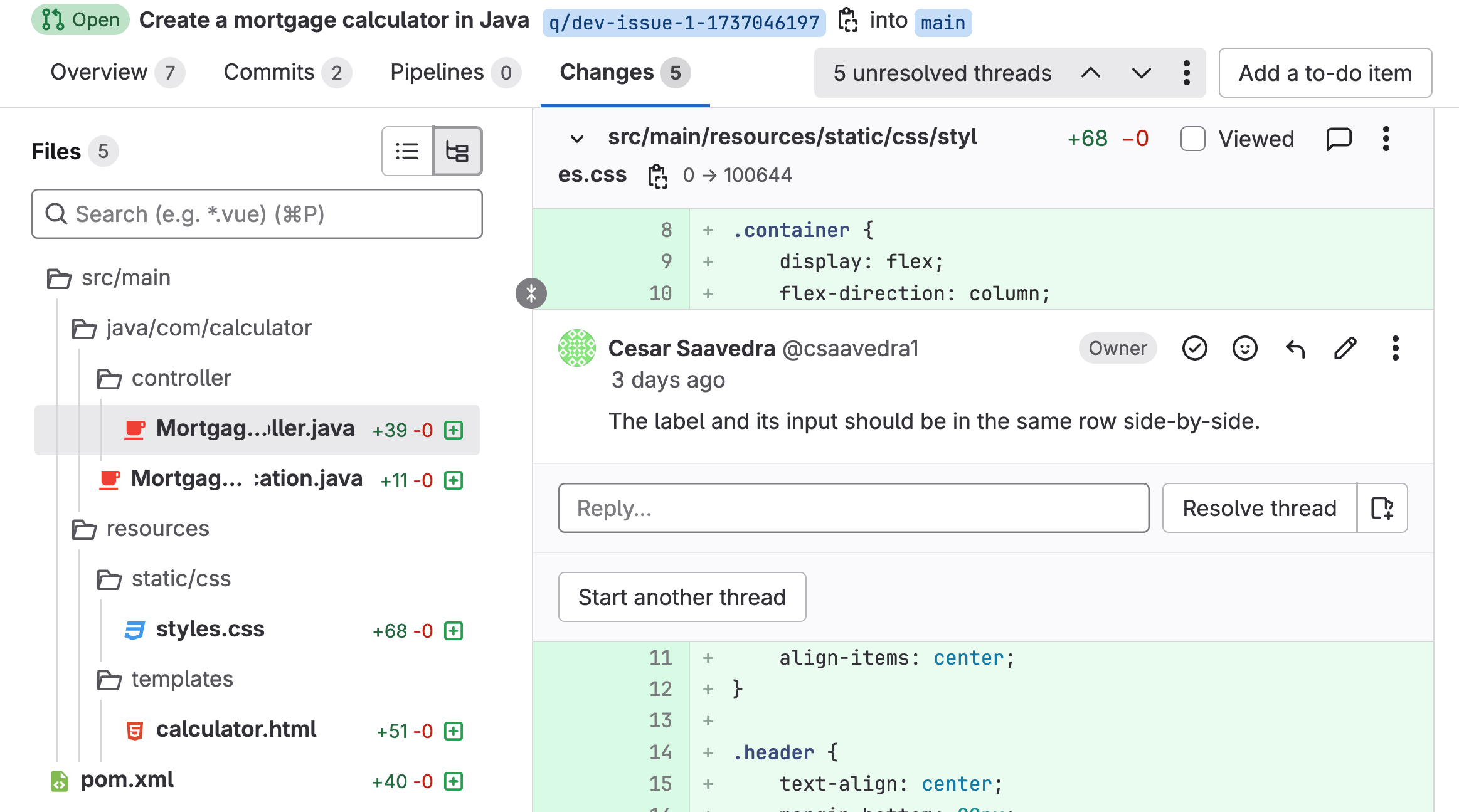
<p>When you're viewing a merge request with reviewer comments, you'll see feedback scattered throughout your code. Let's take the examples from earlier in this article: maybe you've received a request to update a form label here, a suggestion to display fields side-by-side there, or a note about making certain text bold. Each comment represents a task that normally you'd need to handle manually.</p>
<p><img src="https://res.cloudinary.com/about-gitlab-com/image/upload/v1749673634/Blog/Content%20Images/1-show-comment.png" alt="feedback on an MR"></p>
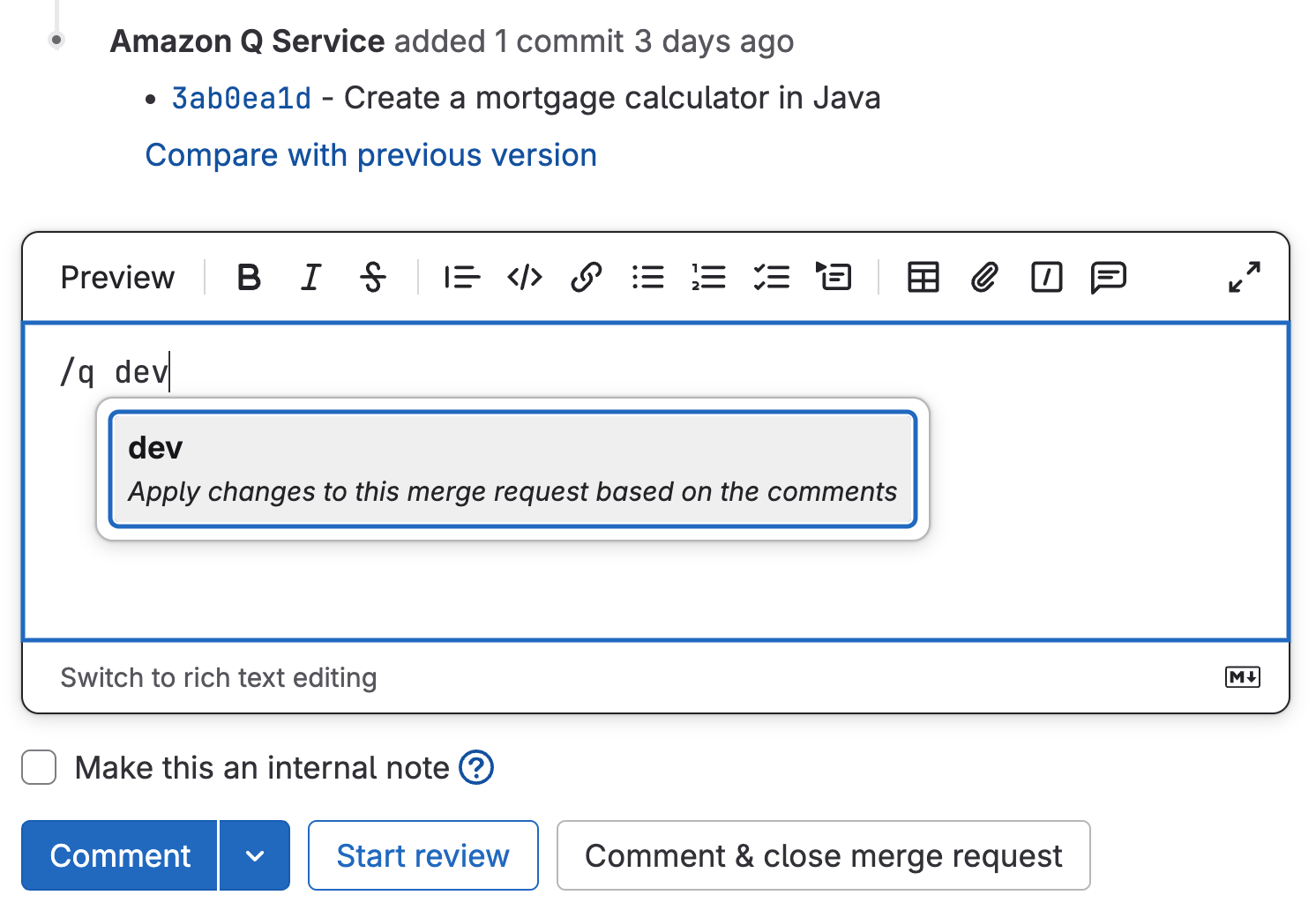
<p>With GitLab Duo with Amazon Q, you can simply enter the <code>/q dev</code> quick action in a comment. This prompts Amazon Q to analyze all the feedback and start modifying your code automatically. The AI agent understands the context of each comment and implements the requested changes directly in your codebase.</p>
<p><img src="https://res.cloudinary.com/about-gitlab-com/image/upload/v1749673634/Blog/Content%20Images/2-invoke-q-dev.png" alt="/q dev function prompting Amazon Q to analyze feedback"></p>
<p>Once Amazon Q processes the feedback, you can view all the updates in the &quot;Changes&quot; tab of your merge request. Every modification is clearly visible, so you can verify that the AI agent correctly interpreted and implemented each piece of feedback. You can then run your updated application to confirm that all the changes work as expected — that form label is updated, the fields are displayed side-by-side, the text is bold, and yes, that button is now blue.</p>
<p>Watch the code review feedback process in action:</p>
<p>&lt;!-- blank line --&gt;
&lt;figure class=&quot;video_container&quot;&gt;
&lt;iframe src=&quot;https://www.youtube.com/embed/31E9X9BrK5s?si=ThFywR34V3Bfj1Z-&quot; frameborder=&quot;0&quot; allowfullscreen=&quot;true&quot;&gt; &lt;/iframe&gt;
&lt;/figure&gt;
&lt;!-- blank line --&gt;</p>
<p>Processing code review feedback is a necessary but time-intensive part of software development.  GitLab Duo with Amazon Q evolves this manual process into an automated workflow, dramatically reducing the time between receiving feedback and implementing changes. By letting AI handle these routine modifications, you're free to focus on what really matters — building innovative features and solving complex problems.</p>
<p>With GitLab Duo with Amazon Q, you can:</p>
<ul>
<li>Eliminate hours of manual feedback implementation</li>
<li>Accelerate your code review cycles</li>
<li>Maintain consistency in how feedback is addressed</li>
<li>Reduce context switching between reviewing comments and writing code</li>
<li>Ship features faster with streamlined deployment times</li>
</ul>
<blockquote>
<h4>To learn more about GitLab Duo with Amazon Q visit us at an upcoming <a href="https://about.gitlab.com/events/aws-summits/">AWS Summit in a city near you</a> or <a href="https://about.gitlab.com/partners/technology-partners/aws/#form">reach out to your GitLab representative</a>.</h4>
</blockquote>
<h2>GitLab Duo with Amazon Q resources</h2>
<ul>
<li><a href="https://about.gitlab.com/blog/gitlab-duo-with-amazon-q-agentic-ai-optimized-for-aws/">GitLab Duo with Amazon Q: Agentic AI optimized for AWS generally available</a></li>
<li><a href="https://about.gitlab.com/partners/technology-partners/aws/">GitLab and AWS partner page</a></li>
<li><a href="https://docs.gitlab.com/user/duo_amazon_q/">GitLab Duo with Amazon Q documentation</a></li>
<li><a href="https://about.gitlab.com/topics/agentic-ai/">What is agentic AI?</a></li>
<li><a href="https://about.gitlab.com/blog/agentic-ai-guides-and-resources/">Agentic AI guides and resources</a></li>
</ul>
]]></content>
        <author>
            <name>Cesar Saavedra</name>
            <uri>https://about.gitlab.com/blog/authors/cesar-saavedra</uri>
        </author>
        <published>2025-06-10T00:00:00.000Z</published>
    </entry>
    <entry>
        <title type="html"><![CDATA[Last year we signed the Secure by Design pledge - here's our progress]]></title>
        <id>https://about.gitlab.com/blog/last-year-we-signed-the-secure-by-design-pledge-heres-our-progress/</id>
        <link href="https://about.gitlab.com/blog/last-year-we-signed-the-secure-by-design-pledge-heres-our-progress/"/>
        <updated>2025-06-09T00:00:00.000Z</updated>
        <content type="html"><![CDATA[<p>A little over a year go, GitLab signed <a href="https://about.gitlab.com/blog/secure-by-design-principles-meet-devsecops-innovation-in-gitlab-17/">CISA’s Secure by Design Pledge</a>, a directive for technology providers to embed security at the heart of their products from the outset of development. Since then, we've made significant progress towards improving our security posture and creating a more secure ecosystem for our customers to develop secure software faster.</p>
<h2>Meeting the security goals</h2>
<p>Let’s explore the additions and improvements we've made to further enhance security across the development lifecycle.</p>
<h3>Multi-factor authentication (MFA)</h3>
<p><em><strong>Goal: Within one year of signing the pledge, demonstrate actions taken to measurably increase the use of multi-factor authentication across the manufacturer’s products.</strong></em></p>
<p>GitLab currently offers multiple <a href="https://docs.gitlab.com/ee/user/profile/account/two_factor_authentication.html">MFA</a> options for users to secure their accounts. We also offer SSO functionality to enable <a href="https://docs.gitlab.com/ee/user/group/saml_sso/">GitLab.com</a>, <a href="https://docs.gitlab.com/integration/saml/">Self-Managed</a>, and <a href="https://docs.gitlab.com/integration/saml/">GitLab Dedicated</a> customers to streamline their authentication processes and their internal MFA requirements.</p>
<p>To further enhance the platform’s resilience, and to create a more secure foundation for our customers, GitLab is executing a phased MFA by Default rollout.</p>
<p>In the coming months, we will deploy changes requiring all customers to enable MFA on their accounts.</p>
<p>For customers who already have MFA enabled or authenticate to GitLab via their organization’s single sign-on (SSO) method, there will be no necessary changes. For customers who do not already have MFA enabled and are not authenticating to GitLab via their organization’s SSO method, they will be required to enable MFA and enroll in one or more of the available MFA methods.</p>
<p>The MFA rollout will occur in stages to ensure a smooth and consistent adoption across all customers. More details on GitLab’s MFA by Default rollout will be shared in the near future.</p>
<h3>Default passwords</h3>
<p><em><strong>Goal: Within one year of signing the pledge, demonstrate measurable progress towards reducing default passwords across the manufacturers’ products.</strong></em></p>
<p>To reduce the use of default passwords, GitLab uses randomly generated root passwords for its multiple installation methods. GitLab’s multi-method <a href="https://docs.gitlab.com/ee/install/install_methods.html">installation instructions</a> also include guidance on how to change the randomly generated root password for each installation.</p>
<p>For some install methods, such as installing GitLab in a Docker container, the password file with the initial root password is deleted in the first container restart after 24 hours to help further harden the GitLab instance.</p>
<h3>Reducing entire classes of vulnerabilities</h3>
<p><em><strong>Goal: Within one year of signing the pledge, demonstrate actions taken towards enabling a significant measurable reduction in the prevalence of one or more vulnerability classes across the manufacturer’s products.</strong></em></p>
<p>GitLab has published <a href="https://docs.gitlab.com/ee/development/secure_coding_guidelines.html#sast-coverage">secure coding guidelines</a> to its documentation site that contains descriptions and guidelines for addressing security vulnerabilities commonly identified in the GitLab codebase.</p>
<p>The guidelines are “intended to help developers identify potential security vulnerabilities early, with the goal of reducing the number of vulnerabilities released over time.”</p>
<p>GitLab continues to improve its <a href="https://docs.gitlab.com/development/secure_coding_guidelines#sast-coverage">SAST rule coverage</a> to address broader sets of security vulnerabilities for itself and its customers.</p>
<h3>Security patches</h3>
<p><em><strong>Goal: Within one year of signing the pledge, demonstrate actions taken to measurably increase the installation of security patches by customers.</strong></em></p>
<p>GitLab handles all updates related to its GitLab.com and GitLab Dedicated service offerings. Additionally, GitLab publishes a <a href="https://docs.gitlab.com/ee/policy/maintenance.html">maintenance policy</a>, which outlines its approach to releasing updates, backporting, upgrade recommendations and supporting documentation, etc.</p>
<p>GitLab’s documentation has comprehensive guidance on <a href="https://docs.gitlab.com/ee/update/?tab=Self-compiled+%28source%29#upgrade-based-on-installation-method">how to upgrade</a> self-managed instances based on their deployment model. This includes Omnibus, Helm chart, Docker and self-compiled GitLab installations.</p>
<p>GitLab also provides a detailed <a href="https://docs.gitlab.com/ee/update/plan_your_upgrade.html">upgrade plan</a> to ensure proper testing and troubleshooting can be performed as well as rollback plans if necessary.</p>
<p>Depending on the version upgrade, specific changes (<a href="https://docs.gitlab.com/ee/update/versions/gitlab_17_changes.html">example for GitLab 17</a>) for each version are highlighted to ensure a smooth upgrade process and limit unavailability of services.</p>
<h3>Vulnerability disclosure policy</h3>
<p><em><strong>Goal: Within one year of signing the pledge, publish a vulnerability disclosure policy (VDP).</strong></em></p>
<p>GitLab maintains a strong bug bounty program through <a href="https://hackerone.com/gitlab?type=team">HackerOne</a>, a <a href="https://gitlab.com/.well-known/security.txt">security.txt</a> file highlighting GitLab’s preferred and additional disclosure processes, and <a href="https://about.gitlab.com/releases/categories/releases/">release posts</a> highlighting security fixes.</p>
<p>Customers and the general public can subscribe to receive GitLab’s release posts directly in their email inbox.</p>
<h3>Common vulnerability enumerations</h3>
<p><em><strong>Goal: Within one year of signing the pledge, demonstrate transparency in vulnerability reporting</strong></em></p>
<p>GitLab includes the Common Weakness Enumeration (CWE) field in all Common vulnerability enumerations (CVE) records it publishes. Over the past year, GitLab has iterated to also include the Common Platform Enumeration (CPE) field in CVE records.</p>
<p>The GitLab <a href="https://gitlab.com/gitlab-org/cves">CVE assignments project</a> stores a copy of all CVE identifiers assigned and published by GitLab in its role as a CVE Numbering Authority.</p>
<blockquote>
<p>Check out <a href="https://gitlab.com/gitlab-org/cves/-/blob/master/.gitlab/issue_templates/Internal%20GitLab%20Submission.md?ref_type=heads">GitLab’s CVE submission template</a>.</p>
</blockquote>
<h3>Evidence of intrusions</h3>
<p><em><strong>Goal: Within one year of signing the pledge, demonstrate a measurable increase in the ability for customers to gather evidence of cybersecurity intrusions affecting the manufacturer’s products.</strong></em></p>
<p>GitLab has published an <a href="https://docs.gitlab.com/ee/security/responding_to_security_incidents.html">incident response guide</a> to help customers respond to incidents involving GitLab instances. Additionally, GitLab has open sourced versions of its <a href="https://about.gitlab.com/blog/unveiling-the-guard-framework-to-automate-security-detections-at-gitlab/">GUARD detection-as-code</a> and TLDR threat detection frameworks. The repositories for those open source frameworks can be found on <a href="https://about.gitlab.com/security/open-source-resources/">GitLab’s Open Source Security Center</a>.</p>
<p>In a similar manner, GitLab is adding functionality to its <a href="http://gitLab.com">GitLab.com</a> service offering to <a href="https://about.gitlab.com/blog/introducing-compromised-password-detection-for-gitlab-com/">detect compromised passwords</a> for all logins using GitLab’s native username and password authentication method.</p>
<h2>What's next</h2>
<p><a href="https://gitlab.com/gitlab-com/gl-security">GitLab’s Security Division’s mission</a> is to enable everyone to innovate and succeed on a safe, secure, and trusted DevSecOps platform.</p>
<p>GitLab's security enhancements over the past year have allowed us to demonstrate our commitment to CISA’s Secure by Design Pledge, and they have strengthened our platform and given customers a more reliable and secure foundation to build on.</p>
<p>Our commitment to iteration means we're already focused on the next set of innovations that will drive us forward.</p>
<blockquote>
<p>To learn more about GitLab’s security enhancements, bookmark our <a href="https://about.gitlab.com/blog/categories/security/">security page on the GitLab Blog</a>.</p>
</blockquote>
<h2>Read more</h2>
<ul>
<li><a href="https://about.gitlab.com/blog/secure-by-design-principles-meet-devsecops-innovation-in-gitlab-17/">Secure by Design principles meet DevSecOps innovation in GitLab 17</a></li>
<li><a href="https://about.gitlab.com/blog/happy-birthday-secure-by-design/">Happy birthday, Secure by Design!</a></li>
<li><a href="https://about.gitlab.com/the-source/security/strengthen-your-cybersecurity-strategy-with-secure-by-design/">Strengthen your cybersecurity strategy with Secure by Design</a></li>
</ul>
]]></content>
        <author>
            <name>Joseph Longo</name>
            <uri>https://about.gitlab.com/blog/authors/joseph-longo</uri>
        </author>
        <published>2025-06-09T00:00:00.000Z</published>
    </entry>
    <entry>
        <title type="html"><![CDATA[4 ways to accelerate embedded development with GitLab]]></title>
        <id>https://about.gitlab.com/blog/4-ways-to-accelerate-embedded-development-with-gitlab/</id>
        <link href="https://about.gitlab.com/blog/4-ways-to-accelerate-embedded-development-with-gitlab/"/>
        <updated>2025-06-05T00:00:00.000Z</updated>
        <content type="html"><![CDATA[<p>Software in embedded systems is no longer just a part number — it's a critical differentiator. This shift has led to enormous complexity in the firmware running in our cars, airplanes, and industrial machines. The number of lines of code in the average car is expected to reach <a href="https://www.statista.com/statistics/1370978/automotive-software-average-lines-of-codes-per-vehicle-globally/">650 million</a> by the end of 2025, up from 200 million just five years ago. In aerospace systems, the complexity of embedded software has nearly <a href="https://www.mckinsey.com/industries/aerospace-and-defense/our-insights/debugging-the-software-talent-gap-in-aerospace-and-defense">doubled every four years</a> for the last several decades.</p>
<p>Traditional embedded development approaches cannot effectively handle the software challenges of modern machines. This shortcoming slows engineers down, in part, by exacerbating challenges such as:</p>
<ul>
<li><a href="#challenge-1-hardware-testing-bottlenecks">Hardware testing bottlenecks</a></li>
<li><a href="#challenge-2-inconsistent-build-environments">Inconsistent build environments</a></li>
<li><a href="#challenge-3-siloed-development-practices">Siloed development practices</a></li>
<li><a href="#challenge-4-manual-functional-safety-compliance-processes">Manual functional safety compliance processes</a></li>
</ul>
<p>Embedded developers need a new approach to deal with the rapid increase in code. In this article, we’ll explain four ways you can use the GitLab AI-native DevSecOps platform to shorten feedback loops, work collaboratively and iteratively, and streamline compliance.</p>
<h2>Challenge 1: Hardware testing bottlenecks</h2>
<p>Unlike enterprise software that can run on virtually any cloud server, embedded automotive software must be tested on specialized hardware that precisely matches production environments. Traditional hardware-in-the-loop (HIL) testing processes often follow this pattern:</p>
<ol>
<li>Developers write code for an embedded system (e.g., an electronic control unit)</li>
<li>They request access to limited, expensive hardware test benches (costing $500,000-$10M each)</li>
<li>They wait days or weeks for their scheduled access window</li>
<li>They manually deploy and test their code on physical hardware at their desks</li>
<li>They document results, pass the hardware to the next developer, and go to the back of the hardware testing queue</li>
</ol>
<p>This process is extremely inefficient. Embedded developers may finish writing their code today and wait weeks to test it on a hardware target. By then, they've moved on to other tasks. This context switching drains productivity. Not only that, developers may wait weeks to learn they had a simple math error in their code.</p>
<h3>Solution: Automated hardware allocation and continuous integration</h3>
<p>You can streamline hardware testing through automation using the <a href="https://gitlab.com/guided-explorations/embedded/ci-components/device-cloud">GitLab On-Premises Device Cloud</a>, a CI/CD component. This lets you automate the orchestration of scarce hardware resources, turning a manual, time-intensive process into a streamlined, continuous workflow.</p>
<p>The On-Premises Device Cloud:</p>
<ol>
<li>Creates pools of shared hardware resources</li>
<li>Automatically — and exclusively — allocates hardware to a developer’s hardware testing pipeline tasks based on availability</li>
<li>Deploys and executes tests without manual intervention</li>
<li>Collects and reports results through integrated pipelines</li>
<li>Automatically deallocates hardware back into the “available” pool</li>
</ol>
<p>After submitting code, you’ll receive results in hours instead of days, often without ever physically touching the test hardware.</p>
<p>What this video for an introduction to the GitLab On-Premises Device Cloud CI/CD Component to orchestrate the remote allocation of shared hardware for HIL:</p>
<p>&lt;!-- blank line --&gt;
&lt;figure class=&quot;video_container&quot;&gt;
&lt;iframe src=&quot;https://www.youtube.com/embed/ltr2CIM9Zag?si=NOij3t1YYz4zKajC&quot; frameborder=&quot;0&quot; allowfullscreen=&quot;true&quot;&gt; &lt;/iframe&gt;
&lt;/figure&gt;
&lt;!-- blank line --&gt;</p>
<p>You can also adopt multi-pronged testing strategies that balance speed and quality. Bring the following embedded test patterns and environments into automated GitLab CI pipelines:</p>
<ul>
<li><strong>Software-in-the-loop (SIL):</strong> Testing on virtual hardware simulators for quicker initial feedback</li>
<li><strong>Processor-in-the-loop (PIL):</strong> Testing on representative processor hardware for faster feedback at a lower cost</li>
<li><strong>Hardware-in-the-loop (HIL):</strong> Testing on full production-equivalent hardware and test benches for late-stage verification</li>
</ul>
<p>By automating the orchestration of these tests within CI pipelines, you’ll be able to identify issues earlier, iterate faster, and accelerate time to market.</p>
<h2>Challenge 2: Inconsistent build environments</h2>
<p>Another significant challenge in embedded development is build environment inconsistency. Embedded developers often manually execute builds on their local machines with varying configurations, compiler versions, and dependencies. Then they’ll paste the binaries from their local build to a shared codebase.</p>
<p>This approach creates several problems:</p>
<ul>
<li><strong>Inconsistent outputs:</strong> Builds for the same source code produce different results on different machines</li>
<li><strong>&quot;Works on my machine&quot; syndrome:</strong> Code that builds locally fails in shared environments</li>
<li><strong>Poor traceability:</strong> Limited audit trail of who built what and when</li>
<li><strong>Knowledge silos:</strong> Build expertise becomes concentrated in a few individuals</li>
</ul>
<p>This approach can lead to errors, bottlenecks, and costly delays.</p>
<h3>Solution: Standardized build automation</h3>
<p>You can address these challenges by implementing standardized build automation within CI/CD pipelines in GitLab. This approach creates consistent, repeatable, container-based build environments that eliminate machine-specific variations. Through the use of special Embedded Gateway Runner provisioning scripts, containers can interface with hardware for flashing and port monitoring for automated testing.</p>
<p>Key elements of this solution include:</p>
<ul>
<li><strong>Lifecycle managed environments:</strong> Define complex embedded simulation environments as code; automatically deploy environments for testing and destroy them afterward</li>
<li><strong>Containerization:</strong> Use Docker containers to ensure identical build environments</li>
<li><strong>Automated dependency management:</strong> Control and version all dependencies</li>
<li><strong>Central build execution:</strong> Run builds on shared infrastructure rather than local machines</li>
</ul>
<blockquote>
<p>Follow this tutorial to learn <a href="https://gitlab.com/guided-explorations/embedded/workshops/embedded-devops-workshop-refactoring-to-ci/-/blob/main/TUTORIAL2.md%20">how to automate embedded software builds within a GitLab CI pipeline</a>.</p>
</blockquote>
<p>By standardizing and automating the build process, you can ensure that every build follows the same steps with the same dependencies, producing consistent outputs regardless of who initiated it. This not only improves quality but also democratizes the build process, enabling more team members to participate without specialized knowledge.</p>
<h2>Challenge 3: Siloed development practices</h2>
<p>Enterprise development teams have widely adopted collaborative practices such as DevOps, underpinned by shared source code management (SCM) and continuous integration/continuous delivery (CI/CD) systems. Embedded developers, on the other hand, have historically worked alone at their desks. There are valid technical reasons for this.</p>
<p>For example, consider hardware virtualization, which is a key enabler of DevOps automation. The industry has been slower to virtualize the massive range of specialized processors and boards used in embedded systems. This is due in large part to the difficulties of virtualizing production real-time systems and the associated lack of economic incentives. Compare that to cloud virtualization which has been commoditized and benefited enterprise SaaS development for over a decade.</p>
<p>Many providers are now embracing virtualization-first for the sake of speeding up embedded development. If teams fail to adopt virtual testing options, however, their silos will remain and negatively impact the business through:</p>
<ul>
<li><strong>Knowledge fragmentation</strong>: Critical insights remain scattered across individuals and teams</li>
<li><strong>Redundant development</strong>: Multiple teams solve identical problems, creating inconsistencies</li>
<li><strong>Late-stage discovery during big-bang integrations</strong>: Problems are found late in the process when multiple developers integrate their code at once, when errors are more costly to fix</li>
<li><strong>Stifled innovation</strong>: Solutions from one domain rarely influence others, hampering the development of new product ideas</li>
</ul>
<h3>Solution: Collaborative engineering through a unified platform</h3>
<p>An important step in breaking down these silos is to standardize embedded development around GitLab’s unified DevSecOps platform. In this regard, GitLab is aligned with the shift of embedded systems toward more consolidated, shared platforms on embedded devices. GitLab enables:</p>
<ul>
<li><strong>Shared visibility:</strong> Make all code, Issues, and documentation visible across teams</li>
<li><strong>Collaborative workflows:</strong> Enable peer review and knowledge sharing through merge requests</li>
<li><strong>Centralized knowledge:</strong> Maintain a single source of truth for all development artifacts</li>
<li><strong>Asynchronous collaboration:</strong> Allow teams to work together across different locations and time zones</li>
</ul>
<p>Human-AI agent collaboration is a fundamental ingredient to fueling the customer-facing innovations that digital natives and established embedded brands desire. GitLab enables human-AI collaboration as well. By creating transparency across the development lifecycle, GitLab changes embedded development from an isolated activity to a collaborative practice. Engineers can see each other's work in progress, learn from collective experiences, and build upon shared solutions.</p>
<p>Watch this presentation from Embedded World Germany 2025, which explains the power of embedded developers collaborating and sharing “work in progress”. The demo portion from 24:42 to 36:51 shows how to integrate HIL into a GitLab CI pipeline and enable collaborative development.</p>
<p>&lt;!-- blank line --&gt;
&lt;figure class=&quot;video_container&quot;&gt;
&lt;iframe src=&quot;https://www.youtube.com/embed/F_rlOyq0hzc?si=eF4alDY6HK98uZPj&quot; frameborder=&quot;0&quot; allowfullscreen=&quot;true&quot;&gt; &lt;/iframe&gt;
&lt;/figure&gt;
&lt;!-- blank line --&gt;</p>
<p>Perhaps most importantly, by achieving greater collaboration through DevSecOps, teams can unlock embedded systems innovations that would otherwise remain hidden. Indeed, collaboration fuels innovation. <a href="https://www.sciencedirect.com/science/article/abs/pii/S0749597800928887">One study</a>, for example, found that group brainstorming, when properly structured, can lead to more innovative and creative outcomes than individuals working alone. Collaborative development is crucial in the race to develop software-defined products.</p>
<h2>Challenge 4: Manual functional safety compliance processes</h2>
<p>Embedded systems in the automotive and aerospace industries must comply with rigorous functional safety standards, including ISO 26262, MISRA C/C++, DO-178C, and DO-254. Traditional compliance approaches involve manual reviews, extensive documentation, and separate verification activities that occur late in the development cycle. This often creates security review bottlenecks. When specialized embedded security and code quality scanners detect vulnerabilities in a developer’s code, the scan issue gets added to a pile of other issues that haven’t been resolved. Developers can’t integrate their code, and security personnel need to wade through a backlog of code violations. This creates delays and makes compliance more difficult.</p>
<p>Some of the challenges can best be summed up as:</p>
<ul>
<li><strong>Late-stage compliance issues</strong>: Problems discovered after development is complete</li>
<li><strong>Documentation burden</strong>: Extensive manual effort to create and maintain compliance evidence</li>
<li><strong>Process bottlenecks</strong>: Serial compliance activities that block development progress</li>
<li><strong>Expertise dependence</strong>: Reliance on limited specialists for compliance activities</li>
</ul>
<p>As a result, teams often need to choose between velocity and compliance — a precarious trade-off in safety-critical systems.</p>
<h3>Solution: Automated functional safety compliance workflow building blocks</h3>
<p>Rather than treating security and compliance as post-development verification activities, you can codify compliance requirements and enforce them automatically through <a href="https://about.gitlab.com/blog/introducing-custom-compliance-frameworks-in-gitlab/">customizable frameworks in GitLab</a>. To do this for functional safety standards, in particular, you can integrate GitLab with specialized embedded tools, which provide the depth of firmware scanning required by functional safety standards. Meanwhile, GitLab provides automated compliance checks, full audit trails, and merge request gating — all features needed to support a robust continuous compliance program.</p>
<p>This integrated approach includes:</p>
<ul>
<li><strong>Compliance-as-code:</strong> Define compliance requirements as automated checks</li>
<li><strong>Integrated specialized tools:</strong> Connect tools like CodeSonar into the DevSecOps platform for automotive-specific compliance</li>
<li><strong>Continuous compliance verification:</strong> Verify requirements throughout development</li>
<li><strong>Automated evidence collection:</strong> Gather compliance artifacts as a by-product of development</li>
</ul>
<p>Watch this video to learn how to use Custom Compliance Frameworks in GitLab to create your own compliance policies. You can create compliance policies related to any standard (e.g., ISO 26262) and automatically enforce those policies in GitLab.</p>
<p>&lt;!-- blank line --&gt;
&lt;figure class=&quot;video_container&quot;&gt;
&lt;iframe src=&quot;https://www.youtube.com/embed/S-FQjzSyVJw?si=0UdtGNuugLPG0SLL&quot; frameborder=&quot;0&quot; allowfullscreen=&quot;true&quot;&gt; &lt;/iframe&gt;
&lt;/figure&gt;
&lt;!-- blank line --&gt;</p>
<p>By shifting compliance left and embedding it within normal development workflows, you can maintain safety standards without sacrificing velocity. Automated checks catch issues early when they're easier and less expensive to fix, while continuous evidence collection reduces the documentation burden.</p>
<h2>Realizing the power of embedded DevOps</h2>
<p>Embedded development is changing fast. Teams that remain stuck in manual processes and isolated workflows will find themselves increasingly left behind, while those that embrace automated, collaborative practices will define the future of software-defined smart systems.</p>
<p>Explore our <a href="https://gitlab.com/guided-explorations/embedded/workshops/embedded-devops-workshop-refactoring-to-ci">Embedded DevOps Workshop</a> to start automating embedded development workflows with GitLab, or <a href="https://content.gitlab.com/viewer/0a35252831bd130f879b0725738f70ed">watch this presentation from GitLab's Field Chief Cloud Architect</a> to learn how leading organizations are bringing hardware-in-the-loop testing into continuous integration workflows to accelerate embedded development.</p>
<h2>Learn more</h2>
<ul>
<li><a href="https://content.gitlab.com/viewer/438451cba726dd017da7b95fd0fb1b59">Why GitLab Premium with Duo for embedded systems development?</a></li>
<li><a href="https://content.gitlab.com/viewer/87f5104c26720e2c0d73a6b377522a44">Why GitLab Ultimate with Duo for embedded systems development?</a></li>
<li><a href="https://content.gitlab.com/viewer/e59c40099d5e3c8f9307afb27c4a923f">More embedded development systems presentations from GitLab</a></li>
</ul>
]]></content>
        <author>
            <name>Matt DeLaney</name>
            <uri>https://about.gitlab.com/blog/authors/matt-delaney</uri>
        </author>
        <author>
            <name>Darwin Sanoy</name>
            <uri>https://about.gitlab.com/blog/authors/darwin-sanoy</uri>
        </author>
        <published>2025-06-05T00:00:00.000Z</published>
    </entry>
    <entry>
        <title type="html"><![CDATA[How we decreased GitLab repo backup times from 48 hours to 41 minutes]]></title>
        <id>https://about.gitlab.com/blog/how-we-decreased-gitlab-repo-backup-times-from-48-hours-to-41-minutes/</id>
        <link href="https://about.gitlab.com/blog/how-we-decreased-gitlab-repo-backup-times-from-48-hours-to-41-minutes/"/>
        <updated>2025-06-05T00:00:00.000Z</updated>
        <content type="html"><![CDATA[<p>Repository backups are a critical component of any robust disaster recovery strategy. However, as repositories grow in size, the process of creating reliable backups becomes increasingly challenging.  Our own <a href="https://gitlab.com/gitlab-org/gitlab">Rails repository</a> was taking 48 hours to back up — forcing impossible choices between backup frequency and system performance. We wanted to tackle this issue for our customers and for our own users internally.</p>
<p>Ultimately, we traced the issue to a 15-year-old Git function with O(N²) complexity and fixed it with an algorithmic change, <strong>reducing backup times exponentially</strong>. The result: lower costs, reduced risk, and backup strategies that actually scale with your codebase.</p>
<p>This turned out to be a Git scalability issue that affects anyone with large repositories. Here's how we tracked it down and fixed it.</p>
<h2>Backup at scale</h2>
<p>First, let's look at the problem. As organizations scale their repositories and backups grow more complex, here are some of the challenges they can face:</p>
<ul>
<li><strong>Time-prohibitive backups:</strong> For very large repositories, creating a repository backup could take several hours, which can hinder the ability to schedule regular backups.</li>
<li><strong>Resource intensity:</strong> Extended backup processes can consume substantial server resources, potentially impacting other operations.</li>
<li><strong>Backup windows:</strong> Finding adequate maintenance windows for such lengthy processes can be difficult for teams running 24/7 operations.</li>
<li><strong>Increased failure risk:</strong> Long-running processes are more susceptible to interruptions from network issues, server restarts, and system errors, which can force teams to restart the entire very long backup process from scratch.</li>
<li><strong>Race conditions:</strong> Because it takes a long time to create a backup, the repository might have changed a lot during the process, potentially creating an invalid backup or interrupting the backup because objects are no longer available.</li>
</ul>
<p>These challenges can lead to compromising on backup frequency or completeness – an unacceptable trade-off when it comes to data protection. Extended backup windows can force customers into workarounds. Some might adopt external tooling, while others might reduce backup frequency, resulting in potential inconsistent data protection strategies across organizations.</p>
<p>Now, let's dig into how we identified a performance bottleneck, found a resolution, and deployed it to help cut backup times.</p>
<h2>The technical challenge</h2>
<p>GitLab's repository backup functionality relies on the <a href="https://git-scm.com/docs/git-bundle"><code>git bundle create</code></a> command, which captures a complete snapshot of a repository, including all objects and references like branches and tags. This bundle serves as a restoration point for recreating the repository in its exact state.</p>
<p>However, the implementation of the command suffered from poor scalability related to reference count, creating a performance bottleneck. As repositories accumulated more references, processing time increased exponentially. In our largest repositories containing millions of references, backup operations could extend beyond 48 hours.</p>
<h3>Root cause analysis</h3>
<p>To identify the root cause of this performance bottleneck, we analyzed a flame graph of the command during execution.</p>
<p><img src="https://res.cloudinary.com/about-gitlab-com/image/upload/v1750097176/Blog/Content%20Images/Blog/Content%20Images/image1_aHR0cHM6_1750097176388.jpg" alt="Flame graph showing command during execution"></p>
<p>A flame graph displays the execution path of a command through its stack trace. Each bar corresponds to a function in the code, with the bar's width indicating how much time the command spent executing within that particular function.</p>
<p>When examining the flame graph of <code>git bundle create</code> running on a repository with 10,000 references, approximately 80% of the execution time is consumed by the <code>object_array_remove_duplicates()</code> function. This function was introduced to Git in the <a href="https://gitlab.com/gitlab-org/git/-/commit/b2a6d1c686">commit b2a6d1c686</a> (bundle: allow the same ref to be given more than once, 2009-01-17).</p>
<p>To understand this change, it's important to know that <code>git bundle create</code> allows users to specify which references to include in the bundle. For complete repository bundles, the <code>--all</code> flag packages all references.</p>
<p>The commit addressed a problem where users providing duplicate references through the command line – such as <code>git bundle create main.bundle main main</code> - would create a bundle without properly handling the duplicated main reference. Unbundling this bundle in a Git repository would break, because it tries to write the same ref twice. The code to avoid duplication uses nested <code>for</code> loops that iterate through all references to identify duplicates. This O(N²) algorithm becomes a significant performance bottleneck in repositories with large reference counts, consuming substantial processing time.</p>
<h3>The fix: From O(N²) to efficient mapping</h3>
<p>To resolve this performance issue, we contributed an upstream fix to Git that replaces the nested loops with a map data structure. Each reference is added to the map, which automatically ensures only a single copy of each reference is retained for processing.</p>
<p>This change dramatically enhances the performance of <code>git bundle create</code> and enables much better scalability in repositories with large reference counts. Benchmark testing on a repository with 10,000 references demonstrates a 6x performance improvement.</p>
<pre><code class="language-shell">Benchmark 1: bundle (refcount = 100000, revision = master)
  Time (mean ± σ): 	14.653 s ±  0.203 s	[User: 13.940 s, System: 0.762 s]
  Range (min … max):   14.237 s … 14.920 s	10 runs

Benchmark 2: bundle (refcount = 100000, revision = HEAD)
  Time (mean ± σ):  	2.394 s ±  0.023 s	[User: 1.684 s, System: 0.798 s]
  Range (min … max):	2.364 s …  2.425 s	10 runs

Summary
  bundle (refcount = 100000, revision = HEAD) ran
	6.12 ± 0.10 times faster than bundle (refcount = 100000, revision = master)
</code></pre>
<p>The patch was accepted and <a href="https://gitlab.com/gitlab-org/git/-/commit/bb74c0abbc31da35be52999569ea481ebd149d1d">merged</a> into upstream Git. At GitLab, we backported this fix to ensure our customers could benefit immediately, without waiting for the next Git release.</p>
<h2>The result: Dramatically decreased backup times</h2>
<p>The performance gains from this improvement have been nothing short of transformative:</p>
<ul>
<li><strong>From 48 hours to 41 minutes:</strong> Creating a backup of our largest repository (<code>gitlab-org/gitlab</code>) now takes just 1.4% of the original time.</li>
<li><strong>Consistent performance:</strong> The improvement scales reliably across repository sizes.</li>
<li><strong>Resource efficiency:</strong> We significantly reduced server load during backup operations.</li>
<li><strong>Broader applicability:</strong> While backup creation sees the most dramatic improvement, all bundle-based operations that operate on many references benefit.</li>
</ul>
<h2>What this means for GitLab customers</h2>
<p>For GitLab customers, this enhancement delivers immediate and tangible benefits on how organizations approach repository backup and disaster recovery planning:</p>
<ul>
<li><strong>Transformed backup strategies</strong>
<ul>
<li>Enterprise teams can establish comprehensive nightly schedules without impacting development workflows or requiring extensive backup windows.</li>
<li>Backups can now run seamlessly in the background during nightly schedules, instead of needing to be dedicated and lengthy.</li>
</ul>
</li>
<li><strong>Enhanced business continuity</strong>
<ul>
<li>With backup times reduced from days to minutes, organizations significantly minimize their recovery point objectives (RPO). This translates to reduced business risk – in a disaster scenario, you're potentially recovering hours of work instead of days.</li>
</ul>
</li>
<li><strong>Reduced operational overhead</strong>
<ul>
<li>Less server resource consumption and shorter maintenance windows.</li>
<li>Shorter backup windows mean reduced compute costs, especially in cloud environments, where extended processing time translates directly to higher bills.</li>
</ul>
</li>
<li><strong>Future-proofed infrastructure</strong>
<ul>
<li>Growing repositories no longer force difficult choices between backup frequency and system performance.</li>
<li>As your codebase expands, your backup strategy can scale seamlessly alongside it</li>
</ul>
</li>
</ul>
<p>Organizations can now implement more robust backup strategies without compromising on performance or completeness. What was once a challenging trade-off has become a straightforward operational practice.</p>
<p>Starting with the <a href="https://about.gitlab.com/releases/2025/05/15/gitlab-18-0-released/">GitLab 18.0</a> release, all GitLab customers regardless of their license tier can already fully take advantage of these improvements for their <a href="https://docs.gitlab.com/administration/backup_restore/backup_gitlab/">backup</a> strategy and execution. There is no further change in configuration required.</p>
<h2>What's next</h2>
<p>This breakthrough is part of our ongoing commitment to scalable, enterprise-grade Git infrastructure. While the improvement of 48 hours to 41 minutes for backup creation time represents a significant milestone, we continue to identify and address performance bottlenecks throughout our stack.</p>
<p>We're particularly proud that this enhancement was contributed upstream to the Git project, benefiting not just GitLab users but the broader Git community. This collaborative approach to development ensures that improvements are thoroughly reviewed, widely tested, and available to all.</p>
<blockquote>
<p>Deep infrastructure work like this is how we approach performance at GitLab. Join the GitLab 18 virtual launch event to see what other fundamental improvements we're shipping. <a href="https://about.gitlab.com/eighteen/">Register today!</a></p>
</blockquote>
]]></content>
        <author>
            <name>Karthik Nayak</name>
            <uri>https://about.gitlab.com/blog/authors/karthik-nayak</uri>
        </author>
        <author>
            <name>Manuel Kraft</name>
            <uri>https://about.gitlab.com/blog/authors/manuel-kraft</uri>
        </author>
        <published>2025-06-05T00:00:00.000Z</published>
    </entry>
    <entry>
        <title type="html"><![CDATA[Accelerate code reviews with GitLab Duo and Amazon Q]]></title>
        <id>https://about.gitlab.com/blog/accelerate-code-reviews-with-gitlab-duo-and-amazon-q/</id>
        <link href="https://about.gitlab.com/blog/accelerate-code-reviews-with-gitlab-duo-and-amazon-q/"/>
        <updated>2025-06-02T00:00:00.000Z</updated>
        <content type="html"><![CDATA[<p>Code reviews are critical for catching bugs, improving code readability, and maintaining coding standards, but they can also be a major bottleneck in your workflow. When you're trying to ship features quickly, waiting for multiple team members to review your code can be frustrating. The back-and-forth discussions, the scheduling conflicts, and the time it takes to get everyone aligned can stretch what should be a simple review into days or even weeks.</p>
<p>Here's where <a href="https://about.gitlab.com/blog/gitlab-duo-with-amazon-q-agentic-ai-optimized-for-aws/">GitLab Duo with Amazon Q</a>, our new offering that delivers agentic AI throughout the software development lifecycle for AWS customers, comes in to transform your review process. This intelligent, AI-powered solution can perform comprehensive code reviews for you in a fraction of the time it would take your human colleagues. By leveraging advanced agentic AI capabilities, GitLab Duo with Amazon Q streamlines your entire review workflow without sacrificing the quality and thoroughness you need. Think of it as having an always-available, highly skilled reviewer who can instantly analyze your code and provide actionable feedback.</p>
<h2>How it works: Launching a code review</h2>
<p>So how does GitLab Duo with Amazon Q actually work? Let's say you've just finished working on a feature and created a merge request with multiple code updates. Instead of pinging your teammates and waiting for their availability, you simply enter a quick command in the comment section: &quot;/q review&quot;. That's it – just those two words trigger the AI to spring into action.</p>
<p><img src="https://res.cloudinary.com/about-gitlab-com/image/upload/v1750097002/Blog/Content%20Images/Blog/Content%20Images/image1_aHR0cHM6_1750097002096.png" alt="Triggering a code review using GitLab Duo with Amazon Q"></p>
<p>Once you've entered the command, Amazon Q Service immediately begins analyzing your code changes. You'll see a confirmation that the review is underway, and within moments, the AI is examining every line of your updates, checking for potential issues across multiple dimensions.
When the review completes, you receive comprehensive feedback that covers all the bases: bug detection, readability improvements, syntax errors, and adherence to your team's coding standards. The AI doesn't just point out problems, it provides context and suggestions for fixing them, making it easy for you to understand what needs attention and why.</p>
<p>The beauty of this agentic AI approach is that it handles the heavy lifting of code review while you focus on what matters most: building great software. You get the benefits of thorough code reviews — better bug detection, consistent coding standards, and improved code quality — without the time sink. Your deployment times shrink dramatically because you're no longer waiting in review queues, and your entire team becomes more productive.</p>
<h2>Why use GitLab Duo with Amazon Q?</h2>
<p>GitLab Duo with Amazon Q transforms your development workflow in the following ways:</p>
<ul>
<li>Lightning-fast code reviews that don't compromise on quality</li>
<li>Consistent application of coding standards across your entire codebase</li>
<li>Immediate feedback that helps you fix issues before they reach production</li>
<li>Reduced deployment times that let you ship features faster</li>
<li>More time for your team to focus on creative problem-solving instead of repetitive reviews</li>
</ul>
<p>Ready to see this game-changing feature in action? Watch how GitLab Duo with Amazon Q can revolutionize your code review process:</p>
<p>&lt;!-- blank line --&gt;
&lt;figure class=&quot;video_container&quot;&gt;
&lt;iframe src=&quot;https://www.youtube.com/embed/4gFIgyFc02Q?si=GXVz--AIrWiwzf-I&quot; frameborder=&quot;0&quot; allowfullscreen=&quot;true&quot;&gt; &lt;/iframe&gt;
&lt;/figure&gt;
&lt;!-- blank line --&gt;</p>
<blockquote>
<p>To learn more about GitLab Duo with Amazon Q visit us at an upcoming <a href="https://about.gitlab.com/events/aws-summits/">AWS Summit in a city near you</a> or <a href="https://about.gitlab.com/partners/technology-partners/aws/#form">reach out to your GitLab representative</a>.</p>
<p>And make sure to join the GitLab 18 virtual launch event to learn about our agentic AI plans and more. <a href="https://about.gitlab.com/eighteen/">Register today!</a></p>
</blockquote>
]]></content>
        <author>
            <name>Cesar Saavedra</name>
            <uri>https://about.gitlab.com/blog/authors/cesar-saavedra</uri>
        </author>
        <published>2025-06-02T00:00:00.000Z</published>
    </entry>
    <entry>
        <title type="html"><![CDATA[GitLab named a Leader in The Forrester Wave™: DevOps Platforms, Q2 2025]]></title>
        <id>https://about.gitlab.com/blog/gitlab-named-a-leader-in-the-forrester-wave-devops-platforms-q2-2025/</id>
        <link href="https://about.gitlab.com/blog/gitlab-named-a-leader-in-the-forrester-wave-devops-platforms-q2-2025/"/>
        <updated>2025-06-02T00:00:00.000Z</updated>
        <content type="html"><![CDATA[<p>Choosing a DevSecOps platform is one of the biggest technology decisions enterprises make. That's why we are thrilled to be named a <a href="https://about.gitlab.com/forrester-wave-devops-platform/"><strong>Leader in The Forrester Wave™: DevOps Platforms, Q2 2025</strong></a>, receiving the highest scores possible across the criteria our customers tell us they care about most, including day zero experience, developer tooling, build automation and CI, deployment automation, AI risk mitigation, AI infusion, directly incorporated security tools, and platform cohesion.</p>
<p><em><strong>&quot;GitLab is the most all-in-one of the all-in-one solutions and suits enterprises looking to standardize with a single purchase.” -</strong></em> Forrester Wave™: DevOps Platforms, Q2 2025</p>
<p>For us, this recognition reflects what we've been hearing from customers: They need to deliver secure software faster, but existing solutions force them to compromise on speed, security, or simplicity. GitLab delivers all three. And with our <a href="https://about.gitlab.com/releases/2025/05/15/gitlab-18-0-released/">GitLab 18.0 release</a> in May, we’ve taken this a step further by <a href="https://about.gitlab.com/blog/gitlab-premium-with-duo/">including AI-native GitLab Duo capabilities</a> — such as test generation, code suggestions, and code refactoring — directly in GitLab Premium and GitLab Ultimate at no additional cost.</p>
<blockquote>
<p><a href="https://about.gitlab.com/forrester-wave-devops-platform/">Access the report today!</a></p>
</blockquote>
<p><img src="https://res.cloudinary.com/about-gitlab-com/image/upload/v1749673518/Blog/Content%20Images/Image_DevOps-Platforms-Q2-2025.png" alt=" Forrester Wave™: DevOps Platforms, Q2 2025 graphic "></p>
<h2>Staying at the forefront of AI transformation, with enterprise control</h2>
<p>DevSecOps is rapidly evolving, with AI at the forefront of that change. Unfortunately, many AI tools force a choice: cutting-edge capabilities or enterprise security.</p>
<p>Forrester scored GitLab a 5 – the highest on their scale – for both the <strong>AI infusion</strong> and <strong>AI risk mitigation</strong> criteria. We’re pleased to see our focus on building innovative AI capabilities that maintain security is being noticed by more than just our customers.</p>
<p>This dual strength shows up across our GitLab Duo AI offerings, including:</p>
<ul>
<li>Duo Workflow (private beta): Autonomous AI agents that handle complex tasks across development, security, and operations — with enterprise-grade guardrails and audit trails.</li>
<li>Agentic Chat: Contextual, conversational AI assistance for everything from code explanations to test creation — with IP protection and privacy controls built in.</li>
<li>Code Suggestions: AI assistance that can predictively complete code blocks, define function logic, generate tests, and propose common code like regex patterns.</li>
<li>AI-native Vulnerability Resolution: Find and fix vulnerabilities with auto explanation and auto-generated merge requests, ensuring a streamlined development process.</li>
</ul>
<h2>Doing more with less</h2>
<p>We’ve heard loud and clear that DevSecOps teams don’t need more tools and integrations that help them with part of their software delivery lifecycle. They need a seamless, integrated developer experience that covers the entire SDLC.</p>
<p>We believe GitLab’s scores in the following criteria are validation of our customer-focused strategy:</p>
<ul>
<li><strong>Day zero experience:</strong> Forrester cited our “strong day zero experience,” noting that “everything is ready to run out-of-the-box,” supported by extensive migration tools and tutorials.</li>
<li><strong>Developer tooling:</strong> Forrester pointed to <a href="https://about.gitlab.com/blog/gitlab-duo-with-amazon-q-agentic-ai-optimized-for-aws/">GitLab Duo with Amazon Q</a>, our agentic AI offering for AWS customers, as well as our cloud development environment, integrated developer platform, and wikis for documentation as examples.</li>
<li><strong>Project planning and alignment:</strong> Forrester noted our &quot;strong compliance center,&quot; and that we have tools to drive alignment top-down and bottom-up.</li>
<li><strong>Pipeline security:</strong> Forrester gave us the highest score possible in the pipeline security criterion.</li>
<li><strong>Build automation and CI:</strong> Forrester cited our build automation and CI with multistage build pipelines and strong self-hosted support.</li>
</ul>
<h2>Read the report</h2>
<p>For us, being named a Leader in The Forrester Wave™: DevOps Platforms, Q2 2025 speaks to the breadth and depth of our platform’s capabilities, providing a single source of truth for the entire software development lifecycle. No more juggling multiple tools and integrations – GitLab provides a seamless, integrated experience that boosts productivity and reduces friction. We believe this placement reflects the hard work of our team, the many contributions from GitLab’s open source community, the invaluable feedback from our customers, and our dedication to shaping the future of software development.</p>
<blockquote>
<h4><a href="https://about.gitlab.com/forrester-wave-devops-platform/">Access the report today!</a></h4>
</blockquote>
<p><em>Forrester does not endorse any company, product, brand, or service included in its research publications and does not advise any person to select the products or services of any company or brand based on the ratings included in such publications. Information is based on the best available resources. Opinions reflect judgment at the time and are subject to change. For more information, read about Forrester’s objectivity <a href="https://www.forrester.com/about-us/objectivity/">here</a>.</em></p>
]]></content>
        <author>
            <name>Dave Steer</name>
            <uri>https://about.gitlab.com/blog/authors/dave-steer</uri>
        </author>
        <published>2025-06-02T00:00:00.000Z</published>
    </entry>
    <entry>
        <title type="html"><![CDATA[Why are organizations moving to a unified DevSecOps platform?]]></title>
        <id>https://about.gitlab.com/blog/why-are-organizations-moving-to-a-unified-devsecops-platform/</id>
        <link href="https://about.gitlab.com/blog/why-are-organizations-moving-to-a-unified-devsecops-platform/"/>
        <updated>2025-06-02T00:00:00.000Z</updated>
        <content type="html"><![CDATA[<p>In today’s modern software development landscape, many organizations are migrating to the cloud and adopting DevSecOps processes. However, this transition presents a significant challenge: a proliferation of tools and legacy systems not designed for modern development. To adapt these systems to DevSecOps, organizations must create integrations between multiple tools for task management, CI/CD, security, monitoring, and more. The result? Operational complexity, high maintenance costs, and disrupted collaboration between development and operations teams. Additionally, developers experience frustration as they constantly switch between different tools to complete a single development flow – from planning to production.</p>
<p><img src="https://res.cloudinary.com/about-gitlab-com/image/upload/v1750097077/Blog/Content%20Images/Blog/Content%20Images/image1_aHR0cHM6_1750097077287.jpg" alt="The complexity and operational costs of integrating multiple tools into a DevSecOps process"></p>
<p>&lt;center&gt;&lt;i&gt;How complex it can be to integrate multiple tools into a DevSecOps process&lt;/i&gt;&lt;/center&gt;</p>
<p>&lt;br&gt;&lt;/br&gt;</p>
<p>The good news is that a solution exists: A comprehensive DevSecOps platform offering a unified approach to software development.</p>
<p>These platforms are built for organizations operating in cloud-based and DevSecOps environments, consolidating all software development stages — from code management, CI/CD processes, task management, and security to AI-driven automation — into a single platform. Centralizing all software development workflows in a unified interface enables development and operations teams to work more efficiently, streamline communication, and minimize operational complexities and disruptions.</p>
<p>Furthermore, the developer experience significantly improves — engineers are much happier working with a product designed specifically for modern development needs.</p>
<p>In the sections below, we’ll explore how GitLab helps teams overcome common challenges — whether it’s managing projects and tasks, ensuring security and compliance, or adopting AI-powered development tools – all within a single, unified platform.</p>
<h2>Integrated Agile project management</h2>
<p>GitLab provides a holistic solution in which project and task management are fully integrated across all stages of the software development lifecycle, such as CI/CD, enabling real-time tracking of development progress. Issues and epics directly link to automation processes, allowing a seamless flow from planning to production deployment. This approach enhances transparency across teams, reduces delays, and ensures that all stakeholders have a clear view of the development status in real-time.</p>
<p><img src="https://res.cloudinary.com/about-gitlab-com/image/upload/v1750097077/Blog/Content%20Images/Blog/Content%20Images/image3_aHR0cHM6_1750097077288.jpg" alt="Issues and epics directly link to automation processes, allowing a seamless flow from planning to production deployment."></p>
<h2>Built-in security</h2>
<p>GitLab strongly emphasizes integrating security capabilities end-to-end (security first). The platform integrates a wide range of automated security scanners, including:</p>
<ul>
<li><a href="https://docs.gitlab.com/user/application_security/dependency_scanning/">Dependency Scanning</a></li>
<li><a href="https://docs.gitlab.com/user/application_security/sast/">Static Application Security Testing (SAST)</a></li>
<li><a href="https://docs.gitlab.com/user/application_security/dast/">Dynamic Application Security Testing (DAST)</a></li>
<li><a href="https://docs.gitlab.com/user/application_security/secret_detection/">Secret Detection</a></li>
<li><a href="https://docs.gitlab.com/user/application_security/container_scanning/">Container Scanning</a></li>
</ul>
<p><img src="https://res.cloudinary.com/about-gitlab-com/image/upload/v1750097077/Blog/Content%20Images/Blog/Content%20Images/image2_aHR0cHM6_1750097077289.jpg" alt="Security scanning capabilities integrated into the CI/CD process at various development stages"></p>
<p>&lt;center&gt;&lt;i&gt;Security scanning capabilities integrated into the CI/CD process at various development stages&lt;/i&gt;&lt;/center&gt;</p>
<p>&lt;br&gt;&lt;/br&gt;</p>
<p>These security checks are built directly into every phase of the software development lifecycle, including the CI/CD pipeline, to provide developers with immediate feedback on potential security issues early in the development cycle.</p>
<h2>Compliance and regulatory requirements</h2>
<p>Beyond efficiency and user experience, many organizations — especially those in regulated industries such as financial institutions or large enterprises — must ensure their processes comply with strict security and compliance standards. They need the ability to enforce policies for different projects, such as mandating a security scanner every time a CI/CD pipeline runs on specific code branches (e.g., main or protected branches) or requiring specific approvals before merging code into the main branch.</p>
<p>With GitLab, this becomes easier through <a href="https://about.gitlab.com/blog/introducing-custom-compliance-frameworks-in-gitlab/">Compliance Frameworks</a>, a feature that allows organizations to define and enforce structured policies for selected projects. This ensures compliance with automatic regulatory and security requirements while maintaining a seamless and efficient developer workflow.</p>
<h2>AI-powered development</h2>
<p><a href="https://about.gitlab.com/gitlab-duo/">GitLab Duo</a> provides AI-driven assistance across all development stages, eliminating the need to switch to external tools. Every AI-powered request is processed within the full context of the project and codebase, enabling smarter and more efficient work.</p>
<p>AI can perform example tasks such as:</p>
<ul>
<li>automatic task description generation</li>
<li>smart summarization of issue discussions, saving developers valuable time</li>
<li>advanced code review capabilities</li>
<li>code improvement and optimization suggestions</li>
<li>automated test generation</li>
<li>security vulnerability detection and remediation</li>
<li>troubleshooting root cause analysis for CI pipeline failures</li>
<li>privacy and Data Security</li>
</ul>
<p>Understanding the needs of regulated organizations, particularly in the public and financial sectors, GitLab offers a unique solution for running AI models in a secure environment. GitLab Duo Self-Hosted enables organizations to maintain full control over data privacy, security, and the deployment of large language models (<a href="https://about.gitlab.com/blog/what-is-a-large-language-model-llm/">LLMs</a>) in their own infrastructure, ensuring:</p>
<ul>
<li>data privacy protection</li>
<li>compliance with regulatory requirements</li>
<li>maximum security</li>
<li>AI benefits without external network dependencies or risks</li>
</ul>
<h2>Summary</h2>
<p>Organizations need a comprehensive DevSecOps platform to streamline processes, enhance security, and accelerate innovation. GitLab delivers precisely that — a single application consolidating all essential development, security, and operational tools with built-in security integration and AI-powered automation.</p>
<p>Ready to see GitLab in action? Explore interactive demos of:</p>
<ul>
<li>
<p><a href="https://gitlab.navattic.com/gitlab-premium-with-duo">GitLab Premium and Ultimate with Duo</a> – experience AI-powered development assistance</p>
</li>
<li>
<p><a href="https://gitlab.navattic.com/gitlab-scans">Adding security to the CI/CD pipeline</a> – see how integrated security scanning protects your software</p>
</li>
<li>
<p><a href="https://gitlab.navattic.com/compliance">Compliance frameworks</a> – discover how GitLab enforces policies across projects for better governance</p>
</li>
</ul>
<blockquote>
<p>Join the GitLab 18 virtual launch event to learn about the future of the DevSecOps platform, including the role of agentic AI. <a href="https://about.gitlab.com/eighteen/">Register today!</a></p>
</blockquote>
]]></content>
        <author>
            <name>Itzik Gan Baruch</name>
            <uri>https://about.gitlab.com/blog/authors/itzik-gan baruch</uri>
        </author>
        <published>2025-06-02T00:00:00.000Z</published>
    </entry>
    <entry>
        <title type="html"><![CDATA[GitLab Duo Chat gets agentic AI makeover  ]]></title>
        <id>https://about.gitlab.com/blog/gitlab-duo-chat-gets-agentic-ai-makeover/</id>
        <link href="https://about.gitlab.com/blog/gitlab-duo-chat-gets-agentic-ai-makeover/"/>
        <updated>2025-05-29T00:00:00.000Z</updated>
        <content type="html"><![CDATA[<p>Generative AI chat assistants have become standard in software development, helping create and fix code just to start. But what if your chat assistant could understand the artifacts of your entire development process, not just your code? What if that chat assistant could help you work through issues and project documentation before it helps you write code, and could access CI/CD pipelines and merge requests to help you finish coding tasks properly?</p>
<p><strong>Meet the next generation of GitLab Duo Chat – GitLab Duo Agentic Chat, a significant evolution in AI-native development assistance and the newest addition to our platform, now in <a href="https://docs.gitlab.com/policy/development_stages_support/#experiment">experimental release</a>.</strong> GitLab Duo Agentic Chat is currently available as an experimental feature in VS Code to all users on GitLab.com that have any one of these add-ons: Duo Core, Duo Pro, or Duo Enterprise.</p>
<p>Agentic Chat transforms chat from traditional conversational AI to a chat experience that takes action on your behalf, breaking down complex problems into discrete tasks that it can complete. Instead of simply responding to questions with the context you provide, Agentic Chat can:</p>
<ul>
<li><strong>Autonomously determine</strong> what information it needs to answer your questions</li>
<li><strong>Execute a sequence of operations</strong> to gather that information from multiple sources</li>
<li><strong>Formulate comprehensive responses</strong> by combining insights from across your project</li>
<li><strong>Create and modify files</strong> to help you implement solutions</li>
</ul>
<p>And all of this is done while keeping the human developer within the loop.</p>
<p>Agentic Chat is built on the Duo Workflow architecture, which is <a href="https://about.gitlab.com/blog/gitlab-duo-workflow-enterprise-visibility-and-control-for-agentic-ai/">currently in private beta</a>. The architecture comprises agents and tools that take on specific tasks like finding the right context for a given question or editing files.</p>
<p><strong>Use cases for GitLab Duo Agentic Chat</strong></p>
<p>Here are some real-world and common use cases for Agentic Chat:</p>
<ul>
<li>
<p>Onboard to new projects faster by having AI help you familiarize yourself with a new codebase.</p>
</li>
<li>
<p>Jump into assigned work immediately, even when issue descriptions are unclear, because Agentic Chat can help you connect the dots between requirements and existing implementations.</p>
</li>
<li>
<p>When it's time to make changes, Agentic Chat can handle the implementation work by creating and editing multiple files across your project.</p>
</li>
<li>
<p>At release time, Agentic Chat can help you verify that your solution actually addresses the original requirements by analyzing your merge requests against the initial issue or task.</p>
</li>
</ul>
<p><img src="https://res.cloudinary.com/about-gitlab-com/image/upload/v1750099210/Blog/Content%20Images/Blog/Content%20Images/image4_aHR0cHM6_1750099210429.png" alt="agentic chat - example"></p>
<p>&lt;center&gt;&lt;i&gt;Agentic Chat making code edits&lt;/i&gt;&lt;/center&gt;</p>
<h2>From learning to shipping: A complete workflow demonstration in four steps</h2>
<p>To show how Agentic Chat transforms the development experience, let's walk through a real scenario from our engineering teams. Imagine you're a new team member who's been assigned an issue but knows nothing about the codebase. You can follow along with this video demonstration:</p>
<p>&lt;!-- blank line --&gt;
&lt;figure class=&quot;video_container&quot;&gt;
&lt;iframe src=&quot;https://www.youtube.com/embed/uG9-QLAJrrg?si=kaOhYylMIaWkIuG8j&quot; frameborder=&quot;0&quot; allowfullscreen=&quot;true&quot;&gt; &lt;/iframe&gt;
&lt;/figure&gt;
&lt;!-- blank line --&gt;</p>
<p><strong>Step 1: Understand the project</strong></p>
<p>Instead of manually exploring files and documentation, you can prompt Agentic Chat:</p>
<pre><code class="language-unset">I am new to this project. Could you read the project structure and explain it to me?
</code></pre>
<p>Agentic Chat provides a comprehensive project overview by:</p>
<ul>
<li>Exploring the directory structure</li>
<li>Reading README files and documentation</li>
<li>Identifying key components and applications</li>
</ul>
<p><strong>Step 2: Understand your assigned task</strong></p>
<p>Next, you need to understand your specific assignment, so you can enter this prompt:</p>
<pre><code class="language-unset">I have been assigned Issue 1119. Could you help me understand this task, specifically where do I need to apply the refactoring?
</code></pre>
<p>Agentic Chat explains the task and proposes a refactoring approach by:</p>
<ul>
<li>Retrieving and analyzing the issue details from the remote GitLab server</li>
<li>Examining relevant project files</li>
<li>Identifying the specific locations requiring changes</li>
</ul>
<p><strong>Step 3: Implement the solution</strong></p>
<p>Rather than doing the work manually, you can request:</p>
<pre><code class="language-unset">Could you make the edits for me? Please start with steps one, two, three.
</code></pre>
<p>Agentic Chat then:</p>
<ul>
<li>Creates new directories and files as needed</li>
<li>Extracts and refactors code across multiple locations</li>
<li>Ensures consistency across all modified files</li>
<li>Provides a summary of all changes made</li>
</ul>
<p><strong>Step 4: Verify completion</strong></p>
<p>Finally, after creating your merge request, you can verify your work:</p>
<pre><code class="language-unset">Does my MR fully address Issue 1119? 
</code></pre>
<p>Agentic Chat confirms whether all requirements have been met by analyzing both your merge request and the original issue.</p>
<h2>Try it today and share your feedback</h2>
<p>GitLab Duo Agentic Chat is currently available as an experimental feature in VS Code to all users on GitLab.com that have any one of these add-ons: Duo Core, Duo Pro, or Duo Enterprise. See our <a href="https://docs.gitlab.com/user/gitlab_duo_chat/agentic_chat/">setup documentation</a> for prerequisites and configuration steps.</p>
<p>As an experimental feature, Agentic Chat has some known limitations we're actively addressing, including slower response times due to multiple API calls, keyword-based rather than semantic search, and limited support for new local folders or non-GitLab projects. <strong>Your feedback is crucial in helping us prioritize improvements and bring Agentic Chat to general availability so please share your experience in <a href="https://gitlab.com/gitlab-org/gitlab/-/issues/542198">this issue</a>.</strong></p>
<h2>What's next?</h2>
<p>We are fully focused on improving Agentic Chat, including bringing it to general availability. In the meantime, we are aiming to improve response times and are adding capabilities that GitLab Duo Chat currently has, such as using self-hosted models or supporting JetBrains and Visual Studio in addition to VS Code. Once we have switched Duo Chat to this new architecture we plan to also bring Agentic Chat to the chat in the GitLab web application. We also plan to add a lot more functionality, such as editing GitLab artifacts, supporting context from custom Model Context Protocol, or MCP, servers, and offering commands to run in the terminal.</p>
<blockquote>
<p>Ready to experience autonomous development assistance but not yet a GitLab customer? Try Agentic Chat today as part of <a href="https://about.gitlab.com/free-trial/">a free, 60-day trial of GitLab Ultimate with Duo Enterprise</a> and help shape the future of AI-powered development. Follow these <a href="https://docs.gitlab.com/user/gitlab_duo_chat/agentic_chat/#use-agentic-chat-in-vs-code">setup steps for VS Code</a>.</p>
<p>And make sure to join the GitLab 18 virtual launch event to learn about our agentic AI plans and more. <a href="https://about.gitlab.com/eighteen/">Register today!</a></p>
</blockquote>
<p><em><strong>Disclaimer: This blog contains information related to upcoming products, features, and functionality. It is important to note that the information in this blog post is for informational purposes only. Please do not rely on this information for purchasing or planning purposes. As with all projects, the items mentioned in this blog and linked pages are subject to change or delay. The development, release, and timing of any products, features, or functionality remain at the sole discretion of GitLab.</strong></em></p>
<h2>Learn more</h2>
<ul>
<li><a href="https://about.gitlab.com/blog/gitlab-duo-workflow-enterprise-visibility-and-control-for-agentic-ai/">GitLab Duo Workflow: Enterprise visibility and control for agentic AI</a></li>
<li><a href="https://about.gitlab.com/topics/agentic-ai/">What is agentic AI?</a></li>
<li><a href="https://about.gitlab.com/blog/agentic-ai-guides-and-resources/">Agentic AI guides and resources</a></li>
</ul>
]]></content>
        <author>
            <name>Torsten Linz</name>
            <uri>https://about.gitlab.com/blog/authors/torsten-linz</uri>
        </author>
        <published>2025-05-29T00:00:00.000Z</published>
    </entry>
    <entry>
        <title type="html"><![CDATA[What is a large language model (LLM)?]]></title>
        <id>https://about.gitlab.com/blog/what-is-a-large-language-model-llm/</id>
        <link href="https://about.gitlab.com/blog/what-is-a-large-language-model-llm/"/>
        <updated>2025-05-29T00:00:00.000Z</updated>
        <content type="html"><![CDATA[<p>Large language models (LLMs) are revolutionizing DevOps and DevSecOps approaches by simplifying complex tasks, such as code creation, log analysis, and vulnerability detection.</p>
<p>In this article, you will learn how LLMs work, their practical applications, and the main challenges to overcome in order to fully harness their potential.</p>
<h2>What is an LLM?</h2>
<p>LLMs are artificial intelligence (AI) systems that can process and generate text autonomously. They are trained by analyzing vast amounts of data from a variety of sources, enabling them to master the linguistic structures, contextual relationships, and nuances of language.</p>
<p>LLMs are a major breakthrough in the field of AI. Their ability to process, generate, and interpret text relies on sophisticated machine learning and natural language processing (NLP) techniques. These systems do not just process individual words; they analyze complex sequences to capture the overall meaning, subtle contexts, and linguistic nuances.</p>
<h2>How do LLMs work?</h2>
<p>To better understand how they work, let's explore some of the key features of large language models.</p>
<h3>Supervised and unsupervised learning</h3>
<p>LLMs are trained using two complementary approaches: supervised learning and unsupervised learning. These two approaches to machine learning maximize their ability to analyze and generate text.</p>
<ul>
<li>
<p><strong>Supervised learning</strong> relies on labeled data, where each input is associated with an expected output. The model learns to associate these inputs with the correct outputs by adjusting its internal parameters to reduce prediction errors. Through this approach, the model acquires precise knowledge about specific tasks, such as text classification or named entity recognition.</p>
</li>
<li>
<p><strong>Unsupervised learning (or machine learning)</strong>, on the other hand, does not require labeled data. The model explores large volumes of text to discover hidden structures and identify semantic relationships. The model is therefore able to learn recurring patterns, implicit grammatical rules in the text, and contextualization of sentences and concepts. This method allows LLMs to be trained on large corpora of data, greatly accelerating their progress without direct human action.</p>
</li>
</ul>
<p>By combining these two approaches, large language models gain the advantages of both precise, human-guided learning and unlimited autonomous exploration. This complementarity allows them to develop rapidly, while continuously improving their ability to understand and generate text coherently and contextually.</p>
<h3>Learning based on a large volume of data</h3>
<p>LLMs are trained on billions of sentences from a variety of sources, such as news articles, online forums, technical documentation, scientific studies, and more. This variety of sources allows them to acquire a broad and nuanced understanding of natural language, ranging from everyday expressions to specialized terminology.</p>
<p>The richness of the data used is a key factor in LLMs' performance. Each source brings different writing styles, cultural contexts, and levels of technicality.</p>
<p>For example:</p>
<ul>
<li><strong>News articles</strong> to master informative and factual language</li>
<li><strong>Online forums</strong> to understand specialized communities' informal conversations and technical language</li>
<li><strong>Technical documentation and scientific studies</strong> to assimilate complex concepts and specific terminology, particularly in areas such as DevOps and DevSecOps</li>
</ul>
<p>This diversity of content allows LLMs to recognize complex linguistic structures, interpret sentences in different contexts, and adapt to highly technical domains. In DevSecOps, this means understanding commands, configurations, security protocols, and even concepts related to the development and maintenance of computer systems.</p>
<p>With this large-scale training, LLMs can accurately answer complex questions, write technical documentation, or identify vulnerabilities in computer systems.</p>
<h3>Neural network architecture and &quot;deep learning&quot;</h3>
<p>LLMs are based on advanced neural network architectures. These networks are specially designed to process large sequences of text while maintaining an accurate understanding of the context. This deep learning-based training is a major asset in the field of NLP.</p>
<p>The best-known of these structures is the architecture of sequence-to-sequence models (transformers). This architecture has revolutionized NLP with its ability to simultaneously analyze all parts of a text, unlike sequential approaches that process words one by one.</p>
<p>Sequence-to-sequence models excel at processing long texts. For example, in a conversation or a detailed technical document, they are able to link distant information in the text to produce precise and well-reasoned answers. This context management is essential in a DevSecOps approach, where instructions can be complex and spread over multiple lines of code or configuration steps.</p>
<h3>Predictive text generation</h3>
<p>When the user submits a text, query, or question, an LLM uses its predictive ability to generate the most likely sequence, based on the context provided.</p>
<p>The model analyzes each word, studies grammatical and semantic relationships, and then selects the most suitable terms to produce a coherent and informative text. This approach makes it possible to generate precise, detailed responses adapted to the expected tone.</p>
<p>In DevSecOps environments, this capability becomes particularly useful for:</p>
<ul>
<li><strong>Coding assistance:</strong> generation of code blocks or scripts adapted to specific configurations</li>
<li><strong>Technical problem solving:</strong> proposing solutions based on descriptions of bugs or errors</li>
<li><strong>Drafting technical documentation:</strong> automatic creation of guides, manuals, or instructions</li>
</ul>
<p>Predictive text generation thus makes it possible to automate many repetitive tasks and speed up technical teams' work.</p>
<h2>Applications of large language models in a DevSecOps approach</h2>
<p>With the rise of automation, LLMs have become indispensable allies for technical teams. Their ability to understand and generate text contextually enables them to effectively operate in complex environments such as <a href="https://about.gitlab.com/topics/devsecops/">DevSecOps</a>.</p>
<p>With their analytical power and ability to adapt to specific needs, these models offer tailored solutions to streamline processes and lighten technical teams' workload.</p>
<p>Development teams can leverage LLMs to automatically transform functional specifications into source code.</p>
<p>With this capability, they can perform the following actions:</p>
<ul>
<li>generate complex automation scripts</li>
<li>create CI/CD pipelines tailored to specific business processes</li>
<li>produce customized security patches</li>
<li>generate code explanation and create documentation</li>
<li>refactor code by improving code structure and readability without changing functionality</li>
<li>generate tests</li>
</ul>
<p>By relying on LLMs, teams are able to accelerate the development of their software while reducing the risk of human error.</p>
<h3>Improved documentation and knowledge sharing</h3>
<p>These powerful tools make it easy to create customized user manuals, API descriptions, and tutorials that are perfectly tailored to each user's level of expertise. By leveraging existing knowledge bases, LLMs create contextual answers to frequently asked questions. This enhances knowledge sharing within teams, speeds up onboarding of new members, and helps centralize best practices.</p>
<h3>Incident management and troubleshooting</h3>
<p>During an incident, LLMs play a crucial role in analyzing logs and <a href="https://docs.gitlab.com/ee/development/tracing.html">trace files</a> in real time. Thanks to their ability to cross-reference information from multiple sources, they identify anomalies and propose solutions based on similar past incidents. This approach significantly reduces diagnosis time. In addition, LLMs can automate the creation of detailed incident reports and recommend specific corrective actions.</p>
<h3>Creating and improving CI/CD pipelines</h3>
<p>LLMs are revolutionizing the configuration of <a href="https://about.gitlab.com/topics/ci-cd/cicd-pipeline/">CI/CD pipelines</a>. They can not only help create pipelines, but also automate this process and suggest optimal configurations based on industry standards. By adapting workflows to your specific needs, they ensure perfect consistency between different development environments. Automated testing is enhanced by relevant suggestions, limiting the risk of failure. LLMs also continuously monitor the efficiency of pipelines and adjust processes to ensure smooth and uninterrupted rollout.</p>
<h3>Security and compliance</h3>
<p>In a DevSecOps environment, large language models become valuable allies for security and compliance. They parse the source code for potential vulnerabilities and generate detailed patch recommendations. LLMs can also monitor the application of security standards in real time, produce comprehensive compliance reports, and automate the application of security patches as soon as a vulnerability is identified. This automation enhances overall security and ensures consistent compliance with legal and industry requirements.</p>
<h2>What are the benefits of large language models?</h2>
<p>LLMs are radically reshaping DevOps and DevSecOps approaches, bringing substantial improvements in productivity, security, and software quality. By integrating with existing workflows, LLMs are disrupting traditional approaches by automating complex tasks and providing innovative solutions.</p>
<h3>Improved productivity and efficiency</h3>
<p>LLMs play a central role in improving technical teams' productivity and efficiency. By automating a wide range of repetitive tasks, they free development teams from routine operations, allowing them to focus on strategic activities with higher added value.</p>
<p>In addition, LLMs act as intelligent technical assistants capable of instantly providing relevant code snippets, tailored to the specific context of each project. In this way, they significantly reduce research time by offering ready-to-use solutions to assist teams in their work. This targeted assistance speeds up problem solving and reduces disruptions in workflows.
As a result, productivity increases and projects move forward more quickly. Technical teams can take on more tasks without compromising the quality of deliverables.</p>
<h3>Improved code quality and security</h3>
<p>The use of large language models in software development is a major lever for improving both code quality and application security. With their advanced analytical capabilities, LLMs can scan source code line by line and instantly detect syntax errors, logical inconsistencies, and potential vulnerabilities. Their ability to recognize defective code allows them to recommend appropriate fixes that comply with industry best practices.</p>
<p>LLMs also play a key preventive role. They excel at identifying complex security flaws that are often difficult for humans to detect. By analyzing dependencies, they can flag obsolete or vulnerable libraries and recommend more secure, up-to-date versions. This approach contributes to maintaining a secure environment that complies with current security standards.</p>
<p>Beyond fixing existing errors, LLMs offer improvements by suggesting optimized coding practices and project structures. They can generate code that meets the most advanced security standards from the earliest stages of development.</p>
<h3>Accelerating development lifecycles</h3>
<p>Large language models play a key role in accelerating software development lifecycles by automating key tasks that would otherwise tie up valuable human resources. Complex and repetitive tasks, such as writing functions, creating unit tests, or implementing standard components, are automated in a matter of moments.</p>
<p>LLMs also speed up the validation phase with their ability to suggest complete and appropriate test cases. They ensure broader test coverage in less time, reducing the risk of errors and enabling early detection of anomalies. This preventive approach shortens the correction cycle and limits delays related to code quality issues.</p>
<p>By simplifying technical tasks and providing fast and tailored solutions, large language models enable businesses to respond to market demands in a more agile way. This acceleration of the development lifecycle results in more frequent updates, faster iterations, and a better ability to adapt products to users' changing needs.</p>
<p>Development lifecycles are becoming shorter, providing a critical strategic advantage in an increasingly demanding technology landscape.</p>
<h2>What are the challenges of using LLMs?</h2>
<p>Despite their many benefits, large language models have certain limitations that require careful management. Their effectiveness depends heavily on the quality of the data used during their training and regular updates to their knowledge bases. In addition, issues related to algorithmic bias, data security, and privacy can arise, exposing companies to operational and legal risks. Rigorous human oversight remains essential in order to ensure the reliability of results, maintain regulatory compliance, and prevent critical errors.</p>
<h3>Data privacy and security</h3>
<p>Training LLMs relies on large volumes of data, often from diverse sources, raising questions about the protection of confidential information. Sensitive data shared with cloud platforms can therefore be exposed to potential breaches. This is of particular concern to companies operating in regulated sectors.</p>
<p>In Europe, where strict regulations like GDPR govern data management, many companies are reluctant to transfer their information to external services. Regulatory requirements, coupled with the fear of unauthorized exploitation of sensitive data, have led some companies to opt for self-hosted solutions to maintain complete control over their systems.</p>
<p>Providers like GitLab have put in place robust security guarantees, such as intentional non-retention of personal data and end-to-end encryption. However, this may not be enough for the most demanding customers, who prefer complete control of their environments. Implementing hybrid or on-premises solutions then becomes a strategic necessity to meet the security requirements of certain companies.</p>
<p>Learn more about GitLab Duo Self-Hosted by clicking on the image below to access our product tour.</p>
<p><a href="https://gitlab.navattic.com/gitlab-duo-self-hosted"><img src="https://res.cloudinary.com/about-gitlab-com/image/upload/v1749673815/Blog/Content%20Images/Screenshot_2025-05-29_at_8.29.30%C3%A2__AM.png" alt="GitLab Duo Self-Hosted tour"></a></p>
<h3>Accuracy and reliability</h3>
<p>Although large language models are capable of producing impressive results, their performance is not infallible. They can produce incorrect, incomplete, or inconsistent answers. This inaccuracy becomes particularly problematic in the context of critical tasks such as generating security code or analyzing sensitive data.</p>
<p>In addition, LLMs operate on the basis of probabilistic models, which means that they do not truly &quot;understand&quot; the content they process, but produce predictions based on statistical probabilities. This can lead to technically incorrect or even dangerous recommendations when used without human validation.</p>
<p>To avoid these pitfalls, it is essential to maintain constant oversight and establish rigorous validation processes. The results provided by LLMs must always be reviewed by humans before being integrated into critical systems.</p>
<p>A strategy of regular model updates, combined with proactive human oversight, can reduce errors and gradually improve the reliability of results.</p>
<h2>How GitLab uses LLMs for GitLab Duo features</h2>
<p><a href="https://about.gitlab.com/gitlab-duo/">GitLab Duo</a> harnesses the power of large language models to transform DevSecOps processes by integrating AI-powered capabilities throughout the software development lifecycle. This approach aims to improve productivity, strengthen security, and automate complex tasks so that development teams can focus on high added-value tasks.</p>
<h3>AI-assisted software development</h3>
<p>GitLab Duo provides continuous support throughout the software development lifecycle with real-time recommendations. Development teams can automatically generate unit tests, get detailed explanations of complex code segments, and benefit from suggestions to improve the quality of their code.</p>
<h3>Proactive CI/CD failure analysis</h3>
<p>One of the key features of GitLab Duo is its assistance in analyzing CI/CD job failures. With LLM and AI, teams are able to quickly identify sources of errors in their continuous integration and deployment pipelines.</p>
<h3>Enhanced code security</h3>
<p>GitLab Duo incorporates AI-based security features. The system detects vulnerabilities in the source code and proposes detailed patches to reduce the risks. Teams receive clear explanations of the nature of the vulnerabilities identified and can apply automated patches via <a href="https://docs.gitlab.com/ee/user/project/merge_requests/">merge requests</a> generated directly by GitLab Duo. This feature helps secure development without slowing down development lifecycles.</p>
<p>Learn more about GitLab Duo Vulnerability Explanation and Resolution by clicking on the image below to access our product tour.</p>
<p><a href="https://gitlab.navattic.com/ve-vr-short"><img src="https://res.cloudinary.com/about-gitlab-com/image/upload/v1749673816/Blog/Content%20Images/Screenshot_2025-05-29_at_8.32.15%C3%A2__AM.png" alt="Vulnerability report interactive tour"></a></p>
<h3>Key features of GitLab Duo</h3>
<ul>
<li>
<p><a href="https://about.gitlab.com/blog/10-best-practices-for-using-ai-powered-gitlab-duo-chat/">GitLab Duo Chat</a>: This conversational feature processes and generates text and code intuitively. It allows users to quickly search for relevant information in large volumes of text, including in tickets, <a href="https://docs.gitlab.com/ee/user/group/epics/">epics</a>, source code, and <a href="https://docs.gitlab.com/">GitLab documentation</a>.</p>
</li>
<li>
<p><a href="https://about.gitlab.com/blog/gitlab-duo-self-hosted-enterprise-ai-built-for-data-privacy/">GitLab Duo Self-Hosted</a>: GitLab Duo Self-Hosted allows companies with strict data privacy requirements to benefit from GitLab Duo's AI capabilities with flexibility in choosing deployment and LLMs from a list of supported options.</p>
</li>
<li>
<p><a href="https://about.gitlab.com/direction/create/code_creation/code_suggestions/">GitLab Duo Code Suggestions</a>: Development teams benefit from automated code suggestions, allowing them to write secure code faster. Repetitive and routine coding tasks are automated, significantly speeding up software development lifecycles.</p>
</li>
</ul>
<p>GitLab Duo is not limited to these features. It offers a wide range of features designed to simplify and optimize software development. Whether it's automating testing, improving collaboration between teams, or strengthening project security, GitLab Duo is a complete solution for smart and efficient DevSecOps processes.</p>
<p>Learn more about GitLab Duo Enterprise by clicking on the image below to access our product tour.</p>
<p><a href="https://gitlab.navattic.com/duo-enterprise"><img src="https://res.cloudinary.com/about-gitlab-com/image/upload/v1749673816/Blog/Content%20Images/Screenshot_2025-05-29_at_8.33.40%C3%A2__AM.png" alt="GitLab Duo Enterprise interactive tour"></a></p>
]]></content>
        <author>
            <name>Itzik Gan Baruch</name>
            <uri>https://about.gitlab.com/blog/authors/itzik-gan baruch</uri>
        </author>
        <published>2025-05-29T00:00:00.000Z</published>
    </entry>
    <entry>
        <title type="html"><![CDATA[Getting started with GitLab: Working with CI/CD variables]]></title>
        <id>https://about.gitlab.com/blog/getting-started-with-gitlab-working-with-ci-cd-variables/</id>
        <link href="https://about.gitlab.com/blog/getting-started-with-gitlab-working-with-ci-cd-variables/"/>
        <updated>2025-05-27T00:00:00.000Z</updated>
        <content type="html"><![CDATA[<p><em>Welcome to our &quot;Getting started with GitLab&quot; series, where we help newcomers get familiar with the GitLab DevSecOps platform.</em></p>
<p>In an earlier article, we explored <a href="https://about.gitlab.com/blog/getting-started-with-gitlab-understanding-ci-cd/">GitLab CI/CD</a>. Now, let's dive deeper into the world of <strong>CI/CD variables</strong> and unlock their full potential.</p>
<h3>What are CI/CD variables?</h3>
<p>CI/CD variables are dynamic key-value pairs that you can define at different levels within your GitLab environment (e.g., project, group, or instance). These variables act as placeholders for values that you can use in your <code>.gitlab-ci.yml</code> file to customize your pipelines, securely store sensitive information, and make your CI/CD configuration more maintainable.</p>
<h3>Why are CI/CD variables important?</h3>
<p>CI/CD variables offer numerous benefits:</p>
<ul>
<li><strong>Flexibility</strong> - Easily adapt your pipelines to different environments, configurations, or deployment targets without modifying your core CI/CD script.</li>
<li><strong>Security</strong> - Securely store sensitive information like API keys, passwords, and tokens, preventing them from being exposed directly in your code.</li>
<li><strong>Maintainability</strong> - Keep your CI/CD configuration clean and organized by centralizing values in variables, making updates and modifications easier.</li>
<li><strong>Reusability</strong> - Define variables once and reuse them across multiple projects, promoting consistency and reducing duplication.</li>
</ul>
<h3>Scopes of CI/CD variables: Project, group, and instance</h3>
<p>GitLab allows you to define CI/CD variables with different scopes, controlling their visibility and accessibility:</p>
<ul>
<li>
<p><strong>Project-level variables</strong> - These variables are specific to a single project and are ideal for storing project-specific settings, such as:</p>
<ul>
<li>Deployment URLs: Define different URLs for staging and production environments.</li>
<li>Database credentials: Store database connection details for testing or deployment.</li>
<li>Feature flags: Enable or disable features during different stages of your pipeline.</li>
<li>Example: You have a project called &quot;MyWebApp&quot; and want to store the production deployment URL. You create a project-level variable named <code>DPROD_DEPLOY_URL</code> with the value <code>https://mywebapp.com</code>.</li>
</ul>
</li>
<li>
<p><strong>Group-level variables</strong> - These variables are shared across all projects within a GitLab group. They are useful for settings that are common to multiple projects, such as:</p>
<ul>
<li>API keys for shared services: Store API keys for services like AWS, Google Cloud, or Docker Hub that are used by multiple projects within the group.</li>
<li>Global configuration settings: Define common configuration parameters that apply to all projects in the group.</li>
<li>Example: You have a group called &quot;Web Apps&quot; and want to store an API key for Docker Hub. You create a group-level variable named <code>DOCKER_HUB_API_KEY</code> with the corresponding API key value.</li>
</ul>
</li>
<li>
<p><strong>Instance-level variables</strong> - These variables are available to all projects on a GitLab instance. They are typically used for global settings that apply across an entire organization such as:</p>
<ul>
<li>Default runner registration token: Provide a default token for registering new <a href="https://docs.gitlab.com/runner/">runners</a>.</li>
<li>License information: Store license keys for GitLab features or third-party tools.</li>
<li>Global environment settings: Define environment variables that should be available to all projects.</li>
<li>Example: You want to set a default Docker image for all projects on your GitLab instance. You create an instance-level variable named <code>DEFAULT_DOCKER_IMAGE</code> with the value <code>ubuntu:latest</code>.</li>
</ul>
</li>
</ul>
<h3>Defining CI/CD variables</h3>
<p>To define a CI/CD variable:</p>
<ol>
<li>Click on the <strong>Settings &gt; CI/CD</strong> buttons for  your project, group, or instance.</li>
<li>Go to the <strong>Variables</strong> section.</li>
<li>Click <strong>Add variable</strong>.</li>
<li>Enter the <strong>key</strong> (e.g., <code>API_KEY</code>) and <strong>value</strong>.</li>
<li>Optionally, check the <strong>Protect variable</strong> box for sensitive information. This ensures that the variable is only available to pipelines running on protected branches or tags.</li>
<li>Optionally, check the <strong>Mask variable</strong> box to hide the variable's value from job logs, preventing accidental exposure.</li>
<li>Click <strong>Save variable</strong>.</li>
</ol>
<h3>Using CI/CD variables</h3>
<p>To use a CI/CD variable in your <code>.gitlab-ci.yml</code> file, simply prefix the variable name with <code>$</code>:</p>
<pre><code class="language-yaml">deploy_job:
  script:
    - echo &quot;Deploying to production...&quot;
    - curl -H &quot;Authorization: Bearer $API_KEY&quot; https://api.example.com/deploy
</code></pre>
<h3>Predefined CI/CD variables</h3>
<p>GitLab provides a set of <a href="https://docs.gitlab.com/ci/variables/predefined_variables/">predefined CI/CD variables</a> that you can use in your pipelines. These variables provide information about the current pipeline, job, project, and more.</p>
<p>Some commonly used predefined variables include:</p>
<ul>
<li><code>$CI_COMMIT_SHA</code>: The commit SHA of the current pipeline.</li>
<li><code>$CI_PROJECT_DIR</code>: The directory where the project is cloned.</li>
<li><code>$CI_PIPELINE_ID</code>: The ID of the current pipeline.</li>
<li><code>$CI_ENVIRONMENT_NAME</code>: The name of the environment being deployed to (if applicable).</li>
</ul>
<h3>Best practices</h3>
<ul>
<li>Securely manage sensitive variables: Use protected and masked variables for API keys, passwords, and other sensitive information.</li>
<li>Avoid hardcoding values: Use variables to store configuration values, making your pipelines more flexible and maintainable.</li>
<li>Organize your variables: Use descriptive names and group related variables together for better organization.</li>
<li>Use the appropriate scope: Choose the correct scope (project, group, or instance) for your variables based on their intended use and visibility.</li>
</ul>
<h3>Unlock the power of variables</h3>
<p>CI/CD variables are a powerful tool for customizing and securing your GitLab pipelines. By mastering variables and understanding their different scopes, you can create more flexible, maintainable, and efficient workflows.</p>
<p>We hope you found it helpful and are now well-equipped to leverage the power of GitLab for your development projects.</p>
<blockquote>
<p>Get started with CI/CD variables today with a <a href="https://about.gitlab.com/free-trial/">free, 60-day trial of GitLab Ultimate with Duo Enterprise</a>.</p>
</blockquote>
<h2>&quot;Getting Started with GitLab&quot; series</h2>
<p>Read more articles in our &quot;Getting Started with GitLab&quot; series:</p>
<ul>
<li><a href="https://about.gitlab.com/blog/getting-started-with-gitlab-how-to-manage-users/">How to manage users</a></li>
<li><a href="https://about.gitlab.com/blog/getting-started-with-gitlab-how-to-import-your-projects-to-gitlab/">How to import your projects to GitLab</a></li>
<li><a href="https://about.gitlab.com/blog/getting-started-with-gitlab-mastering-project-management/">Mastering project management</a></li>
<li><a href="https://about.gitlab.com/blog/automating-agile-workflows-with-the-gitlab-triage-gem/">Automating Agile workflows with the gitlab-triage gem</a></li>
<li><a href="https://about.gitlab.com/blog/getting-started-with-gitlab-understanding-ci-cd/">Understanding CI/CD</a></li>
</ul>
]]></content>
        <author>
            <name>GitLab Team</name>
            <uri>https://about.gitlab.com/blog/authors/gitlab-team</uri>
        </author>
        <published>2025-05-27T00:00:00.000Z</published>
    </entry>
    <entry>
        <title type="html"><![CDATA[Introducing compromised password detection for GitLab.com]]></title>
        <id>https://about.gitlab.com/blog/introducing-compromised-password-detection-for-gitlab-com/</id>
        <link href="https://about.gitlab.com/blog/introducing-compromised-password-detection-for-gitlab-com/"/>
        <updated>2025-05-22T00:00:00.000Z</updated>
        <content type="html"><![CDATA[<p>Data breaches have become more common than ever. <a href="https://www.idtheftcenter.org/publication/2024-data-breach-report/">According to a recent report by the Identity Theft Resource Center</a>, over 2,800 data breaches occurred in 2024 alone, with over 1 billion victim notices sent by compromised organizations. Often, these breaches result in the exposure of credentials – usernames, emails, and passwords – in plain text, either directly or with insufficient protection against conversion to plain text. These compromised or stolen credentials are actively and widely leveraged by attackers, too. <a href="https://www.verizon.com/business/resources/reports/2024-dbir-data-breach-investigations-report.pdf">Verizon’s 2024 Data Breach Investigations Report</a> identified use of stolen credentials as the initial action in 24% of breaches, ranking it as their top initial action.</p>
<p>GitLab.com stores your password securely, salted and hashed with bcrypt. Your password goes through a one-way hashing transformation before storage, securing your password and ensuring it is not possible to extract the original password from storage. The representation is also unique: Even if two users shared the same password, the results of the one-way transformations would be completely different. However, these safeguards intentionally make it impractical to identify all users with a compromised or otherwise weak password.</p>
<p><strong>Starting on June 19, 2025, GitLab will be introduce compromised password detection during sign-in for all GitLab.com users.</strong> This works by securely comparing the password you log in with against a database of known compromised credentials during authentication. If the password is correct but matches known compromised credentials, you will be alerted with a banner on GitLab.com and you will be sent an email notification until you change your password.</p>
<p><em><strong>Note:</strong> Compromised password detection is only for logins using GitLab’s native username and password and does not apply to credentials used through SSO.</em></p>
<p>Example compromised password warning banner:</p>
<p><img src="https://res.cloudinary.com/about-gitlab-com/image/upload/v1750097349/Blog/Content%20Images/Blog/Content%20Images/image1_aHR0cHM6_1750097348674.png" alt="Example Compromised Password Warning Banner"></p>
<p>We’re excited to introduce this additional countermeasure to help ensure your account is secure. We also encourage users to take these additional preventive actions to maintain the security of your account(s):</p>
<ol>
<li><a href="https://docs.gitlab.com/user/profile/user_passwords/#change-a-known-password"><strong>Use a strong password unique to your GitLab.com account.</strong></a>
GitLab <a href="https://docs.gitlab.com/user/profile/user_passwords/#block-weak-passwords">disallows weak passwords</a> that are considered compromised or that contain part of your name, email address, or predictable words. We strongly recommend using a password manager like <a href="https://1password.com/">1Password</a>, <a href="https://passwords.google.com/">Google Password Manager</a>, or <a href="https://support.apple.com/en-us/120758">Apple Passwords</a>, as well.</li>
<li><a href="https://docs.gitlab.com/user/profile/account/two_factor_authentication/#enable-two-factor-authentication"><strong>Set up two-factor authentication for your GitLab.com account.</strong></a>
GitLab supports time-based, one-time password applications, like <a href="https://support.google.com/accounts/answer/1066447?hl=en&amp;co=GENIE.Platform%3DAndroid">Google Authenticator</a> and WebAuthn, with a <a href="https://support.google.com/chromebook/answer/10364515?hl=en">PIN/fingerprint</a> or a <a href="https://www.yubico.com/jp/product/security-key-series/security-key-nfc-by-yubico-black/">hardware security key</a>.</li>
<li><strong>Prevent yourself from getting locked out of your account.</strong>
<a href="https://docs.gitlab.com/user/profile/#change-your-primary-email">Change your primary email address</a> if you no longer have access, and <a href="https://docs.gitlab.com/user/profile/account/two_factor_authentication/#recovery-codes">ensure you have recovery codes</a> in case your two-factor authentication device is lost or stolen. Also, consider <a href="https://docs.gitlab.com/user/profile/account/two_factor_authentication/#set-up-a-webauthn-device">setting up an alternative method for two-factor authentication</a>.</li>
<li><strong>Stay aware of new risks.</strong>
Register with a service like <a href="http://haveibeenpwned.com">haveibeenpwned.com</a> to receive an email notification if your email address appears in a newly disclosed breach. This service is free to use and requires only your email address at registration.</li>
</ol>
<blockquote>
<p>To learn more about trust and security measures on GitLab.com, visit the <a href="https://about.gitlab.com/security/">GitLab security page</a>, highlighting the GitLab Trust Center, compliance certifications, and security measures that keep users and customers safe on our platform.</p>
</blockquote>
]]></content>
        <author>
            <name>Ruby Nealon</name>
            <uri>https://about.gitlab.com/blog/authors/ruby-nealon</uri>
        </author>
        <author>
            <name>Matt Coons</name>
            <uri>https://about.gitlab.com/blog/authors/matt-coons</uri>
        </author>
        <published>2025-05-22T00:00:00.000Z</published>
    </entry>
    <entry>
        <title type="html"><![CDATA[Refactoring JavaScript to TypeScript with GitLab Duo Workflow]]></title>
        <id>https://about.gitlab.com/blog/refactoring-javascript-to-typescript-with-gitlab-duo-workflow/</id>
        <link href="https://about.gitlab.com/blog/refactoring-javascript-to-typescript-with-gitlab-duo-workflow/"/>
        <updated>2025-05-22T00:00:00.000Z</updated>
        <content type="html"><![CDATA[<p>TypeScript adoption continues to grow, with over 88% of developers reporting they either use or want to use it. Yet, migrating existing JavaScript codebases to TypeScript is often a time-consuming process. Enter <a href="https://about.gitlab.com/blog/gitlab-duo-workflow-enterprise-visibility-and-control-for-agentic-ai/">GitLab Duo Workflow</a>: secure, agentic AI that sits right inside your development environment, helping transform high-level tasks into executable workflows. In this article, you'll learn how we used Duo Workflow to update Duo Workflow, converting a real-world JavaScript application to TypeScript. We'll also review the technical process and broader implications for development workflows.</p>
<p>This video walks through visually what you'll read below:</p>
<p>&lt;div style=&quot;padding:56.25% 0 0 0;position:relative;&quot;&gt;&lt;iframe src=&quot;https://player.vimeo.com/video/1085078036?badge=0&amp;autopause=0&amp;player_id=0&amp;app_id=58479&quot; frameborder=&quot;0&quot; allow=&quot;autoplay; fullscreen; picture-in-picture; clipboard-write; encrypted-media&quot; style=&quot;position:absolute;top:0;left:0;width:100%;height:100%;&quot; title=&quot;Refactor JavaScript to TypeScript with GitLab Duo Workflow&quot;&gt;&lt;/iframe&gt;&lt;/div&gt;&lt;script src=&quot;https://player.vimeo.com/api/player.js&quot;&gt;&lt;/script&gt;</p>
<h2>The challenge: Refactor JS to TS</h2>
<p>We decided to migrate Duo Workflow client-related logic to TypeScript for better type safety and auto-complete. A JavaScript-to-TypeScript migration involves more than just changing file extensions. It requires:</p>
<ol>
<li>Analyzing existing code patterns to determine appropriate types</li>
<li>Handling edge cases where type inference is ambiguous</li>
<li>Ensuring consistency across the codebase</li>
<li>Managing dependencies and third-party libraries</li>
<li>Validating that runtime behavior remains unchanged</li>
</ol>
<p>Doing all of this work manually can be very time consuming and not much fun. Thankfully, managing your projects is easier and more efficient with Duo Workflow – even when the project is Duo Workflow.</p>
<h2>How it works</h2>
<p>If you've used AI coding assistants before, you're likely familiar with their chat-based interfaces (like <a href="https://about.gitlab.com/blog/gitlab-duo-chat-now-generally-available/">GitLab Duo Chat</a>). These chats can provide code snippets, suggested directory structures, and more. GitLab Duo Workflow fundamentally differs from these in several key ways:</p>
<ol>
<li>It's contextually aware of your entire codebase, not just open files or highlighted text. You can also add context from relevant GitLab issues or merge requests.</li>
<li>It develops and executes a multi-stage plan, allowing for more complete solutions.</li>
<li>It keeps a human in the loop, ensuring you understand and approve of what is happening at each step of the way.</li>
<li>It stages changes to your repository, giving you control over what to accept.</li>
</ol>
<p>Duo Workflow uses an agentic AI approach, powered by Claude 3.5 Sonnet, to understand code semantics while maintaining a deep integration with GitLab's DevOps platform.</p>
<p>Let's walk through a real-world example of refactoring a JavaScript file using GitLab Duo Workflow. In our case, we started with the prompt:</p>
<pre><code class="language-unset">I need to refactor a JavaScript file packages/webview_duo_workflow/src/app/stores/workflow.js to TypeScript. Please analyze the code, identify any issues, and convert it to TypeScript with appropriate type definitions.
</code></pre>
<h3>Analysis</h3>
<p>After prompting, Duo Workflow first analyzed the codebase structure:</p>
<ul>
<li>Identified that <code>workflow.js</code> is a Pinia store implementation</li>
<li>Noted it uses imports from various modules including <code>constants.ts</code> (which was already in TypeScript)</li>
<li>Recognized GraphQL queries import exists but the file wasn't accessible</li>
</ul>
<p>Based on this analysis, Duo Workflow identified specific typing needs:</p>
<p><strong>Type definitions needed for:</strong></p>
<ul>
<li>Store State interface with precise types:
<ul>
<li><code>areWorkflowsLoading</code>: boolean</li>
<li><code>isLoadingWorkflow</code>: boolean</li>
<li><code>isLoadingRecentWorkflows</code>: boolean</li>
<li><code>recentWorkflows</code>: array</li>
<li><code>workflows</code>: array</li>
<li><code>workflowsPageInfo</code>: object</li>
<li><code>initialState</code>: object</li>
<li><code>activeWorkflow</code>: object with specific shape</li>
</ul>
</li>
</ul>
<p><strong>Interface definitions required:</strong></p>
<ul>
<li>Workflow interface with properties:
<ul>
<li><code>id</code>: string</li>
<li><code>goal</code>: string</li>
<li><code>status</code>: string</li>
<li><code>checkpoint</code>: object</li>
<li><code>type</code>: string</li>
</ul>
</li>
</ul>
<p><strong>Parameter types needed for:</strong></p>
<ul>
<li>GraphQL response types for workflows data</li>
<li>Event handler parameter types</li>
<li>Function parameter types for actions like <code>getWorkflowById</code>, <code>runWorkflow</code>, etc.</li>
</ul>
<p>Duo Workflow identified several complex patterns requiring special handling:</p>
<ul>
<li>Uses optional chaining extensively</li>
<li>Has nested object destructuring</li>
<li>Contains GraphQL integration</li>
<li>Uses Pinia store patterns with state, getters, and actions</li>
<li>Implements an events mapping system</li>
</ul>
<p>The system recognized external type dependencies:</p>
<ul>
<li>Pinia store types</li>
<li>GraphQL query response types</li>
<li>Functions from an internal Bridge module were also properly recognized (for <code>sendRequest</code>, <code>sendGraphqlRequest</code>)</li>
</ul>
<p>The final analysis concluded: &quot;The file will need to be renamed from .js to .ts and appropriate type definitions added while maintaining the existing functionality.&quot;</p>
<h3>Planning</h3>
<p>Based on this thorough analysis, Duo Workflow created a structured plan consisting of specific tasks:</p>
<ol>
<li>
<p><strong>Create a new TypeScript file</strong> <code>workflow.ts</code> in the same directory as the original JS file.</p>
</li>
<li>
<p><strong>Create TypeScript interfaces</strong> for the store state and workflow types at the top of the new file, including:</p>
<ul>
<li>WorkflowState interface for store state</li>
<li>Workflow interface for workflow object structure</li>
<li>WorkflowPageInfo interface for pagination info</li>
<li>WorkflowCheckpoint interface for checkpoint data</li>
</ul>
</li>
<li>
<p><strong>Copy and add type annotations</strong> to the store implementation from <code>workflow.js</code>, including:</p>
<ul>
<li>State return type</li>
<li>Getter return types</li>
<li>Action parameter types</li>
<li>Action return types</li>
</ul>
</li>
<li>
<p><strong>Update all imports</strong> in <code>workflow.ts</code> to:</p>
<ul>
<li>Add type imports from Pinia</li>
<li>Update local imports to use .ts extensions where applicable</li>
<li>Import any required type definitions</li>
</ul>
</li>
</ol>
<h3>Execution</h3>
<p>After the plan is complete, we were prompted to  “Approve plan.” Before clicking approve, we reviewed each step and ensured we were comfortable with the plan. After approval, Duo Workflow showed its progress through each step with visual indicators and explanations of what API operations were supporting each task (like &quot;Supported by: create_file_with_contents&quot; or &quot;Supported by: edit_file&quot;). When the work was done, we reviewed the changes before committing.</p>
<h2>What we learned</h2>
<p>This JavaScript-to-TypeScript migration example showcases a significant evolution in AI-assisted development. What makes GitLab Duo Workflow particularly interesting is its approach to:</p>
<h3>Task-oriented programming vs. suggestion-only assistance</h3>
<p>Unlike many AI assistants that simply offer code snippets or suggestions, Duo Workflow understands and executes complete tasks. The difference is significant — rather than saying &quot;here's some TypeScript code you might use,&quot; it says &quot;I'll convert this file for you, here's my plan, and here are the changes I'm making.&quot;</p>
<h3>Contextual understanding of the entire codebase</h3>
<p>The tool demonstrates awareness of project structure, related files (like constants.ts and GraphQL queries), and the relationships between components. This contextual understanding allows for more sophisticated conversions than localized transformations.</p>
<h3>Step-by-step execution with visibility</h3>
<p>The plan-based approach, with clear steps and progress indicators, provides transparency into what would otherwise be a black-box process. This allows developers to understand what the AI is doing and how it's approaching the problem.</p>
<blockquote>
<p>GitLab Duo Workflow is currently available in private beta for GitLab Ultimate customers. <a href="https://about.gitlab.com/gitlab-duo/workflow/">Sign up for the waitlist today!</a></p>
</blockquote>
<h2>Learn more</h2>
<ul>
<li><a href="https://about.gitlab.com/blog/agentic-ai-guides-and-resources/">Agentic AI guides and resources</a></li>
<li><a href="https://about.gitlab.com/blog/gitlab-duo-workflow-enterprise-visibility-and-control-for-agentic-ai/">GitLab Duo Workflow</a></li>
<li><a href="https://about.gitlab.com/topics/agentic-ai/">What is agentic AI?</a></li>
</ul>
]]></content>
        <author>
            <name>Frédéric Caplette</name>
            <uri>https://about.gitlab.com/blog/authors/frédéric-caplette</uri>
        </author>
        <published>2025-05-22T00:00:00.000Z</published>
    </entry>
    <entry>
        <title type="html"><![CDATA[Tutorial: Secure and optimize your Maven Repository in GitLab]]></title>
        <id>https://about.gitlab.com/blog/tutorial-secure-and-optimize-your-maven-repository-in-gitlab/</id>
        <link href="https://about.gitlab.com/blog/tutorial-secure-and-optimize-your-maven-repository-in-gitlab/"/>
        <updated>2025-05-22T00:00:00.000Z</updated>
        <content type="html"><![CDATA[<p>As a GitLab product manager, I'm excited to share insights on securing and optimizing your Maven repository. We're passionate about providing a complete DevSecOps platform, and the Maven repository is part of this ecosystem. Explore best practices, advanced techniques, and upcoming features that will transform your Maven workflow.</p>
<h2>Securing your Maven repository: A comprehensive approach</h2>
<p>Securing your software supply chain is more critical than ever so let's dive into strategies to fortify your Maven packages in GitLab.</p>
<h3>Implement strong authentication</h3>
<p><strong>Personal access tokens:</strong> Use PATs for fine-grained access control.</p>
<p>For example:</p>
<pre><code class="language-bash">mvn deploy -s settings.xml
</code></pre>
<p>Where <code>settings.xml</code> contains:</p>
<pre><code class="language-xml">&lt;settings&gt;
  &lt;servers&gt;
    &lt;server&gt;
      &lt;id&gt;gitlab-maven&lt;/id&gt;
      &lt;configuration&gt;
        &lt;httpHeaders&gt;
          &lt;property&gt;
            &lt;name&gt;Private-Token&lt;/name&gt;
            &lt;value&gt;${env.GITLAB_PERSONAL_TOKEN}&lt;/value&gt;
          &lt;/property&gt;
        &lt;/httpHeaders&gt;
      &lt;/configuration&gt;
    &lt;/server&gt;
  &lt;/servers&gt;
&lt;/settings&gt;
</code></pre>
<p><strong>Deploy tokens:</strong> Ideal for CI/CD pipelines. Generate these in your GitLab project settings and use them in your <code>.gitlab-ci.yml</code>.</p>
<pre><code class="language-yaml">deploy:
  script:
    - 'mvn deploy -s ci_settings.xml'
  variables:
    MAVEN_CLI_OPTS: &quot;-s ci_settings.xml --batch-mode&quot;
    MAVEN_OPTS: &quot;-Dmaven.repo.local=.m2/repository&quot;
  only:
    - main
</code></pre>
<p>The corresponding <code>ci_settings.xml</code> file:</p>
<pre><code class="language-xml">&lt;settings xmlns=&quot;http://maven.apache.org/SETTINGS/1.1.0&quot; xmlns:xsi=&quot;http://www.w3.org/2001/XMLSchema-instance&quot;
  xsi:schemaLocation=&quot;http://maven.apache.org/SETTINGS/1.1.0 http://maven.apache.org/xsd/settings-1.1.0.xsd&quot;&gt;
  &lt;servers&gt;
    &lt;server&gt;
      &lt;id&gt;gitlab-maven&lt;/id&gt;
      &lt;configuration&gt;
        &lt;httpHeaders&gt;
          &lt;property&gt;
            &lt;name&gt;Deploy-Token&lt;/name&gt;
            &lt;value&gt;${env.CI_DEPLOY_PASSWORD}&lt;/value&gt;
          &lt;/property&gt;
        &lt;/httpHeaders&gt;
      &lt;/configuration&gt;
    &lt;/server&gt;
  &lt;/servers&gt;
&lt;/settings&gt;
</code></pre>
<p>In this setup:</p>
<ul>
<li>The <code>CI_DEPLOY_PASSWORD</code> should be set as a CI/CD variable in your GitLab project settings containing the deploy token.</li>
<li>The <code>&lt;id&gt;</code> should match the repository ID in your project's <code>pom.xml</code> file.</li>
</ul>
<p><strong>Token rotation:</strong> Implement a token rotation policy using GitLab's API. For example, you could create a scheduled pipeline that rotates tokens monthly:</p>
<pre><code class="language-yaml">rotate_tokens:
  script:
    - curl --request POST &quot;https://gitlab.example.com/api/v4/projects/${CI_PROJECT_ID}/deploy_tokens&quot; --header &quot;PRIVATE-TOKEN: ${ADMIN_TOKEN}&quot; --form &quot;name=maven-deploy-${CI_PIPELINE_ID}&quot; --form &quot;scopes[]=read_registry&quot; --form &quot;scopes[]=write_registry&quot;
  only:
    - schedules
</code></pre>
<h3>Leverage GitLab's built-in security features</h3>
<p><strong>Dependency Scanning:</strong> Enable it in your <code>.gitlab-ci.yml</code>.</p>
<pre><code class="language-yaml">include:
  - template: Security/Dependency-Scanning.gitlab-ci.yml

variables:
  DS_JAVA_VERSION: 11
</code></pre>
<p><strong>Container Scanning:</strong> If you're containerizing your Maven applications.</p>
<pre><code class="language-yaml">include:
  - template: Security/Container-Scanning.gitlab-ci.yml

variables:
  CS_IMAGE: $CI_REGISTRY_IMAGE:$CI_COMMIT_SHA
</code></pre>
<p><strong>License Compliance:</strong> Ensure all dependencies comply with your project's licensing requirements.</p>
<pre><code class="language-yaml">include:
  - template: Security/License-Scanning.gitlab-ci.yml
</code></pre>
<h3>Secure your CI/CD pipeline</h3>
<ul>
<li>
<p><strong>CI/CD variables:</strong> Store sensitive information securely.</p>
<pre><code class="language-yaml">variables:
  MAVEN_REPO_USER: ${CI_DEPLOY_USER}
  MAVEN_REPO_PASS: ${CI_DEPLOY_PASSWORD}
</code></pre>
</li>
<li>
<p><strong>Masked variables:</strong> Prevent exposure in job logs. Set these in your GitLab CI/CD settings.</p>
</li>
<li>
<p><strong>Protected branches and tags:</strong> Configure these in your GitLab project settings to control who can trigger package publishing.</p>
</li>
</ul>
<h3>Implement package signing</h3>
<ul>
<li>
<p>Use the Maven GPG plugin to sign your artifacts.</p>
<pre><code class="language-xml">&lt;plugin&gt;
  &lt;groupId&gt;org.apache.maven.plugins&lt;/groupId&gt;
  &lt;artifactId&gt;maven-gpg-plugin&lt;/artifactId&gt;
  &lt;version&gt;1.6&lt;/version&gt;
  &lt;executions&gt;
    &lt;execution&gt;
      &lt;id&gt;sign-artifacts&lt;/id&gt;
      &lt;phase&gt;verify&lt;/phase&gt;
      &lt;goals&gt;
        &lt;goal&gt;sign&lt;/goal&gt;
      &lt;/goals&gt;
    &lt;/execution&gt;
  &lt;/executions&gt;
&lt;/plugin&gt;
</code></pre>
</li>
<li>
<p>Store your GPG key securely using GitLab CI/CD variables.</p>
</li>
</ul>
<h3>Control package access</h3>
<ul>
<li>Use GitLab's project and group-level package registry settings to restrict access.</li>
<li>Implement IP allowlists for network-level access control in your GitLab instance settings.</li>
</ul>
<h2>Optimize performance: Streamline your Maven workflow</h2>
<p>Efficiency is crucial when working with large projects or numerous dependencies. Here are advanced techniques to optimize your Maven package usage in GitLab.</p>
<h3>Utilize dependency management</h3>
<ul>
<li>
<p>Use the <code>&lt;dependencyManagement&gt;</code> section in your parent POM.</p>
<pre><code class="language-xml">&lt;dependencyManagement&gt;
  &lt;dependencies&gt;
    &lt;dependency&gt;
      &lt;groupId&gt;org.springframework.boot&lt;/groupId&gt;
      &lt;artifactId&gt;spring-boot-dependencies&lt;/artifactId&gt;
      &lt;version&gt;${spring-boot.version}&lt;/version&gt;
      &lt;type&gt;pom&lt;/type&gt;
      &lt;scope&gt;import&lt;/scope&gt;
    &lt;/dependency&gt;
  &lt;/dependencies&gt;
&lt;/dependencyManagement&gt;
</code></pre>
</li>
</ul>
<h3>Leverage multi-module projects</h3>
<ul>
<li>
<p>Structure your project with a parent POM and multiple modules:</p>
<pre><code>my-project/
├── pom.xml
├── module1/
│   └── pom.xml
├── module2/
│   └── pom.xml
└── module3/
    └── pom.xml
</code></pre>
</li>
<li>
<p>Use Maven's reactor to build modules in the optimal order:</p>
<pre><code class="language-bash">mvn clean install
</code></pre>
</li>
</ul>
<h3>Implement parallel builds</h3>
<ul>
<li>
<p>Use Maven's parallel build feature:</p>
<pre><code class="language-bash">mvn -T 4C clean install
</code></pre>
</li>
</ul>
<h3>Optimize for CI/CD</h3>
<ul>
<li>
<p>In <code>.gitlab-ci.yml</code>, use caching to speed up builds:</p>
<pre><code class="language-yaml">cache:
  paths:
    - .m2/repository

build:
  script:
    - mvn clean package -Dmaven.repo.local=$CI_PROJECT_DIR/.m2/repository
</code></pre>
</li>
<li>
<p>Implement incremental builds:</p>
<pre><code class="language-yaml">build:
  script:
    - mvn clean install -Dmaven.repo.local=$CI_PROJECT_DIR/.m2/repository -am -amd -fae
</code></pre>
</li>
</ul>
<h3>Utilize build caching</h3>
<ul>
<li>
<p>Use the Gradle Enterprise Maven Extension for build caching:</p>
<pre><code class="language-xml">&lt;build&gt;
  &lt;plugins&gt;
    &lt;plugin&gt;
      &lt;groupId&gt;com.gradle&lt;/groupId&gt;
      &lt;artifactId&gt;gradle-enterprise-maven-plugin&lt;/artifactId&gt;
      &lt;version&gt;1.9&lt;/version&gt;
      &lt;configuration&gt;
        &lt;gradleEnterprise&gt;
          &lt;server&gt;https://ge.example.com&lt;/server&gt;
          &lt;allowUntrusted&gt;false&lt;/allowUntrusted&gt;
        &lt;/gradleEnterprise&gt;
      &lt;/configuration&gt;
    &lt;/plugin&gt;
  &lt;/plugins&gt;
&lt;/build&gt;
</code></pre>
</li>
</ul>
<h2>Introducing the Maven Virtual Registry beta program</h2>
<p>I'm thrilled to announce the launch of our beta program for the upcoming Maven virtual registry feature. This addition to our package ecosystem will change how you manage Maven repositories in GitLab.</p>
<h3>Key features of Maven Virtual Registry</h3>
<ol>
<li><strong>Repository aggregation:</strong> Combine multiple Maven repositories (both internal and external) into a single virtual repository.</li>
<li><strong>Smart proxy and caching:</strong> Improve build times by caching artifacts and intelligently routing requests.</li>
<li><strong>Centralized Access Control:</strong> Enhance security by managing access to all repositories from a single point.</li>
</ol>
<h3>How it works</h3>
<ol>
<li><strong>Configuration:</strong> Configure Maven authentication in your <code>settings.xml</code>:</li>
</ol>
<pre><code>&lt;settings&gt;
  &lt;servers&gt;
    &lt;server&gt;
      &lt;id&gt;gitlab-maven&lt;/id&gt;
      &lt;configuration&gt;
        &lt;httpHeaders&gt;
          &lt;property&gt;
            &lt;name&gt;Private-Token&lt;/name&gt;
            &lt;value&gt;${env.GITLAB_TOKEN}&lt;/value&gt;
          &lt;/property&gt;
        &lt;/httpHeaders&gt;
      &lt;/configuration&gt;
    &lt;/server&gt;
  &lt;/servers&gt;
&lt;/settings&gt;
</code></pre>
<p>Authentication options:</p>
<ul>
<li>
<p>Personal access token: Use <code>Private-Token</code> as the name and <code>${env.GITLAB_TOKEN}</code> as the value.</p>
</li>
<li>
<p>Group deploy token: Use <code>Deploy-Token</code> as the name and <code>${env.GITLAB_DEPLOY_TOKEN}</code> as the value.</p>
</li>
<li>
<p>Group access token: Use <code>Private-Token</code> as the name and <code>${env.GITLAB_ACCESS_TOKEN}</code> as the value.</p>
</li>
<li>
<p>CI job token: Use <code>Job-Token</code> as the name and <code>${CI_JOB_TOKEN}</code> as the value.</p>
</li>
<li>
<p>Configure the virtual registry in your <code>pom.xml</code>.</p>
</li>
</ul>
<p>Option 1: As an additional registry:</p>
<pre><code>&lt;repositories&gt;
  &lt;repository&gt;
    &lt;id&gt;gitlab-maven&lt;/id&gt;
    &lt;url&gt;https://gitlab.example.com/api/v4/virtual_registries/packages/maven/&lt;virtual registry id&gt;&lt;/url&gt;
  &lt;/repository&gt;
&lt;/repositories&gt;
</code></pre>
<p>Option 2: As a replacement for Maven Central (in your <code>settings.xml</code>):</p>
<pre><code>&lt;mirrors&gt;
  &lt;mirror&gt;
    &lt;id&gt;gitlab-maven&lt;/id&gt;
    &lt;name&gt;GitLab virtual registry for Maven Central&lt;/name&gt;
    &lt;url&gt;https://gitlab.example.com/api/v4/virtual_registries/packages/maven/&lt;virtual registry id&gt;&lt;/url&gt;
    &lt;mirrorOf&gt;central&lt;/mirrorOf&gt;
  &lt;/mirror&gt;
&lt;/mirrors&gt;
</code></pre>
<ol start="2">
<li><strong>Usage:</strong> Now all your Maven operations will use the virtual repository.</li>
</ol>
<pre><code># For personal access tokens
export GITLAB_TOKEN=your_personal_access_token

# For group deploy tokens
export GITLAB_DEPLOY_TOKEN=your_deploy_token

# For group access tokens
export GITLAB_ACCESS_TOKEN=your_access_token

# Then run Maven commands normally
mvn package

</code></pre>
<ol start="3">
<li>Benefits</li>
</ol>
<ul>
<li>Simplified dependency management</li>
<li>Improved build times</li>
<li>Enhanced security and compliance</li>
<li>Better control over third-party dependencies</li>
</ul>
<h3>Join the beta program</h3>
<p>We're actively seeking participants for our beta program. As a beta tester, you'll have the opportunity to:</p>
<ul>
<li>Get early access to the Maven Virtual Registry feature.</li>
<li>Provide direct feedback to our development team.</li>
<li>Shape the future of Maven package management in GitLab.</li>
<li>Participate in exclusive webinars and Q&amp;A sessions with our product team.</li>
</ul>
<blockquote>
<p>To join the beta program or learn more about the Maven Virtual Registry, please visit the <a href="https://gitlab.com/gitlab-org/gitlab/-/issues/498139">GitLab Maven Virtual Registry Beta Program</a> (<strong>Note:</strong> This is a placeholder link).</p>
</blockquote>
<h2>Summary</h2>
<p>At GitLab, we're committed to providing cutting-edge tools for secure, efficient, and scalable software development. The Maven Virtual Registry is just one example of how we're continuously innovating to meet the evolving needs of developers and platform engineers.</p>
<p>Implementing the security measures and optimization techniques discussed in this post and leveraging upcoming features like the Maven Virtual Registry can improve your Maven workflow within GitLab.</p>
<p>We're excited about the future of package management in GitLab and can't wait to see how you'll use these features to take your development process to the next level. Stay tuned for more updates and happy coding!</p>
]]></content>
        <author>
            <name>Tim Rizzi</name>
            <uri>https://about.gitlab.com/blog/authors/tim-rizzi</uri>
        </author>
        <published>2025-05-22T00:00:00.000Z</published>
    </entry>
    <entry>
        <title type="html"><![CDATA[GitLab Dedicated for Government now FedRAMP-authorized]]></title>
        <id>https://about.gitlab.com/blog/gitlab-dedicated-for-government-now-fedramp-authorized/</id>
        <link href="https://about.gitlab.com/blog/gitlab-dedicated-for-government-now-fedramp-authorized/"/>
        <updated>2025-05-19T00:00:00.000Z</updated>
        <content type="html"><![CDATA[<p>We're excited to announce that GitLab Dedicated for Government has achieved FedRAMP Authorization at the Moderate Impact Level, marking a significant milestone in our commitment to serving public sector organizations. GitLab Dedicated for Government is now listed as &quot;Authorized&quot; on the <a href="https://marketplace.fedramp.gov/products/FR2411959145">FedRAMP Marketplace</a>. Our single-tenant solution provides all the benefits of an enterprise DevSecOps platform with enhanced data residency, isolation, and private networking capabilities to meet the most stringent compliance requirements. GitLab Dedicated for Government provides the flexibility and scalability of a SaaS solution, enabling government agencies to modernize and secure their software supply chain from code to cloud.</p>
<p>The <a href="https://www.fedramp.gov/">Federal Risk and Authorization Management Program</a> (FedRAMP) is the gold standard for cloud security across US government agencies. As a mandatory security framework for federal cloud adoption since its 2011 launch, it provides a standardized approach to security assessment, authorization, and continuous monitoring for cloud products and services.</p>
<h2>Meeting the growing demand for secure cloud solutions</h2>
<p>As more public sector organizations move away from costly legacy systems and migrate their mission-critical workloads to the cloud, cloud-native development and multi-cloud adoption will grow significantly. At GitLab, we serve a wide variety of customers in the public sector – from federally-funded research and development centers, service providers, and contractors working on behalf of the government, to the largest government agencies across the globe. We understand that no single deployment model will serve the needs of all of our customers.</p>
<p>Our customers have told us they need a SaaS offering that provides additional deployment control and data residency to meet stringent compliance requirements. We see this need with large enterprises and companies in regulated industries that are coming under increased scrutiny, facing global internet policy fragmentation, and dealing with the expanding complexity of data governance. GitLab has consistently observed that security is a top priority for organizations and our <a href="https://about.gitlab.com/developer-survey/">2024 Global DevSecOps Survey</a> showed that this trend continued, with security remaining the primary investment area.</p>
<p>GitLab Dedicated for Government was specifically designed to address these needs – enabling organizations to accelerate their digital transformation initiatives with confidence.</p>
<h2>Key benefits of GitLab Dedicated for Government</h2>
<p><strong>1. Toolchain consolidation</strong></p>
<p>Toolchain management continues to be a significant challenge for DevSecOps teams. According to our 2024 Global DevSecOps Survey, 64% of respondents expressed the need to consolidate their toolchains, with security professionals particularly affected – 63% reported using six or more tools.</p>
<p>This proliferation of tools results in unnecessary expenditure and introduces complexities and vulnerabilities that increase the risk of cyber attacks. GitLab Dedicated for Government unites DevSecOps teams on a single platform with a unified workflow, eliminating the need to purchase or maintain multiple tools. Organizations can strengthen security, improve efficiency, and accelerate collaboration by consolidating their complex toolchains. Additionally, consolidation supports zero trust architecture implementation by centralizing access control, making it easier to enforce consistent security policies and authentication requirements across the entire development lifecycle. GitLab also enables flexibility by allowing you to utilize existing critical tools through our integration capabilities.</p>
<p><strong>2. Data residency and protection</strong></p>
<p>GitLab Dedicated for Government is built on FedRAMP-authorized infrastructure that meets U.S. data sovereignty requirements, including access restricted to U.S. citizens. To further enhance data protection, our solution supports secure, private connections between the customer's virtual private cloud network and GitLab, ensuring users, data, and services have secure access to isolated instances without direct internet exposure. All data is <a href="https://docs.gitlab.com/subscriptions/gitlab_dedicated/#data-encryption">encrypted at rest</a> and in transit using the latest encryption standards, with the option to use your own AWS Key Management Service encryption key for data at rest, giving you full control over stored data. GitLab Dedicated for Government also ensures CVEs are patched continuously. It is an ideal platform for teams to build a centralized DevSecOps platform while offboarding compliance burdens to GitLab.</p>
<p><strong>3. Managed and hosted by GitLab</strong></p>
<p>Our solution is single-tenant (providing physical isolation from other customers), U.S.-based, privately connected, and fully managed and hosted by GitLab. Organizations can quickly realize the value of a comprehensive DevSecOps platform with the advanced flexibility and customization of a self-managed instance – without requiring staff to build and manage infrastructure.</p>
<p>This approach delivers all the benefits of GitLab – shorter cycle times, lower costs, stronger security, and more productive developers – with a lower total cost of ownership and quicker time-to-value compared to self-hosting.</p>
<p><strong>4. Comprehensive native security capabilities</strong></p>
<p>Our 2024 Global DevSecOps Survey revealed that 60% of public sector security professionals report vulnerabilities are mostly discovered after code is merged into test environments, and only 51% consider their DevSecOps practices mature and well-ingrained. GitLab's comprehensive security scanning capabilities, built into the DevSecOps platform,  provide superior control and protection throughout the entire software development lifecycle, helping public sector organizations address these issues. These features eliminate the need for third-party security tools that could potentially compromise compliance.</p>
<p>For example, organizations gain access to a complete suite of native security scanners including API Security, Container Scanning, Dynamic Application Security Testing, and Fuzz Testing. This integrated approach ensures federal security standards are met without disrupting development workflows.</p>
<p>With the GitLab DevSecOps unified platform, public sector organizations avoid the painful scenario of discovering security limitations mid-implementation and having to choose between compromising on security features or implementing non-compliant solutions.</p>
<h2>How to get started with GitLab Dedicated for Government</h2>
<p>GitLab Dedicated for Government provides the efficiencies of the cloud combined with infrastructure-level isolation and data residency controls. To learn more about how GitLab Dedicated for Government can help secure your software supply chain, reach out to our <a href="https://about.gitlab.com/sales/">sales team</a>. Whether you are a new customer or looking to migrate from your existing GitLab instance, we will ensure a smooth transition with comprehensive <a href="https://about.gitlab.com/services/">migration support</a> tailored to your needs.</p>
<p><strong>Note:</strong> GitLab has also achieved the <a href="https://dir.texas.gov/resource-library-item/tx-ramp-certified-cloud-products">Texas Risk and Authorization Management Program Certification</a> (TX_RAMP), which allows us to work with Texas state agencies.</p>
]]></content>
        <author>
            <name>Deepa Mahalingam</name>
            <uri>https://about.gitlab.com/blog/authors/deepa-mahalingam</uri>
        </author>
        <author>
            <name>Elisabeth Burrows</name>
            <uri>https://about.gitlab.com/blog/authors/elisabeth-burrows</uri>
        </author>
        <published>2025-05-19T00:00:00.000Z</published>
    </entry>
    <entry>
        <title type="html"><![CDATA[Unlocking AI for every GitLab Premium and Ultimate customer]]></title>
        <id>https://about.gitlab.com/blog/gitlab-premium-with-duo/</id>
        <link href="https://about.gitlab.com/blog/gitlab-premium-with-duo/"/>
        <updated>2025-05-15T00:00:00.000Z</updated>
        <content type="html"><![CDATA[<p>Today, we launch GitLab 18.0, which highlights our latest innovations and plans in core DevSecOps workflows, security and compliance, and AI. <strong>As part of this release, we're excited to announce that GitLab Premium and Ultimate now include essential GitLab Duo AI capabilities at no additional cost.</strong> All Premium and Ultimate customers will have immediate access to GitLab Duo Code Suggestions and Chat directly in their preferred supported source code editors and IDEs.</p>
<h2>AI for every development team</h2>
<p>Artificial intelligence is now at the center of the developer experience. AI enhances coding in many ways: It analyzes your codebase and provides real-time suggestions as you type, creates functions and methods based on your project's context, reduces repetitive tasks, and automates code reviews.</p>
<p>Over the past few years, we've built <a href="https://about.gitlab.com/gitlab-duo/">GitLab Duo</a> to infuse generative and agentic AI capabilities like these into our platform. Because writing code is just the start of the software lifecycle – our <a href="https://about.gitlab.com/developer-survey/">global DevSecOps study</a> found that developers spend 79% of their time on tasks other than code creation – we have adopted a strategy to integrate AI throughout the entire software development lifecycle.</p>
<p>Now, we’re excited to take the next step forward by including essential GitLab Duo capabilities in our GitLab Premium and Ultimate tiers, enabling developers to get the benefits of AI at no additional cost.</p>
<p>By including GitLab Duo Chat and Duo Code Suggestions in Premium and Ultimate, every software engineer can accelerate their workflow within the IDE — without requiring separate tooling, licensing, or governance. All existing Premium and Ultimate customers now have instant access to Duo Chat and Code Suggestions, once they upgrade to GitLab 18.0, and this enhancement becomes standard for all new customers.</p>
<blockquote>
<p><strong>&quot;GitLab has already been instrumental in eliminating our reliance on a fragmented toolchain, which cut costs from disconnected solutions, and streamlined our workflow. Enhancing GitLab Premium with Duo will give us even greater efficiency and cost savings as our developers spend less time on routine coding tasks and more time tackling complex challenges that drive real business value.”</strong></p>
<ul>
<li>Andrei Nita, Chief Technology Officer at McKenzie Intelligence Services</li>
</ul>
</blockquote>
<p>&lt;div style=&quot;padding:56.25% 0 0 0;position:relative;&quot;&gt;&lt;iframe src=&quot;https://player.vimeo.com/video/1083723619?badge=0&amp;autopause=0&amp;player_id=0&amp;app_id=58479&quot; frameborder=&quot;0&quot; allow=&quot;autoplay; fullscreen; picture-in-picture; clipboard-write; encrypted-media&quot; style=&quot;position:absolute;top:0;left:0;width:100%;height:100%;&quot; title=&quot;GitLab Premium with Duo Core&quot;&gt;&lt;/iframe&gt;&lt;/div&gt;&lt;script src=&quot;https://player.vimeo.com/api/player.js&quot;&gt;&lt;/script&gt;</p>
<p>&lt;br&gt;&lt;/br&gt;
Premium and Ultimate customers now have these AI-native capabilities:</p>
<h4>GitLab Duo Code Suggestions</h4>
<ul>
<li>Generate complete functions and code blocks from comments</li>
<li>Get intelligent code completions as you type</li>
<li>Support for 20+ programming languages</li>
<li>Available in most popular IDEs</li>
</ul>
<p>Take this interactive tour to learn about GitLab Duo Code Suggestions (click on the image to start the tour).</p>
<p>&lt;a href=&quot;https://gitlab.navattic.com/code-suggestions&quot;&gt;&lt;img src=&quot;//images.ctfassets.net/r9o86ar0p03f/4nclgZ2JUeQ0hR4wjOS30P/ba948ae1a0dce0cff4469ca06490efb1/Screenshot_2024-08-27_at_9.24.32_AM.png&quot; alt=&quot;GitLab Duo Code Suggestions cover image&quot;&gt;&lt;/a&gt;</p>
<p>Learn more in our <a href="https://docs.gitlab.com/user/project/repository/code_suggestions/">Duo Code Suggestions documentation</a>.</p>
<h4>GitLab Duo Chat</h4>
<ul>
<li>Explain unfamiliar code to understand complex functionality</li>
<li>Refactor existing code to improve quality and maintainability</li>
<li>Generate comprehensive test cases to help catch bugs earlier</li>
<li>Fix code issues directly in your workflow</li>
</ul>
<p><img src="https://res.cloudinary.com/about-gitlab-com/image/upload/v1749673912/Blog/Content%20Images/Duo_Chat_-_gif_-_API_endpoint_explanation__3_.gif" alt="Duo Chat - API endpoint explanation"></p>
<p>Learn more in our <a href="https://docs.gitlab.com/user/gitlab_duo_chat/">Duo Chat documentation</a>.</p>
<blockquote>
<p><strong>&quot;For us, as GitLab users, Duo's intelligent code suggestions have become a daily asset for our developers. Combined with the chat feature, it allows for immediate feedback and iteration, resulting in faster development cycles and a more secure codebase. It's a seamless and powerful addition to our workflows.&quot;</strong></p>
<ul>
<li>Felix Kortmann, Chief Technology Officer, Ignite by FORVIA HELLA</li>
</ul>
</blockquote>
<h2>Duo Enterprise now available to GitLab Premium customers</h2>
<p>Due to strong customer demand, we're also excited to share that <a href="https://about.gitlab.com/pricing/premium/">GitLab Premium</a> customers now can purchase Duo Enterprise, our full suite of AI offerings, without needing to upgrade to GitLab Ultimate. Premium customers can enjoy a rich AI experience seamlessly integrated across the software development lifecycle. This includes exciting GitLab Duo capabilities like:</p>
<ul>
<li><a href="https://docs.gitlab.com/user/gitlab_duo/use_cases/#root-cause-analysis-use-cases">Root Cause Analysis</a> helps resolve CI/CD pipeline failures quickly, ensuring your CI/CD pipelines remain green.</li>
<li><a href="https://docs.gitlab.com/user/project/merge_requests/duo_in_merge_requests/#have-gitlab-duo-review-your-code">Code Review</a> enables faster merge request reviews by leveraging Duo as a code reviewer.</li>
<li><a href="https://docs.gitlab.com/user/gitlab_duo_chat/">Advanced Chat</a> summarizes conversations, helps understand code changes, and provides advanced configuration assistance.</li>
<li><a href="https://docs.gitlab.com/administration/gitlab_duo_self_hosted/">Self-Hosted</a> enables Duo to be leveraged within air-gapped and offline environments by hosting approved AI models for Duo to use.</li>
</ul>
<p>In addition to Duo Enterprise availability, we continue to invest in the success of GitLab Premium customers. Since the launch of GitLab 17, <a href="https://gitlab.com/gitlab-org/gitlab/-/releases">we’ve shipped more than a hundred features and improvements</a>, including:</p>
<ul>
<li><a href="https://about.gitlab.com/blog/ci-cd-catalog-goes-ga-no-more-building-pipelines-from-scratch/"><strong>CI/CD Catalog</strong></a> enables developers to share, discover, and reuse<br>
pre-existing CI/CD components and configurations.</li>
<li><a href="https://docs.gitlab.com/user/packages/virtual_registry/"><strong>Artifact registry</strong></a> gives developers secure access to artifacts and seamless integration with CI/CD pipelines.</li>
<li><a href="https://docs.gitlab.com/user/project/remote_development/"><strong>Remote development</strong></a> enables developers to work in on-demand,<br>
cloud-based development environments.</li>
</ul>
<blockquote>
<p><a href="https://about.gitlab.com/pricing/premium/#wp-premium-features">Learn more about GitLab Premium features.</a></p>
</blockquote>
<h2>GitLab Duo: AI that meets organizations where they are</h2>
<p>GitLab customers have a comprehensive menu of Duo offerings, across our Pro and Enterprise solutions, to meet you where you are in the AI adoption cycle – the further along your teams are, the more capabilities you can use to build, test, and deploy secure software faster.</p>
<p><img src="https://res.cloudinary.com/about-gitlab-com/image/upload/v1749673912/Blog/Content%20Images/Screenshot_2025-05-14_at_8.50.34_AM.png" alt="Key features in Duo plans"></p>
<h2>How current GitLab Ultimate and Premium customers can get started with Duo</h2>
<p>Starting with GitLab 18.0, for existing Ultimate and Premium customers, Duo Code Suggestions and Chat features will be off by default but can easily be enabled – learn how below.</p>
<p>To start experiencing GitLab Premium and Ultimate with Duo:</p>
<ol>
<li>
<p>Ensure you're on GitLab Premium or Ultimate. If not, you can start a free, 60-day trial.</p>
</li>
<li>
<p>Enable GitLab Duo in your organization settings.</p>
</li>
<li>
<p>If using a local IDE, install the appropriate GitLab <a href="https://docs.gitlab.com/editor_extensions/#available-extensions">Editor Extension</a>.</p>
</li>
<li>
<p>Start using Code Suggestions and Chat in your preferred supported local IDE or the GitLab Web IDE.</p>
</li>
</ol>
<p><strong>Note:</strong> For new customers and trials, GitLab's AI capabilities will be enabled automatically.</p>
<h2>AI-native development requires a DevSecOps platform</h2>
<p>AI is fundamentally reshaping the developer experience. Organizations won't just have more people building software. They'll have more production-ready code generated by AI – <strong>making GitLab more essential than ever.</strong></p>
<p>We built GitLab Premium and Ultimate with Duo specifically for this new reality, giving teams one secure foundation for all their code. As AI generates code across your organization, GitLab becomes your control center: no separate tools for security scanning, compliance checks, or managing pipelines. Just a single, unified platform that scales with your organization and helps ensure all code meets your standards before reaching production. As AI accelerates your development, GitLab enables you to maintain control, security, and quality from end to end.</p>
<blockquote>
<p>To learn more about GitLab Duo and all the ways it can transform how your team works, <a href="https://about.gitlab.com/pricing/premium/">visit our GitLab Premium page</a> or if you are a GitLab customer, reach out to your GitLab representative to schedule a demo. Finally, we invite you to join us on June 24, 2025, for our <a href="https://about.gitlab.com/eighteen/">GitLab 18 virtual launch event</a> to learn about the future of AI-native software development.</p>
</blockquote>
]]></content>
        <author>
            <name>David DeSanto, Chief Product Officer, GitLab</name>
            <uri>https://about.gitlab.com/blog/authors/david-desanto, chief product officer, gitlab</uri>
        </author>
        <published>2025-05-15T00:00:00.000Z</published>
    </entry>
</feed>